The hidden cost of free Android VPNs: Tracking, leaks, and false assurances
Free VPNs promise an irresistible bargain: privacy without paying for it. SplitVPN made that promise unusually explicit. Its homepage declares: “VPN that makes you forget about privacy issues!” Just below, it promises unlimited traffic, fast servers — and “no logs.”
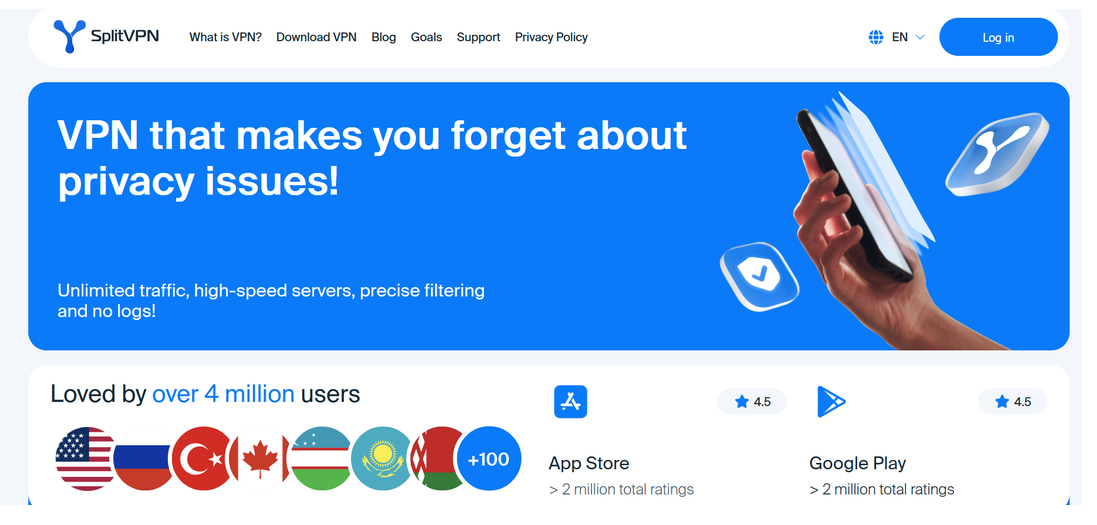
To be precise, SplitVPN is not entirely free. It offers both free and paid plans, while its Google Play listing says the app contains ads and in-app purchases. But the free version still sells that enticing idea of privacy without payment. For those users, the price becomes clearer in the small print.
The privacy policy linked from the current Google Play listing says third-party advertising services may collect information such as advertising IDs, IP addresses, device details, app usage, and approximate location. It also acknowledges that, under California privacy law’s definition, some ad-supported versions of its product may “sell” certain data to advertising partners. The policy explicitly says this does not include users’ VPN browsing activity, so it does not by itself contradict SplitVPN’s no-logs promise. But it does complicate the promise of privacy at no cost: free users may not pay a subscription fee, yet their attention and other data can still have commercial value.
In late July, the idea that user data can have commercial value took on a darker meaning. Messages on hacking forums claimed that a database stolen from SplitVPN, previously marketed as NotVPN, had been put up for sale. The seller alleged that it contained data on millions of users, including emails, IP addresses, device and subscription information, and payment records. It supposedly also included nearly 58 million connection logs — a particularly damaging claim for a service built around a no-logs promise.
SplitVPN/NotVPN confirmed the breach but disputed the claim that it had leaked connection logs. The company said someone had accessed its subscription database on July 21 and acknowledged that users’ email addresses, countries, subscription statuses, device names, and limited payment information had been exposed. However, it insisted that it does not record which websites users visit, saying that attackers invented the connection-log table to make the dump appear more valuable.
It was not the first time NotVPN had come up in a privacy context. A recent academic study of Android VPNs found that packages linked to the app sent some app-generated data over unencrypted connections and were easy to recognize as VPN traffic. Importantly, the researchers did not accuse NotVPN of leaking browsing traffic or keeping activity or connection logs.
But NotVPN was only one part of a much larger and more troubling pattern.
Many free VPNs are privacy and security time bombs. Servers, bandwidth, development, and maintenance all cost money. If users are not paying for the service, the provider may be making money through advertising, tracking, or data collection instead. And because a VPN has privileged access to their internet connection, the potential price is much higher than with an ordinary free app.
Collectively, the problematic apps identified in the study had amassed more than 2.4 billion installations. Below are the key findings.
Free VPNs: what was surveyed
The study was conducted by researchers from the University of Michigan, the University of New Mexico, and IIT Delhi and presented at the Network and Distributed System Security Symposium (NDSS) in February 2026.
The team assembled its dataset in November 2024 by searching Google Play for 40 popular terms associated with VPNs, including “VPN,” “free VPN,” “best free VPN,” “secure VPN,” “VPN with no logs,” “VPN for privacy,” “VPN for streaming,” and “VPN for gaming,” and so on. Google Play returned up to 30 apps for each search term, producing as many as 1,200 results per country before duplicates were removed. The final sample contained 281 free VPN apps.
Then they tested them on a physical Android 14 device using MVPNalyzer, a framework developed for the project. The apps were checked for:
unencrypted communication between the app and its own servers;
DNS or browsing traffic escaping the VPN tunnel;
advertising identifiers and other device data being sent to trackers;
weak or outdated VPN configurations;
VPN traffic that could be easily recognized and blocked.
Traffic and DNS leaks, tracking and fingerprinting — the dangers behind free VPNs
The first problem went against the very purpose of using a VPN: 61 apps sent their own data to servers without encryption. This was app-generated traffic, not users’ browsing traffic, but it could still be seen or altered by the user’s internet provider, the operator of a public Wi-Fi network, or an attacker monitoring the connection. In 5 cases, apps even downloaded their VPN configuration files this way. An attacker could potentially replace the file and redirect the supposedly protected connection to a server they controlled — while the app continued to show that the VPN was “connected.”
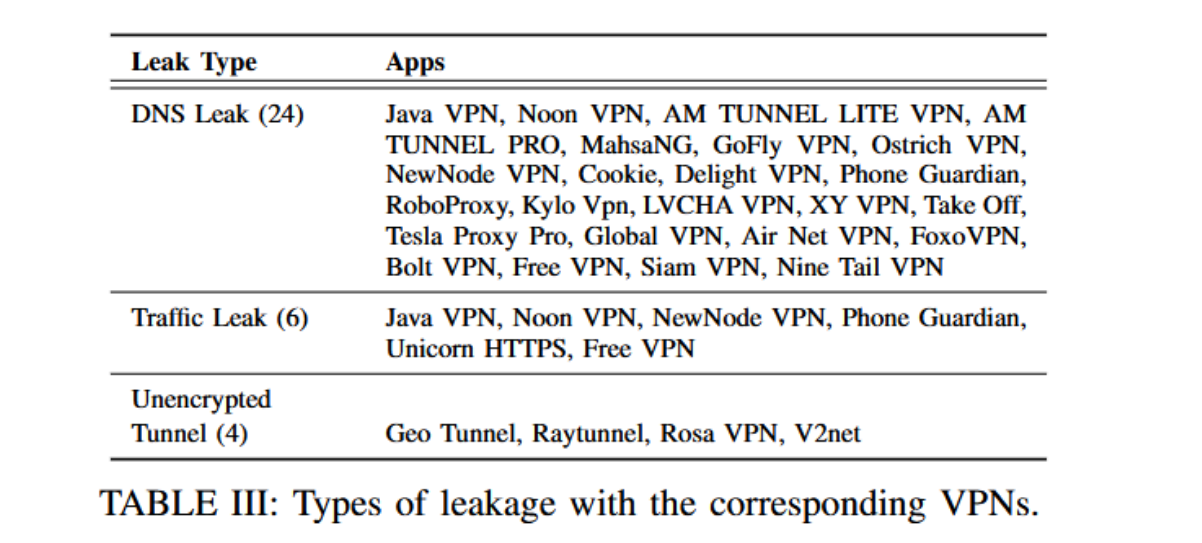
Another 29 apps allowed traffic to escape the tunnel. This traffic might still be encrypted by a website through HTTPS, but it would bypass the additional protection and privacy the VPN was supposed to provide. This included apps leaking DNS requests, leaking browser traffic, and creating tunnels that carried data without adding any VPN encryption. Each of these independently defeats a basic reason for using a VPN. A DNS leak, for example, can reveal which websites or services someone is trying to reach even if the pages themselves remain encrypted.
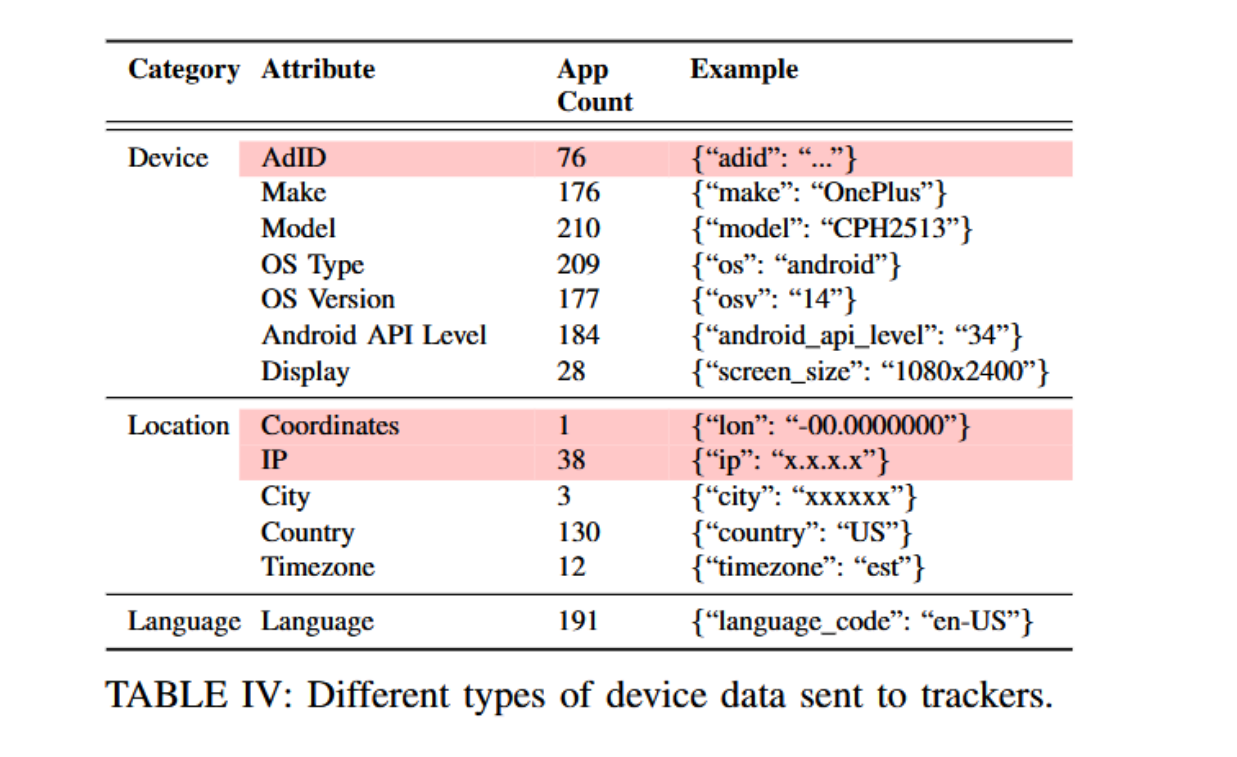
The scale of tracking was even more striking. More than 80% of the tested apps contacted advertising or tracking domains. The researchers identified them using EasyList, EasyPrivacy, Disconnect, and the AdGuard Mobile Ads filter.
Seventy-six apps transmitted the Android Advertising ID, while others shared IP addresses, device models, operating-system versions, language, or location information. One app even transmitted precise coordinates. Most of these details may appear harmless. Combined, they can build a persistent device profile, connect activity across apps and sessions, and potentially link it back to a real network or location. Instead of removing a layer of surveillance, a free VPN may simply add a new one.
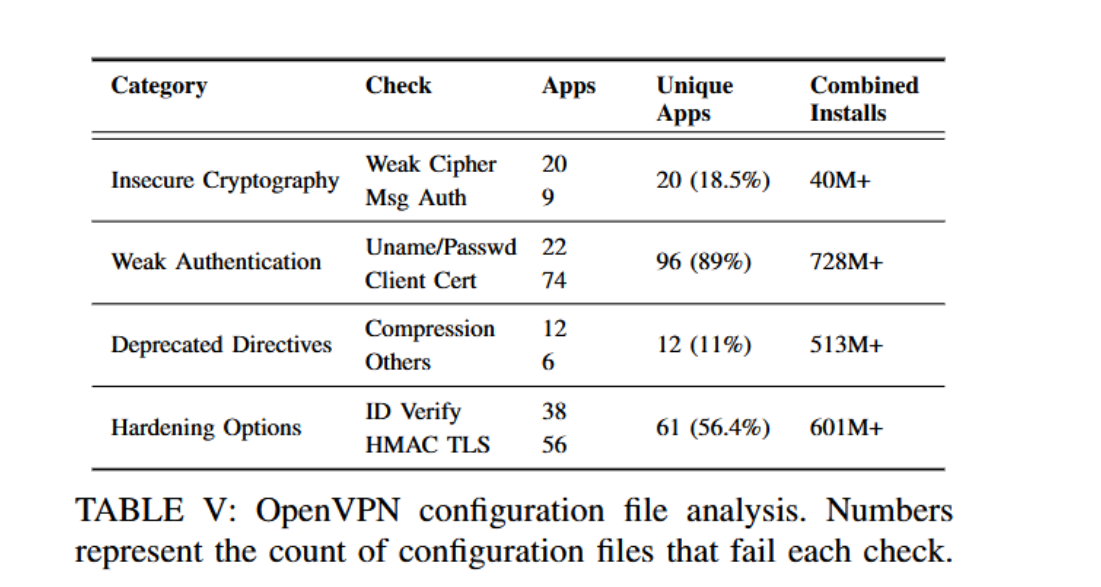
The configurations hidden behind the “Connect” button were hardly more reassuring. Of the 108 OpenVPN configurations the researchers obtained, 107 failed at least one security check. Many relied on weak authentication, outdated settings, or lacked basic protections against known attacks.
OpenVPN is a widely used technology for creating an encrypted connection between your device and a VPN server. Its configuration tells the app how to set up and secure that connection.
For users relying on VPNs to bypass censorship, there was another catch. The researchers could easily identify 169 apps as VPNs through standard ports, common protocols, or obvious domain names. In 101 cases, apps contacted domains containing the word “vpn.” Once a censor can recognize a VPN connection, blocking it becomes much easier.
The researchers aimed to survey the most popular Android VPN apps, so if you think these were obscure services with only a few thousand users, that is unfortunately not the case. Current Google Play listings show that several of the VPNs mentioned in the report have surpassed 100 million downloads:
Instabridge — 100 million+ downloads — was flagged for unencrypted traffic, tracking, easy detection, and configuration problems.
VPN Proxy Master — 100 million+ downloads — was linked to unencrypted traffic, tracking, and easy detection.
Super VPN — 100 million+ downloads — was found to transmit some data without encryption.
Thunder VPN — 100 million+ downloads — was among the apps found to transmit Advertising IDs.
If anything, the download numbers make the findings more unsettling. These apps were not hiding in obscure corners of the internet: users found them on Google Play, surrounded by ratings, download counts, privacy labels, and checkmarks that made them look vetted.
Google guardrails are not enough
Google Play does impose requirements on VPN apps. To remain in the store, they must declare their use of Android’s VPN service and encrypt data between the device and the VPN endpoint, follow Google’s user-data and malware policies, publish a privacy policy, and complete the Data safety form. Google also says that it reviews apps for compliance with its policies. From a user’s perspective, this understandably looks like Google has checked that the app is safe.
The problem is that these checks are far less comprehensive than the labels suggest. The Data safety section is largely a self-disclosure completed by the developer — not the result of Google independently examining everything the app sends. Google’s own documentation states: “You alone are responsible for making complete and accurate declarations in your app’s store listing on Google Play”. Google may act when it discovers a discrepancy, but it does not claim to verify every declaration before users see it. So, what may look like Google’s seal of approval in fact is little more than a developer’s word. Worse still, instead of providing transparency, these declarations can give a false sense of security.
For example, the current Google Play Data safety page for VPN Proxy Master says that data is encrypted in transit and displays an “Independent security review” checkmark. Yet the version examined by the MVPNalyzer researchers was flagged for unencrypted traffic, tracking, and VPN traffic that was easy to identify.
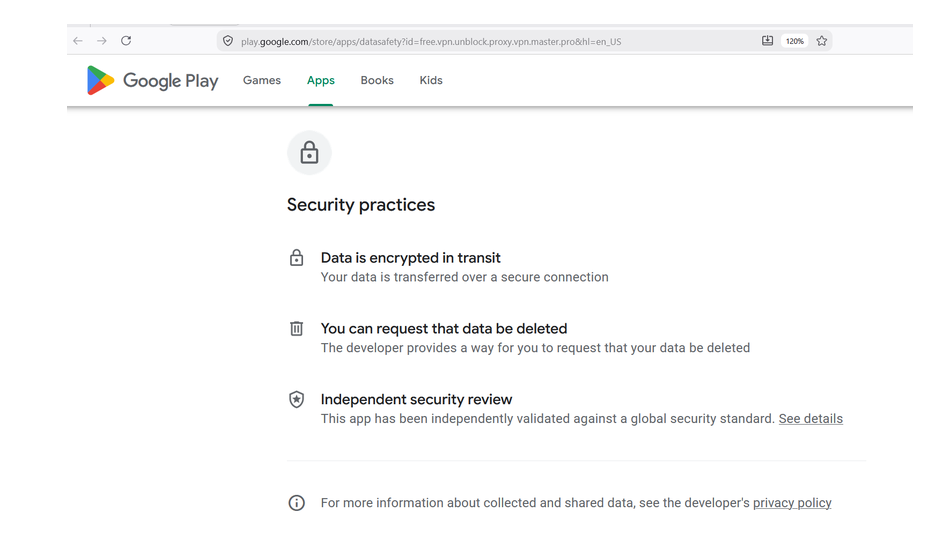
Google Play’s current Data safety page for VPN Proxy Master, captured on July 30, 2026.
The researchers tested the app in November 2024, while the listing was updated in July 2026, so the current version may differ.
Google’s Verified badge is more meaningful. To earn it, a VPN provider must undergo a Mobile Application Security Assessment at Level 2, or MASA Level 2. This is the higher of the program’s two assurance levels: instead of relying mainly on the developer’s answers, a Google-authorized lab manually tests the app against an international mobile-security standard. AdGuard VPN passed this assessment too. That is certainly more reassuring than self-disclosure, but it still covers a particular version at a particular time — not every server request or future update.
Then there is the metric that may be most persuasive of all: install count. A VPN with 100 million downloads feels tried and tested. But even when the number is genuine, it is no guarantee that the app works properly or keeps its privacy promises. And the count itself can be heavily inflated. As the study showed, popularity tells you how far a VPN has spread — not how well it protects you.
If the product is free, you are likely the product
Free VPNs do not run on good intentions alone. Servers, bandwidth, development, and maintenance all cost money, so if users are not paying the bill, someone else must be, and, more often than not, it would be advertisers or companies interested in user data.
This does not make every free VPN unsafe. Some providers offer a limited free version supported by subscriptions. AdGuard VPN’s free plan, for example, includes 3 GB of monthly traffic, four server locations, and support for two devices, while paid users get unlimited traffic and more locations.
So how do you separate a reasonable free plan from a privacy trap? Here is a quick cheat sheet for choosing a VPN:
Google its name. Search for the VPN and its owner alongside words such as “breach,” “leak,” “privacy,” or “scam.”
Find out who runs it. A real company should have a proper website, clear contact details, and some history. A developer offering dozens of nearly identical VPNs under generic names is a red flag.
Check how the free version makes money. The provider should explain whether it relies on subscriptions, advertising, or something else. Its privacy policy should also clearly say what data it collects.
Look beyond ratings and downloads. Read recent reviews, especially the negative ones, but remember that even millions of installs and a high score cannot prove that a VPN is safe.
Check its permissions. If a VPN wants access to your contacts, photos, microphone, or precise location without a convincing reason, choose another one.
None of these checks takes long, but together they can tell you far more than a download count or a shiny badge. Before handing a VPN the keys to your internet connection, it is worth finding out who is standing on the other side. A VPN should give you one less thing to worry about, not add another one to the list.