AdGuard VPN for Android v2.14: Dynamic protocol selection

A stable VPN connection starts with the right protocol. In AdGuard VPN for Android v2.14, dynamic protocol selection takes care of it for you, automatically adjusting to your network environment.

Why protocol choice matters

AdGuard VPN supports two modern protocols: HTTP2-over-TLS and HTTP3-over-QUIC. Each has its strengths, but the best choice can vary depending on your location, network conditions, and even the server you connect to.

Previously, AdGuard VPN leaned towards using QUIC by default, even in situations where HTTP2/TLS might have offered better performance. This could occasionally mean slower speeds or less stable connections for some users.

Dynamic VPN protocol selection

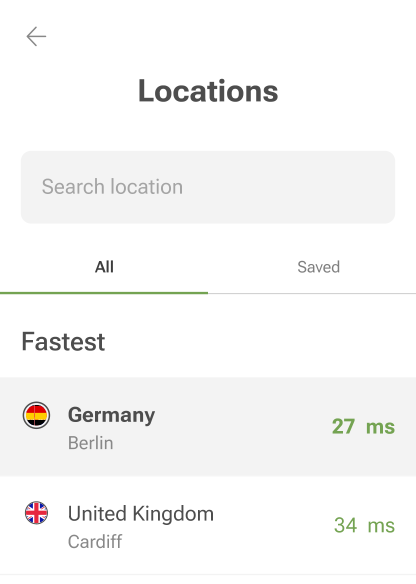
With the dynamic VPN protocol selection, AdGuard VPN automatically figures out which protocol — HTTP2/TLS or HTTP3/QUIC — will give you the best performance and switches to it instantly.

The option is on by default. If you’d like to check or change it, open the Settings tab and go to GeneralAdvancedLow-level settingsAdGuard VPN protocol and select your preferred protocol instead of Auto-select.

With Auto-select turned on, the VPN automatically adapts to network changes, reducing connection drops and speeding up downloads to provide a smoother online experience. This is particularly useful if you are in an area where VPN performance is unstable or unpredictable.

Other changes

We didn’t stop there. Besides the new feature, we’ve updated the VPN client for a smoother performance and greater stability.

Share your thoughts

Got ideas or spotted a bug? Let’s talk! Connect with us on social media or head over to GitHub.

Liked this post?
9,332 9332 user reviews
Excellent!

AdGuard VPN
for Windows

Use any browser or app and never worry about your anonymity again. The entire world is at your fingertips with AdGuard VPN.
Download
By downloading the program you accept the terms of the License agreement
Read more
9,332 9332 user reviews
Excellent!

AdGuard VPN
for Mac

In just two clicks, select a city from anywhere in the world — we have 80+ locations — and your data is invisible to prying eyes.
Download
By downloading the program you accept the terms of the License agreement
Read more
9,332 9332 user reviews
Excellent!

AdGuard VPN
for Android

Remain anonymous wherever you go with AdGuard VPN! Dozens of locations, fast and reliable connection — all in your pocket.
Google Play
By downloading the program you accept the terms of the License agreement
Read more
Download
By downloading the program you accept the terms of the License agreement
Read more
9,332 9332 user reviews
Excellent!

AdGuard VPN
for iOS

Boost your online protection by taking it with you wherever you go. Use AdGuard VPN to enjoy your favorite movies and shows!
App Store
By downloading the program you accept the terms of the License agreement
Read more
9,332 9332 user reviews
Excellent!

AdGuard VPN
for Android TV

Discover AdGuard VPN for Android TV! Enjoy seamless streaming, enhanced security, and easy setup.
Google Play
By downloading the program you accept the terms of the License agreement
Download
By downloading the program you accept the terms of the License agreement
9,332 9332 user reviews
Excellent!

AdGuard VPN
for Chrome

Hide your true location and emerge from another place in the world — access any content without speed limits and preserve your web anonymity.
Learn more
Install
By downloading the program you accept the terms of the License agreement

AdGuard VPN
for Edge

Get to a different location in one click, hide your IP, and make your web surfing safe and anonymous.
Learn more
Install
By downloading the program you accept the terms of the License agreement

AdGuard VPN
for Firefox

Protect your privacy, hide your real location, and decide to where you need the VPN and where you don't!
Learn more
Install
By downloading the program you accept the terms of the License agreement

AdGuard VPN
for Opera

Be a ninja in your Opera browser: move quickly to any part of the world and remain unnoticed.
Learn more
Install
By downloading the program you accept the terms of the License agreement
9,332 9332 user reviews
Excellent!

AdGuard VPN
for routers

Install AdGuard VPN on your router to secure your entire network. Decide which devices to protect and when
This option is only available with an AdGuard VPN subscription
9,332 9332 user reviews
Excellent!

AdGuard VPN
for Linux

Get the best free VPN for Linux and enjoy seamless web browsing, enhanced security, Internet traffic encryption, and DNS leak protection. Choose from multiple VPN servers and access the locations you want
9,332 9332 user reviews
Excellent!

AdGuard VPN
for Apple TV

Discover AdGuard VPN for Apple TV! Enjoy seamless streaming, enhanced security, and easy setup
This option is only available with an AdGuard VPN subscription
9,332 9332 user reviews
Excellent!

AdGuard VPN for Xbox

Protect your Xbox with AdGuard VPN and enjoy seamless online gaming, enhanced security, and easy setup
This option is only available with an AdGuard VPN subscription
9,332 9332 user reviews
Excellent!

AdGuard VPN
for PS4/PS5

Protect your PlayStation with AdGuard VPN and enjoy seamless online gaming, enhanced security, and easy setup. Choose from multiple VPN servers and access the locations you want
This feature is only available with an AdGuard VPN subscription
9,332 9332 user reviews
Excellent!

AdGuard VPN
for Chromecast

Install AdGuard VPN on your Google TV (Chromecast Gen 4) or on your network router (Chromecast Gen 3) and enjoy streaming content with Chromecast while staying anonymous online and accessing content from anywhere. For Chromecast Gen 3, you need an AdGuard VPN subscription
AdGuard VPN
download has started
Click the button indicated by the arrow to start the installation.
Scan to install AdGuard VPN on your mobile device