Secret screenshots and stolen passwords: Over 65% of free VPNs threaten your privacy
If you’re looking to protect your privacy online, the first thing that immediately comes to your mind is probably a VPN. A Virtual Private Network, or a VPN for short, is a program that runs on your device (be it desktop, laptop, or mobile device), encrypts all its internet traffic, and further protects your privacy by masking your real location from anyone curious enough to check your IP address. Using a VPN is really ‘Privacy 101,’ and VPNs are extremely popular even among people who have a very vague idea about how they work — or no idea at all.
Unfortunately, in practice it means that, when choosing a VPN, less tech-savvy users often pick the first option they see in their browser extension store. It is usually one of literally thousands free, often relatively unknown VPNs. The more privacy-concerned readers already can hear alarm bells in their heads just reading about this scenario, and for a good reason. Free VPNs simply are not safe. There is already a lot of evidence to this claim, and a recent study by the mobile security company called Zimperium zLabs only confirms it. According to their research, of 800 free Android and iOS VPN apps over 65% showed one or more security or privacy issues, like leaking personal data or vulnerable code.
Most common issues
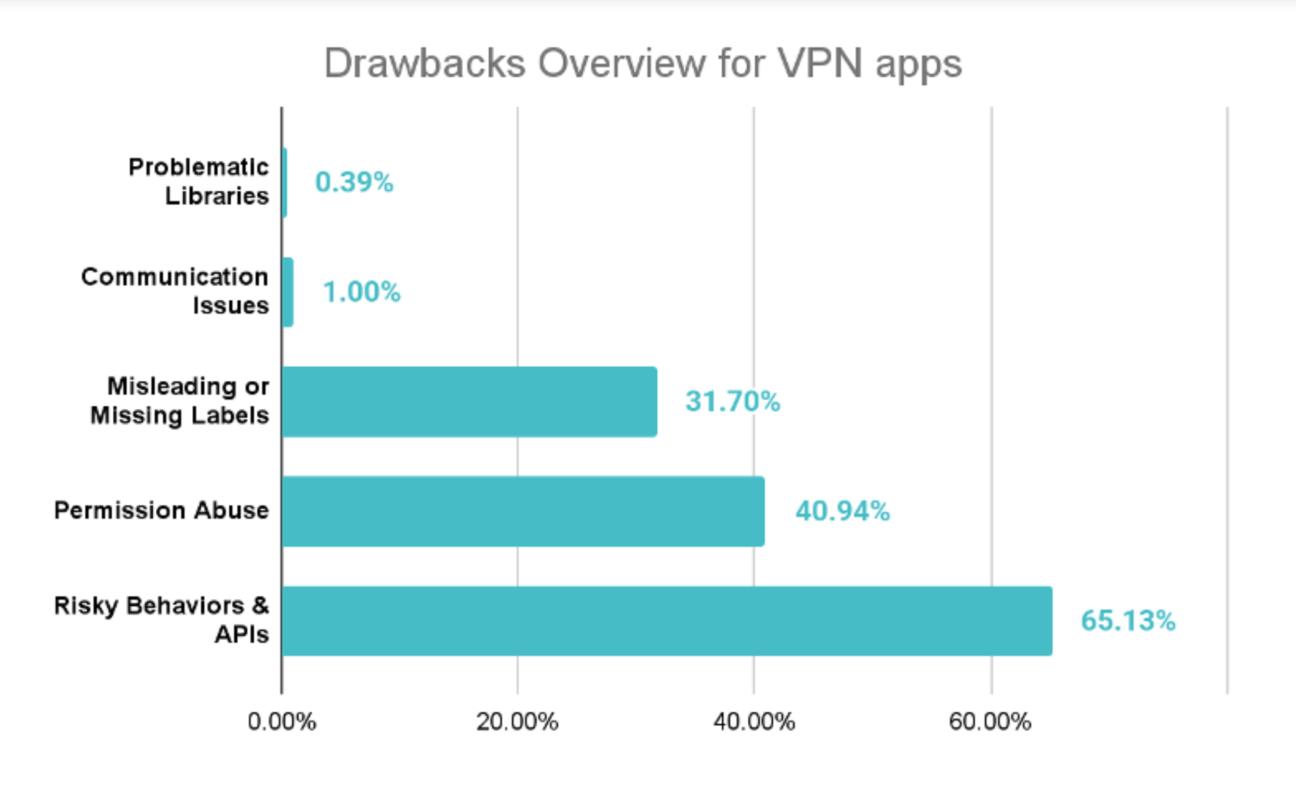
Vulnerabilities that are seen most commonly among free mobile VPN apps
The most commonly seen problem by far, present in nearly two-thirds of all reviewed apps, was “risky behaviors and APIs.” This umbrella term includes both the use of dangerous APIs that can increase the attack surface of a VPN app, and a number of additional concerns in apps’ behavior. For example, some of the reviewed apps went as far as capturing screenshots of the user interface — your guess why a VPN app would need to do that is as good as ours. Other apps were guilty of insecure activity launch, leaving the attackers windows of opportunity to bypass the operating system’s security checks. Bad actors could exploit that by launching sensitive components — such as the login screen — outside the normal app flow. This could allow them to forcibly disable encryption or even disconnect the VPN entirely.
Some of the studied VPNs were caught allowing other apps to access their internal parts without proper permission checks. This kind of oversight could let malicious apps peek into sensitive data — like logs, connection details, or user accounts — or even change how the VPN works, altering its settings or rerouting traffic through dangerous servers.
Permission abuse in general was another very prominent issue that was spotted in ~40% of the reviewed apps. Even if you rule out malicious intent, an app requesting permissions that exceed its functionality is fraught with security risks: the more permissions the app has, the more doors it opens to a potential attacker looking to exploit it. And, surely, some of the VPN apps that request bizarre permissions like microphone access, do so with less-than-good intentions — imagine a VPN app that records everything you talk about throughout the day and then uploads it to some random server you know nothing about.
30 iOS VPN apps also stood out for requesting “private entitlements,” the type of permission that gives the app a great deal of control over the device and is normally reserved for Apple or very specific trusted applications. For example, granting some of these permissions to the app would allow it to execute system calls, access memory space containing sensitive information, or even siphon private data from other apps, including credentials. When an app asks for an entitlement, it’s a huge red flag and usually indicates that this app is up to no good.
One of the more common problems with free VPN apps on iOS specifically is misleading or missing labels. Any app distributed via the App Store has to declare what user data it is handling and how, along with the reasons why it needs the APIs it uses. This is done via the app’s privacy manifest — an internal file included in the app bundle. Based on that privacy manifest, developers are supposed to list user-visible nutrition labels on their app’s App Store page. They serve as an easy-to-understand privacy summary for users, and the study found out that over 40% of all studied iOS VPN apps failed to correctly present necessary labels. What is possibly worse, 25% of the apps did not include a valid privacy manifest at all.
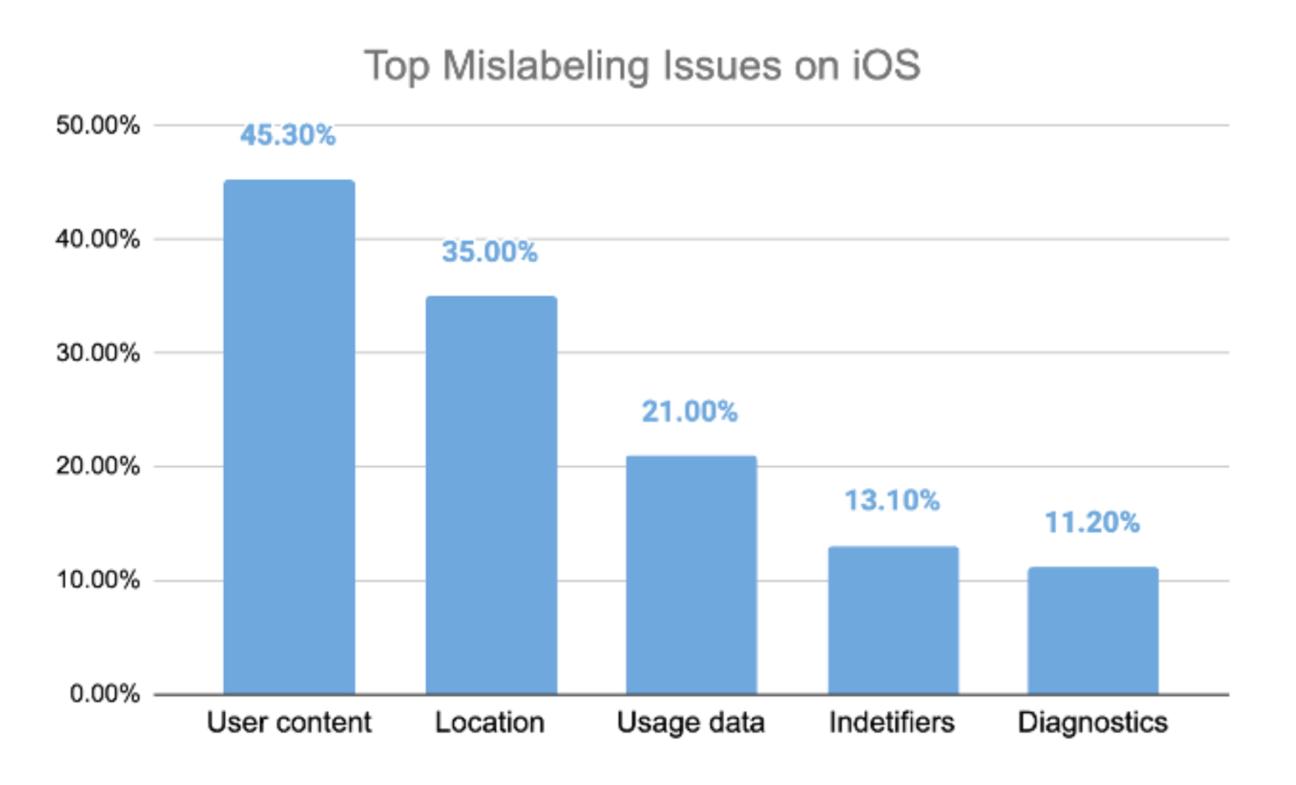
Most commonly missing types of labels among free iOS VPN apps
Misrepresented nutrition labels and missing privacy manifests can be attributed to carelessness or malice, but in either case it is not what you want to see from the app that is supposed to protect your privacy. Deceiving and misleading users from the get-go is bad enough and possibly dangerous in its own right, while also being indicative of other, potentially much more serious issues.
The last two categories of privacy and security drawbacks listed in the research, communication issues and problematic libraries, are much less represented, appearing only in a handful of apps (in 1% and 0.4% of all apps respectively). However, they are among the most egregious privacy faux pas that a VPN app can commit. Three apps were found still using a legacy version of the OpenSSL library, leaving them vulnerable to a very well-known, decade-old, easily fixable bug that can expose users’ usernames, passwords, and secret keys. This is simply inexcusable, especially for any app that claims to protect you — yet betrays your trust. Another 1% of the apps were leaving users vulnerable to MitM (Man-in-the-Middle) attacks, allowing bad actors to intercept and read all of the device’s web traffic. This is quite literally the opposite of what you expect from a VPN — secure communication.
Our takeaway
This research shows that when you install a random free VPN app, you are more likely than not going to run into at least some privacy- or security-related issues. Some may only pose minor threats, but others can lead to truly disastrous consequences. Are you prepared to take this risk? Here’s how AdGuard VPN’s Chief Product Officer comments on Zimperium zLabs’s findings:
“If I had to give just one piece of advice, it would be to avoid free VPNs altogether. They will never give you the same protection, speed, and feature set as paid VPNs, and the risks you take on by installing one are very real. You really don’t want to skimp on your privacy here.
But if you absolutely need to choose a free VPN, look for free plans of established, trusted paid VPNs. Their free plans are usually subject to the same privacy policy, which generally guarantees the safety of your personal data.”
— Denis Vyazovoy, AdGuard VPN CPO
Remember that a VPN is not ‘just another app’ on your device. It potentially has access to all of your device’s web traffic, and, as the research shows, sometimes even to system settings. Treat the choice of your VPN app accordingly — with care and respect to your own privacy.