Don’t let Meta block your news: How to stay informed in Canada despite the ban
Since August 1, Meta has begun the process of “ending news availability in Canada.” This means that Canadians can no longer view or share any news links on Meta platforms, whether they are from local or foreign sources. Specifically, they no longer see the news articles, broadcasts, stories and reels that media outlets around the world post on either Facebook or Instagram.
Meta's drastic move to effectively cut off many of its Canadian users from their preferred news source — about 34% of Canadians say they get their news from Facebook — is its way of retaliating against Bill C-18, also known as Canada's Online News Act. The Act forces tech giants like Meta and Google to pay news publishers for using their content on their platforms. The Canadian government has estimated that Meta will have to pay C$60 million (US$44 million) a year to local news publishers if it agrees to make deals with them voluntarily. Even though this would have been a fraction of Meta's $117 billion in annual revenue, the parent company of Facebook and Instagram has refused to go along with the deal.
Second time is not the charm
In many ways, Canada's quest against Meta and Google is similar to Australia's campaign to force the companies to subsidise its cash-strapped local news industry. Back in 2021, Meta temporarily blocked Australian news from its platforms, and Google threatened to do the same if a law that would force “designated” digital platforms to pay news outlets for their stories was passed. After a lot of drama and heated negotiations, the law was changed to give more power to Meta and Google and less to the government. The so-called “News Media Bargaining Code” was watered down to remove the mention of "designated platforms," which also meant that the Australian government was excluded from the bargaining process. Meta and Google were left to choose with whom to make deals and how much to pay. After the law came into effect in March 2021, Google and Meta inked separate deals with more than 30 Australian publishers, and ended up paying them more than $140 million for their news content.
Canada apparently wanted to replicate Australia's successful strategy with tech corporations, but so far it has failed spectacularly. It's debatable what went south in the negotiations between the Canadian government and the duo of Meta and Google, but they all have refused to budge an inch from their respective positions. In particular, what may have rubbed Meta and Google the wrong way is the Canadian government's intention to have the final say in the process, that is, to be able to designate certain platforms as "digital news intermediaries" (DNIs) and make them pay if they refuse to negotiate with publishers on their own volition.
Both Meta and Google had been up in arms about the bill even before it was given the green light by the Canadian government. But if there were any hopes for a compromise, they were dashed on June 15, when the bill passed the parliament. A week later, on June 22, the law was officially enacted with royal assent.
In response to the bill’s passage, Meta said that it was "based on the incorrect premise that Meta benefits unfairly from news content shared on our platforms, when the reverse is true." Moreover, Meta argued that "people using our platforms don't come to us for news." While it may be beside the point, this is a controversial statement at best, and untrue at worst. Surveys have consistently shown that Facebook remains a regular news source for one third of Americans and Canadians.
Not all Canadian media are on board
While it has not been a surprise that Meta and Google came out strongly against the bill that hurts them financially, it has not been unanimously welcomed by the Canadian news media, either. In fact, the Online News Act did not sit well with quite a few domestic outlets. Some, such as Village Media, a leading local digital publisher, and the Globe and Mail, argued that the bill would compromise the independence of the media and put many smaller outlets on the brink of survival, which would defeat the bill’s intended purpose. However, other media organisations, notably News Media Canada, endorsed the bill, saying that it would "address the significant market power imbalance between publishers and platforms”.
Although the bill is set to come into full effect only next year, Meta has preemptively blocked news for Canadians. As for Google, the search engine giant has yet to follow into Meta’s footsteps. In a blog post from June 29, Google said that it would be “removing links to Canadian news from our Search, News, and Discover products and will no longer be able to operate Google News Showcase in Canada” once the law takes effect — that is, presumably in December.
How is the bill affecting users now: in and out of Canada
We have confirmed with our readers from Canada (shoutout to Extravi that so far it has been only Meta that is blocking Canadians from reading news.
Early August, Meta sent out notifications to Canadian users, warning them to brace for the blackout. “In response to Canadian legislation, news won’t be available soon,” the notification read.
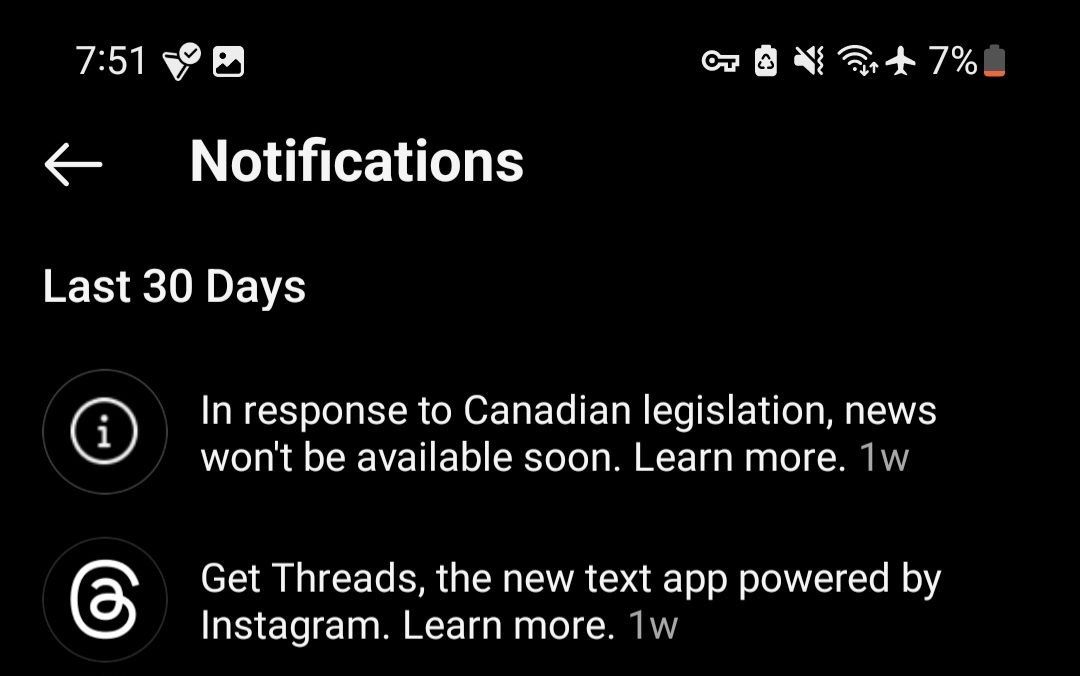
Credit: Extravi
If a Canadian user tries to visit a news outlet's official page on Instagram, they will draw a blank: the news outlet’s page will be empty, except for the profile picture and description. The news posts would not load at all.
Credit: Extravi
However, there’s a way to get around this ban. When our Canadian reader used a VPN, a service which masks your real IP address and location, he was able to access the same news content without any issues. This suggests that Meta’s news block is fairly easy to circumvent. You just need to make it look like you are outside of Canada, either by using a VPN or by actually being in another country.
Meta’s own statement on how they plan to enforce the ban suggests that Canadian news outlets may still be physically able to post content on its platforms. The catch is that only people outside Canada will be able to see it (plus those who connect to a foreign VPN server before going on Facebook or Instagram).
As for people who are not in Canada, they won’t be affected by the Meta news block in any way. They can still see Canadian and international news on Meta platforms. The only thing they might miss is what Canadians that do not use a VPN are saying about those news.
Ways to sidestep the restrictions
All in all, there are several other ways to bypass the news ban in Canada. None of them is foolproof, and some may be more effective than others. Here are some of them:
- Screenshotting news: While Meta blocks links to Canadian news sources, screenshots of articles from the same news sources may slip through its algorithms. However, it cannot be ruled out that Meta could attempt to detect and delete screenshots using its image recognition technology if it really wants to.
- Tracking journalists' personal pages: There have been reports that some Canadian journalists working for news outlets have turned their personal pages into news sources. However, Meta may get wind of their rather simple replacement strategy and ban them as well.
- Using alternative platforms: If you prefer to get your news from social media rather than going directly to the website of the news outlet, then you might consider switching from Facebook and Instagram to their competitors, such as Twitter (X), TikTok, or Reddit.
- Go directly to the websites or apps of the news outlets: Perhaps the best and most obvious solution will be to visit the news sites you trust directly. This way you won’t have to depend on any intermediaries, such as search engines or social media.
- Using a VPN: You can use a VPN, such as AdGuard VPN, to access news on Instagram and Facebook as if from a different country, for example, the US or the UK. The added benefit to this method is that the VPN will also encrypt your traffic and protect it from being snooped on by your ISP.
It's sad to see that regular users in Canada are caught in the crosshairs of the war between the government, news publishers, and big tech companies. Especially unfortunate is the timing of this back-and-forth - it comes as devastating wildfires have ravaged Canada's western province of British Columbia and the Northwest Territories. People who normally rely on Facebook for emergency news updates may find it difficult to adjust to the new reality and turn to other sources of information.
Regardless of who is right and wrong in the Canada vs. Google and Meta dispute, we hope they find a way out of this impasse. After all, when people's lives are on the line, the last thing you want is for the big guns to be bickering over some laws. But again, it's not like users have always been the primary concern of the big tech companies. Rather it's been revenue or the threat of losing it, as in this case.













