AdGuard VPN major update for all platforms and extra 10 GB in March and April

Nothing of this caliber has ever happened in AdGuard! Today we release AdGuard VPN updates for all platforms — for macOS, Windows, iOS, Android, and browser extensions for Chrome, Firefox, and Edge. 7/7, that makes a bingo!

You probably wonder what's new in all these apps and extensions. Let's see.

What's new

Exclusions 2.0

Firstly, now you can not only add websites to exclusions but also choose among the lists of popular services. The lists are divided into eight categories: Social networks, Messengers, Video and Music streaming services, Games, Shopping, Search engines, and Work communication tools. From now on, any of these services can be added to exclusions in one click! It's especially convenient if you use Selective mode where AdGuard VPN is on only for the domains added to exclusions.

This feature is available on all platforms except iOS.
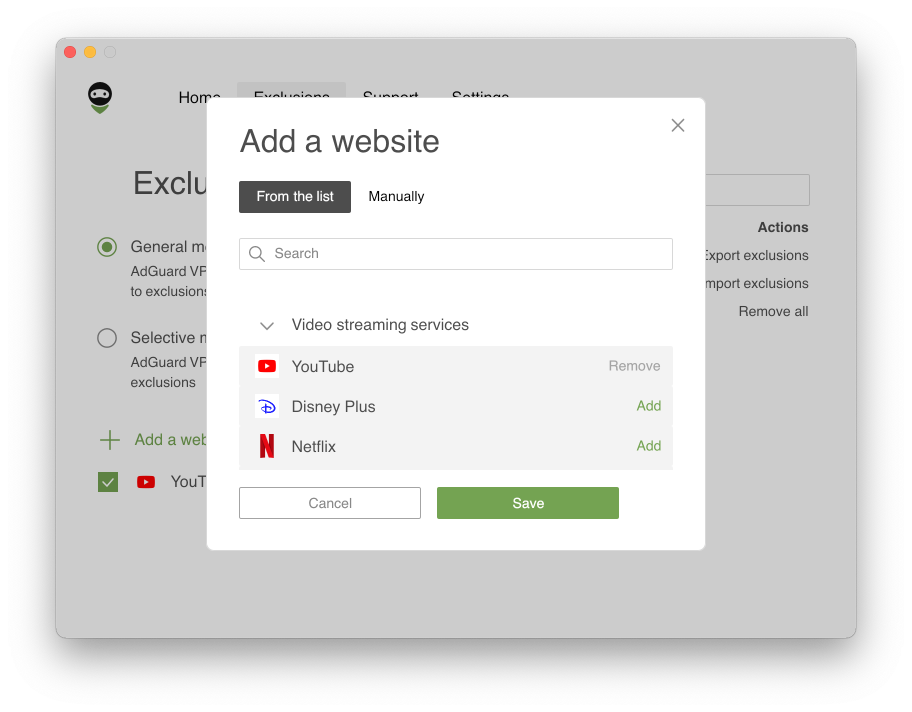
Exclusions 2.0

Secondly, Exclusions lists can be easily configured. If you've added a domain and some of its subdomains, they'll be grouped inside the root one. Also, when adding a root domain (example.com) its mask is added too (*.example.com) — previously, one had to enter it manually, not many users knew about it. If you've added a service, changed or removed something and now want to recover initial settings, don't worry: just press Reset to default next to the domain — this action will restore any missing domains and tick all checkboxes.
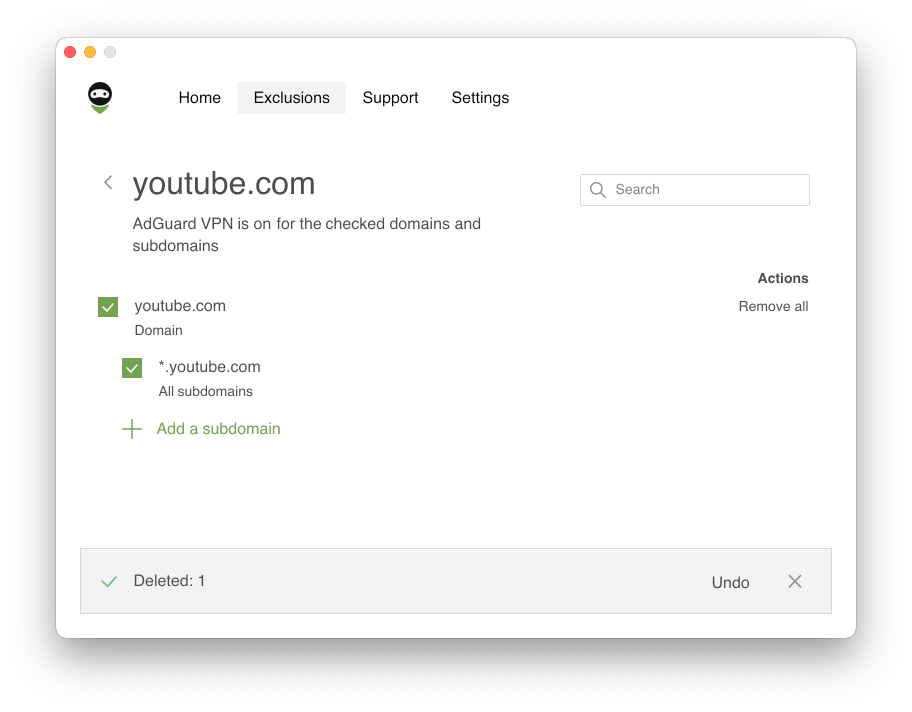
Reset to default

Full redesign

Both our apps and website have been redesigned. Perhaps, the visual style of the AdGuard VPN website has changed most: a landscape and many vivid illustrations have appeared there. In apps, all the illustrations and the main screen are new too (except AdGuard VPN for Mac and Windows — the design of the desktop apps will be updated soon). But you can already see what the main screen in AdGuard VPN for iOS looks like:
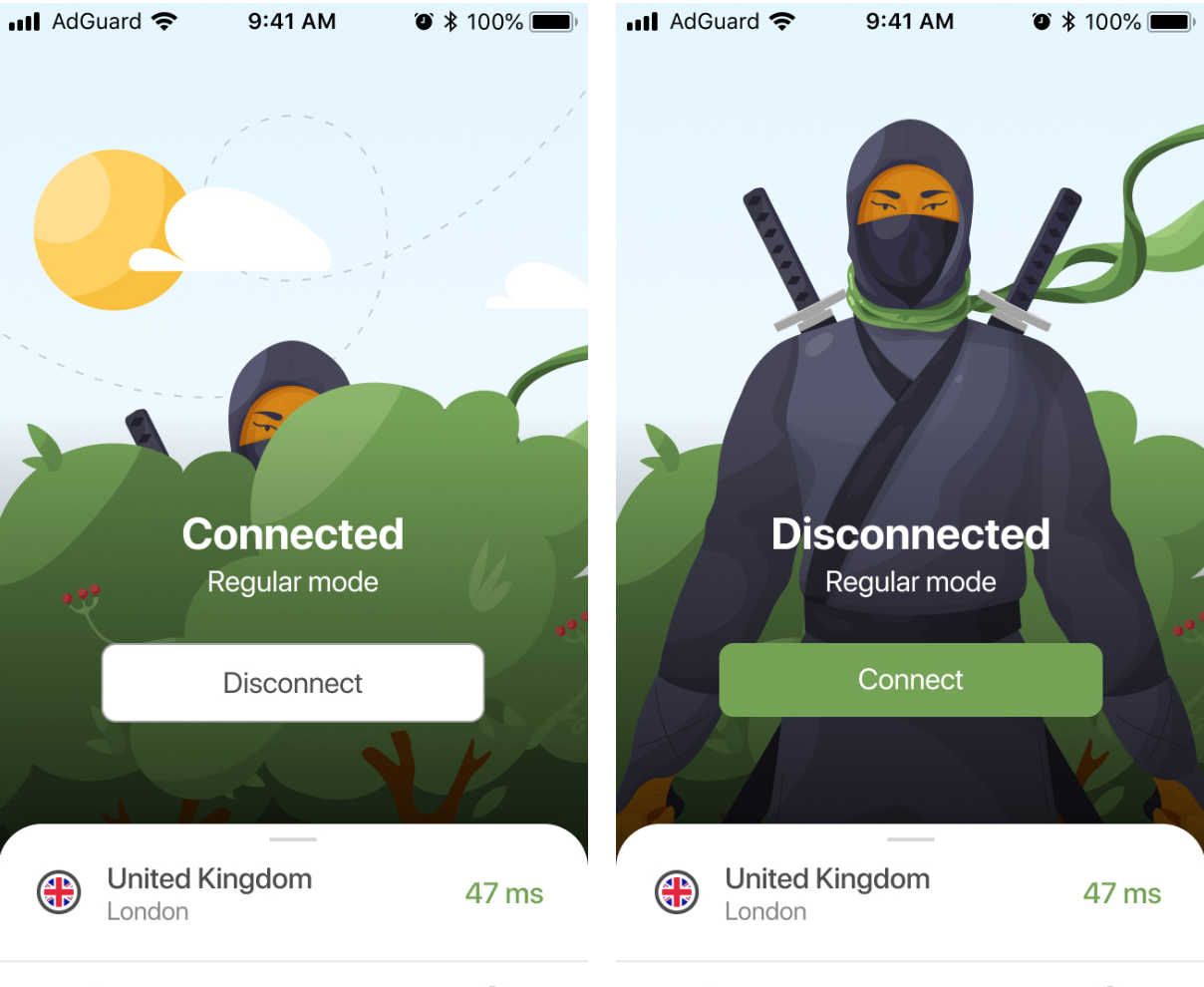
New design of app main screen

Besides the renewed exclusions and design, we have also found and fixed a lot of bugs and flaws, so AdGuard VPN apps and extensions turned more stable and reliable. Of course, there is always room for improvement and we definitely have things to strive for, but such simultaneous product releases cannot but make us feel happy.

Rising prices and new subscription format

Although prices went up a bit, there is an upside — we offer a new two-year subscription plan, the most cost-effective when you compare prices per month.

New prices:
Monthly subsciption — $11,99
Yearly subscription — $3,99 per month ($47.88 total price)
Two-year subscription — $2,99 per month ($71,76 total price)

Note that if you choose a two-year subscription plan, the price per month will be the same as before the price increase.

Auto-protection in AdGuard VPN for Android

The most noticeable change in AdGuard VPN for Android is Auto-protection. With this feature, you don't have to worry anymore whether your connection is secure at the moment. You can enable it for Wi-Fi, mobile networks or both. Depending on the chosen option, AdGuard VPN will turn on automatically when the device connects to cellular or Wi-Fi networks. For further convenience you can add your Wi-Fi network at home and/or work to the trusted ones, so that Auto-protection doesn't cover them.

Note that Auto-protection is not available in the Compatibility mode and in the SOCKS5 mode.

Custom DNS servers in AdGuard VPN for Mac and Windows

Following the footprints of AdGuard VPN for Android, the desktop apps now also feature DNS filtering. You can add custom DNS servers — choose from the broad selection of popular DNS providers such as Cloudflare DNS. Thanks to the new feature, AdGuard VPN users don't have to be limited to a default DNS server provided by their ISP. We suggest that you try various DNS solutions and choose one that suits you best, as each DNS provider has their perks.

Additional 10 GB to all users

The world is going through a difficult time. There are problems with access to various resources in some countries, and we can't stay away. We're giving all AdGuard VPN users, old and new, extra 10 GB in March and April. You'll have 13 GB of VPN traffic instead of three during both months — so that you can browse freely and get more information.


That seems to be it. Hurry up to update AdGuard VPN and see for yourself how different it has become. Hope you'll like it! As usual, we welcome feedback in whatever format convenient for you — share any thoughts in the comments here or on social media. See you!


Podobał Ci się ten post?
9 332 9332 recenzje
Doskonały!

AdGuard VPN dla Windows

Korzystaj z dowolnej przeglądarki lub aplikacji i nigdy więcej nie martw się o swoją anonimowość. Cały świat jest na wyciągnięcie ręki dzięki AdGuard VPN.
Pobierz
Pobierając program, akceptujesz warunki Umowy licencyjnej
Dowiedz się więcej
Ekran główny AdGuard VPN dla Windows z aktywnym połączeniem VPN.
Ekran główny AdGuard VPN dla systemu Windows pokazujący stan braku połączenia.
Ekran Wykluczenia z listą witryn, które nie korzystają z VPN.
9 332 9332 recenzje
Doskonały!

AdGuard VPN dla Mac

Wystarczą dwa kliknięcia, aby wybrać miasto z dowolnego miejsca na świecie — mamy 75+ lokalizacji — a Twoje dane staną się niewidoczne dla ciekawskich oczu.
Pobierz
Pobierając program, akceptujesz warunki Umowy licencyjnej
Dowiedz się więcej
Ekran główny AdGuard VPN na Maca z aktywnym połączeniem VPN.
Główny ekran AdGuard VPN na Maca pokazujący stan rozłączenia.
Ekran Wykluczenia z listą witryn, które nie korzystają z VPN.
9 332 9332 recenzje
Doskonały!

AdGuard VPN dla Android

AdGuard VPN dla Android oferuje dziesiątki szybkich lokalizacji. Przeglądaj Internet mobilnie z większą prywatnością. Blokuj reklamy i trackery dzięki wbudowanej Ochronie DNS
Dowiedz się więcej
Pobierz
Pobierając program, akceptujesz warunki Umowy licencyjnej
Google Play
Pobierając program, akceptujesz warunki Umowy licencyjnej
Ekran główny AdGuard VPN na Androida z aktywnym połączeniem VPN.
Ekran główny AdGuard VPN na Androida pokazujący stan braku połączenia.
Ekran Lokalizacje przedstawiający najszybsze dostępne serwery.
Ekran Wykluczenia z listą witryn, które nie korzystają z VPN.
Ekran z kodem QR umożliwiającym zainstalowanie AdGuard VPN.
9 332 9332 recenzje
Doskonały!

AdGuard VPN na iOS

Chroń swoją prywatność i anonimowo streamuj ulubione programy dzięki AdGuard VPN dla iOS. Blokuj reklamy za pomocą wbudowanej ochrony DNS
Dowiedz się więcej
App Store
Pobierając program, akceptujesz warunki Umowy licencyjnej
Ekran główny aplikacji AdGuard VPN na iOS z aktywnym połączeniem VPN.
Ekran główny AdGuard VPN na iOS pokazujący stan braku połączenia.
Ekran Lokalizacje przedstawiający najszybsze dostępne serwery.
Ekran Wykluczenia z listą witryn, które nie korzystają z VPN.
Ekran z kodem QR umożliwiającym zainstalowanie AdGuard VPN.
9 332 9332 recenzje
Doskonały!

AdGuard VPN dla Android TV

Odkryj AdGuard VPN dla Android TV! Ciesz się płynnym streamingiem, zwiększonym bezpieczeństwem i łatwą konfiguracją.
Pobierz
Pobierając program, akceptujesz warunki Umowy licencyjnej
Google Play
Pobierając program, akceptujesz warunki Umowy licencyjnej
Dowiedz się więcej
Ekran główny AdGuard VPN na Android TV z aktywnym połączeniem VPN z serwerem w Helsinkach w Finlandii.
9 332 9332 recenzje
Doskonały!

AdGuard VPN dla Chrome

AdGuard VPN dla Edge

AdGuard VPN dla Firefox

AdGuard VPN dla Opery

Ukryj swoją prawdziwą lokalizację i wyjdź z innego miejsca na świecie — uzyskaj dostęp do dowolnych treści bez ograniczeń prędkości i zachowaj anonimowość w sieci.
Przejdź do innej lokalizacji jednym kliknięciem, ukryj swój adres IP i spraw, aby surfowanie po sieci było bezpieczne i anonimowe.
Chroń swoją prywatność, ukryj swoją prawdziwą lokalizację i zdecyduj, gdzie potrzebujesz VPN, a gdzie nie!
Zostań ninja w przeglądarce Opera: szybko przenieś się w dowolne miejsce na świecie i pozostań niezauważony(a).
Instalacja
Pobierając program, akceptujesz warunki Umowy licencyjnej
Dowiedz się więcej
Instalacja
Pobierając program, akceptujesz warunki Umowy licencyjnej
Dowiedz się więcej
Instalacja
Pobierając program, akceptujesz warunki Umowy licencyjnej
Dowiedz się więcej
Instalacja
Pobierając program, akceptujesz warunki Umowy licencyjnej
Dowiedz się więcej
Ekran główny rozszerzenia przeglądarki AdGuard VPN z aktywnym połączeniem VPN.
Ekran Lokalizacje przedstawiający najszybsze dostępne serwery.
9 332 9332 recenzje
Doskonały!

AdGuard VPN dla routerów

Zainstaluj AdGuard VPN na routerze, aby zabezpieczyć całą sieć. Zdecyduj, które urządzenia mają być chronione i kiedy
Ta opcja jest dostępna tylko z subskrypcją AdGuard VPN
Router z ikoną tarczy z dziurką od klucza.
9 332 9332 recenzje
Doskonały!

AdGuard VPN dla Linux

Zdobądź najlepszą darmową sieć VPN dla systemu Linux i ciesz się płynnym przeglądaniem sieci, zwiększonym bezpieczeństwem, szyfrowaniem ruchu internetowego i ochroną przed wyciekiem DNS. Wybierz jeden z wielu serwerów VPN i uzyskaj dostęp do wybranych lokalizacji
Maskotka AdGuard VPN, Tengu, z linuksowym pingwinem Tuxem siedzącym w krzakach.
9 332 9332 recenzje
Doskonały!

AdGuard VPN dla Android TV

Odkryj AdGuard VPN dla Apple TV! Ciesz się płynnym przesyłaniem strumieniowym, zwiększonym bezpieczeństwem i łatwą konfiguracją
Ta opcja jest dostępna tylko z subskrypcją AdGuard VPN
Urządzenie do strumieniowania Apple TV z logo AdGuard VPN.
9 332 9332 recenzje
Doskonały!

AdGuard VPN dla Xbox

Chroń swoją konsolę Xbox za pomocą AdGuard VPN i ciesz się płynną grą online, większym bezpieczeństwem i łatwą konfiguracją
Ta opcja jest dostępna tylko z subskrypcją AdGuard VPN
Konsola Microsoft Xbox i kontroler z logo AdGuard VPN.
9 332 9332 recenzje
Doskonały!

AdGuard VPN dla PS4/PS5

Chroń swoje PlayStation dzięki AdGuard VPN i ciesz się płynną rozgrywką online, zwiększonym bezpieczeństwem i łatwą konfiguracją. Wybieraj spośród wielu serwerów VPN i uzyskuj dostęp do wybranych lokalizacji
Ta funkcja jest dostępna tylko z subskrypcją AdGuard VPN
Ta opcja jest dostępna tylko z subskrypcją AdGuard VPN
Konsola Sony PlayStation i kontroler z logo AdGuard VPN.
9 332 9332 recenzje
Doskonały!

AdGuard VPN dla Chromecast

Zainstaluj AdGuard VPN na swoim Google TV (Chromecast Gen 4) lub na routerze sieciowym (Chromecast Gen 3) i ciesz się strumieniowaniem treści za pomocą Chromecast, zachowując anonimowość online i uzyskując dostęp do treści z dowolnego miejsca. W przypadku Chromecast Gen 3 potrzebujesz subskrypcji AdGuard VPN
Ta opcja jest dostępna tylko z subskrypcją AdGuard VPN
Urządzenie do strumieniowania Google Chromecast z ikoną tarczy z dziurką od klucza.
AdGuard VPN
pobieranie rozpoczęte
Kliknij przycisk wskazany strzałką, aby rozpocząć instalację.
Skanuj, aby zainstalować AdGuard VPN na swoim urządzeniu mobilnym
Ekran z kodem QR umożliwiającym zainstalowanie AdGuard VPN.

































