Four tomatoes, a VPN, and a closed to-do list: easy and smart tools to balance study, work, and life

We at AdGuard try to balance work, study, and life. Many digital tools out there look impressive — but they often feel overwhelming, built for people with iron discipline and perfect self-management. Big dashboards, kanban systems, five-year plans in Trello… they’re more likely to exhaust you before they help.

What actually works best, in our experience, are the simplest helpers. The lower the entry barrier, the easier it is to follow through. Here are a few small tools and tricks we use ourselves. Some take less than ten minutes to set up, some are just small habits, but everything here is manageable for anyone.

Prompts and simple visuals

Make the machine do it for you. The easiest way to start is to let an AI help build a schedule around your real life. Preparing for an exam? Taking extra courses? Adding a side hustle? Make the machine do the planning: first, ask the AI to interview you about your habits and time, and then ask it to come up with a routine just for you.

Here is a prompt example from one of our content managers who is trying to juggle work, study, and writing a novel without losing marbles:

Prompt example

I want to improve my time management and concentration so I can balance my job, studies, fitness, and writing a novel. Please create a self-assessment test (10–15 questions) with multiple-choice answers that takes into account personality and lifestyle differences. The test should help me identify my current habits, challenges, and strengths. After the test, provide personalized suggestions for organizational strategies and routines that can help me work, study, exercise, and write fiction more effectively while also saving time. Present the output in a clear structure: questions, answer options, scoring/interpretation, and strategy recommendations.

Make today a closed day. We also like the idea of a “closed list.” The rules are simple: write tasks for today, don’t add new ones. Fewer tasks are better, the list is finite, and you can do them in any order. It forces you to choose carefully and teaches you to say “no” to tasks that appear during the day. Plan for tomorrow today, and tomorrow becomes a closed list.
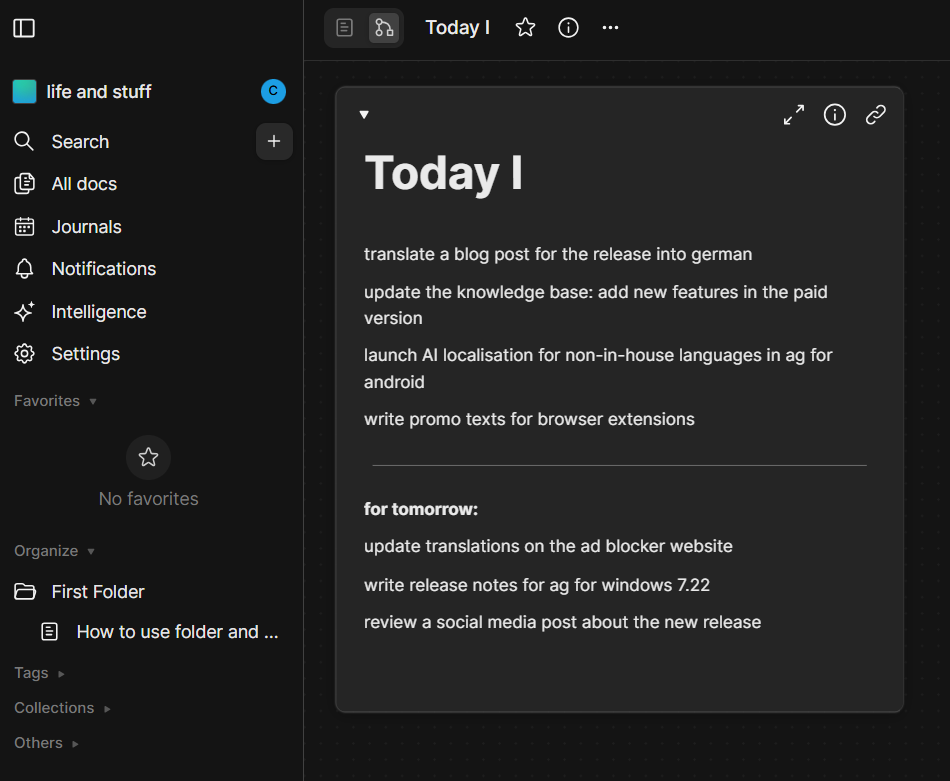
A plan for the day *border

Keep it visual but not overwhelming. For visualization, the same colleague came up with a scheme called “4 out of 6.” All tasks fall into six categories: work, study, writing, exercise, chores, downtime (yes, even doomscrolling counts if planned). Each day should contain at least four of these blocks. That’s enough to stay balanced without overloading. More is great, but four is enough.

For students who enjoy visual planning, AI posters can also turn key goals, reminders, or study milestones into eye-catching visuals.
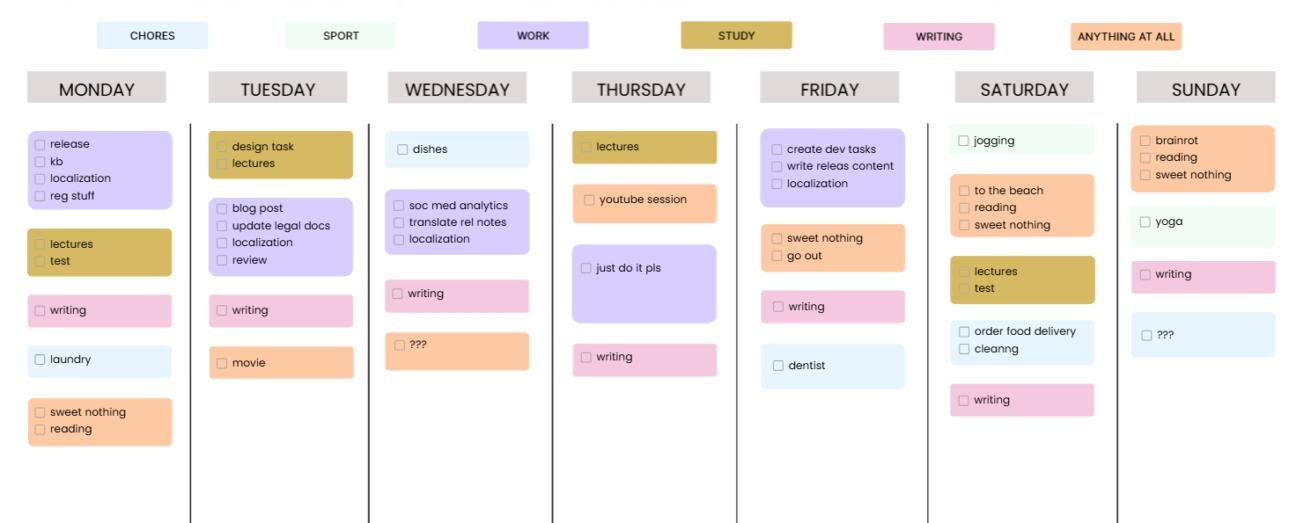
Weekly schedule *border

If you feel like a day goes to waste, try writing down even the smallest things you do. You’ll have written proof that you actually achieve a lot. And if you already remember your tasks well, you can just leave some blocks blank.

You can copy this template from AFFiNE if you have an account there.

Distraction limits

Block all that’s not needed. The biggest problem is distraction. It’s too easy to check reels, news feeds, or memes instead of studying. That’s why we block temptations.

One option is to use focus mode on a phone. Another — set up parental control for yourself. With AdGuard DNS, you can block certain websites on a schedule and study or work without interruptions. DNS also filters ads and pop-ups along the way.
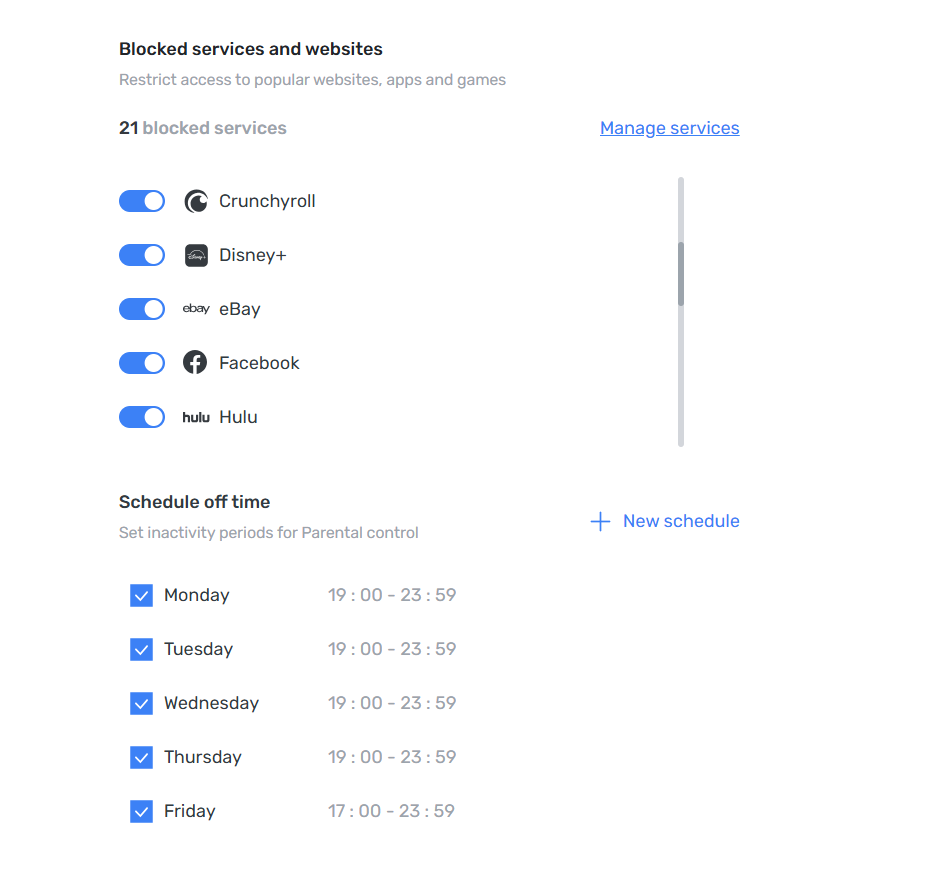
Parental control *border

The Pomodoro technique turned out useful. 25 minutes of focus, 5 minutes of rest — simple and effective. No special app is needed: you can just play a Pomodoro video on YouTube, whether it’s (lo-fi beats, brown noise, or even silence — whatever works). The only challenge is not wasting time searching for “the perfect” one.

If videos are not for you, you can use a simple timer and count tomatoes. Two tomatoes make one hour of concentrated work; four are often enough to finish most tasks.

This very article is being written with a Pomodoro cat video playing in the background — and it has already taken us three Pomodoros. It works.

💡
And if YouTube ads break the flow — AdGuard Ad Blocker takes care of them.

Tools for access and privacy

Not every helper is about discipline. Some just make studying smoother and save time.

VPN is one of those. Learning often means accessing materials that aren’t available where you are. It could be an academic archive restricted to a certain country, a lecture on YouTube blocked in your region, or a database. The simplest way to go around this is to change your IP. VPN is the safe way to do so.

💡
With AdGuard VPN, you can switch between 70+ locations and open the doors you need.

Temporary mail is another simple tool. Many websites won’t let you download an article or book without registration. Some, like Web of Science, won’t even let you browse without an account. Instead of using your main inbox, you can create a disposable email address to sign up for services.

💡
With AdGuard Mail, you generate a temporary address — convenient for quick registrations.

That’s just a small part of what we do. We’re not experts, just people who strive to learn more and keep improving. Share your own tips and tools that help you stay organized and focused — our social media is open for suggestions!


Podobał Ci się ten post?
9 332 9332 recenzje
Doskonały!

AdGuard VPN dla Windows

Korzystaj z dowolnej przeglądarki lub aplikacji i nigdy więcej nie martw się o swoją anonimowość. Cały świat jest na wyciągnięcie ręki dzięki AdGuard VPN.
Pobierz
Pobierając program, akceptujesz warunki Umowy licencyjnej
Dowiedz się więcej
Ekran główny AdGuard VPN dla Windows z aktywnym połączeniem VPN.
Ekran główny AdGuard VPN dla systemu Windows pokazujący stan braku połączenia.
Ekran Wykluczenia z listą witryn, które nie korzystają z VPN.
9 332 9332 recenzje
Doskonały!

AdGuard VPN dla Mac

Wystarczą dwa kliknięcia, aby wybrać miasto z dowolnego miejsca na świecie — mamy 75+ lokalizacji — a Twoje dane staną się niewidoczne dla ciekawskich oczu.
Pobierz
Pobierając program, akceptujesz warunki Umowy licencyjnej
Dowiedz się więcej
Ekran główny AdGuard VPN na Maca z aktywnym połączeniem VPN.
Główny ekran AdGuard VPN na Maca pokazujący stan rozłączenia.
Ekran Wykluczenia z listą witryn, które nie korzystają z VPN.
9 332 9332 recenzje
Doskonały!

AdGuard VPN dla Android

AdGuard VPN dla Android oferuje dziesiątki szybkich lokalizacji. Przeglądaj Internet mobilnie z większą prywatnością. Blokuj reklamy i trackery dzięki wbudowanej Ochronie DNS
Dowiedz się więcej
Pobierz
Pobierając program, akceptujesz warunki Umowy licencyjnej
Google Play
Pobierając program, akceptujesz warunki Umowy licencyjnej
Ekran główny AdGuard VPN na Androida z aktywnym połączeniem VPN.
Ekran główny AdGuard VPN na Androida pokazujący stan braku połączenia.
Ekran Lokalizacje przedstawiający najszybsze dostępne serwery.
Ekran Wykluczenia z listą witryn, które nie korzystają z VPN.
Ekran z kodem QR umożliwiającym zainstalowanie AdGuard VPN.
9 332 9332 recenzje
Doskonały!

AdGuard VPN na iOS

Chroń swoją prywatność i anonimowo streamuj ulubione programy dzięki AdGuard VPN dla iOS. Blokuj reklamy za pomocą wbudowanej ochrony DNS
Dowiedz się więcej
App Store
Pobierając program, akceptujesz warunki Umowy licencyjnej
Ekran główny aplikacji AdGuard VPN na iOS z aktywnym połączeniem VPN.
Ekran główny AdGuard VPN na iOS pokazujący stan braku połączenia.
Ekran Lokalizacje przedstawiający najszybsze dostępne serwery.
Ekran Wykluczenia z listą witryn, które nie korzystają z VPN.
Ekran z kodem QR umożliwiającym zainstalowanie AdGuard VPN.
9 332 9332 recenzje
Doskonały!

AdGuard VPN dla Android TV

Odkryj AdGuard VPN dla Android TV! Ciesz się płynnym streamingiem, zwiększonym bezpieczeństwem i łatwą konfiguracją.
Pobierz
Pobierając program, akceptujesz warunki Umowy licencyjnej
Google Play
Pobierając program, akceptujesz warunki Umowy licencyjnej
Dowiedz się więcej
Ekran główny AdGuard VPN na Android TV z aktywnym połączeniem VPN z serwerem w Helsinkach w Finlandii.
9 332 9332 recenzje
Doskonały!

AdGuard VPN dla Chrome

AdGuard VPN dla Edge

AdGuard VPN dla Firefox

AdGuard VPN dla Opery

Ukryj swoją prawdziwą lokalizację i wyjdź z innego miejsca na świecie — uzyskaj dostęp do dowolnych treści bez ograniczeń prędkości i zachowaj anonimowość w sieci.
Przejdź do innej lokalizacji jednym kliknięciem, ukryj swój adres IP i spraw, aby surfowanie po sieci było bezpieczne i anonimowe.
Chroń swoją prywatność, ukryj swoją prawdziwą lokalizację i zdecyduj, gdzie potrzebujesz VPN, a gdzie nie!
Zostań ninja w przeglądarce Opera: szybko przenieś się w dowolne miejsce na świecie i pozostań niezauważony(a).
Instalacja
Pobierając program, akceptujesz warunki Umowy licencyjnej
Dowiedz się więcej
Instalacja
Pobierając program, akceptujesz warunki Umowy licencyjnej
Dowiedz się więcej
Instalacja
Pobierając program, akceptujesz warunki Umowy licencyjnej
Dowiedz się więcej
Instalacja
Pobierając program, akceptujesz warunki Umowy licencyjnej
Dowiedz się więcej
Ekran główny rozszerzenia przeglądarki AdGuard VPN z aktywnym połączeniem VPN.
Ekran Lokalizacje przedstawiający najszybsze dostępne serwery.
9 332 9332 recenzje
Doskonały!

AdGuard VPN dla routerów

Zainstaluj AdGuard VPN na routerze, aby zabezpieczyć całą sieć. Zdecyduj, które urządzenia mają być chronione i kiedy
Ta opcja jest dostępna tylko z subskrypcją AdGuard VPN
Router z ikoną tarczy z dziurką od klucza.
9 332 9332 recenzje
Doskonały!

AdGuard VPN dla Linux

Zdobądź najlepszą darmową sieć VPN dla systemu Linux i ciesz się płynnym przeglądaniem sieci, zwiększonym bezpieczeństwem, szyfrowaniem ruchu internetowego i ochroną przed wyciekiem DNS. Wybierz jeden z wielu serwerów VPN i uzyskaj dostęp do wybranych lokalizacji
Maskotka AdGuard VPN, Tengu, z linuksowym pingwinem Tuxem siedzącym w krzakach.
9 332 9332 recenzje
Doskonały!

AdGuard VPN dla Android TV

Odkryj AdGuard VPN dla Apple TV! Ciesz się płynnym przesyłaniem strumieniowym, zwiększonym bezpieczeństwem i łatwą konfiguracją
Ta opcja jest dostępna tylko z subskrypcją AdGuard VPN
Urządzenie do strumieniowania Apple TV z logo AdGuard VPN.
9 332 9332 recenzje
Doskonały!

AdGuard VPN dla Xbox

Chroń swoją konsolę Xbox za pomocą AdGuard VPN i ciesz się płynną grą online, większym bezpieczeństwem i łatwą konfiguracją
Ta opcja jest dostępna tylko z subskrypcją AdGuard VPN
Konsola Microsoft Xbox i kontroler z logo AdGuard VPN.
9 332 9332 recenzje
Doskonały!

AdGuard VPN dla PS4/PS5

Chroń swoje PlayStation dzięki AdGuard VPN i ciesz się płynną rozgrywką online, zwiększonym bezpieczeństwem i łatwą konfiguracją. Wybieraj spośród wielu serwerów VPN i uzyskuj dostęp do wybranych lokalizacji
Ta funkcja jest dostępna tylko z subskrypcją AdGuard VPN
Ta opcja jest dostępna tylko z subskrypcją AdGuard VPN
Konsola Sony PlayStation i kontroler z logo AdGuard VPN.
9 332 9332 recenzje
Doskonały!

AdGuard VPN dla Chromecast

Zainstaluj AdGuard VPN na swoim Google TV (Chromecast Gen 4) lub na routerze sieciowym (Chromecast Gen 3) i ciesz się strumieniowaniem treści za pomocą Chromecast, zachowując anonimowość online i uzyskując dostęp do treści z dowolnego miejsca. W przypadku Chromecast Gen 3 potrzebujesz subskrypcji AdGuard VPN
Ta opcja jest dostępna tylko z subskrypcją AdGuard VPN
Urządzenie do strumieniowania Google Chromecast z ikoną tarczy z dziurką od klucza.
AdGuard VPN
pobieranie rozpoczęte
Kliknij przycisk wskazany strzałką, aby rozpocząć instalację.
Skanuj, aby zainstalować AdGuard VPN na swoim urządzeniu mobilnym
Ekran z kodem QR umożliwiającym zainstalowanie AdGuard VPN.

































