Four tomatoes, a VPN, and a closed to-do list: easy and smart tools to balance study, work, and life

We at AdGuard try to balance work, study, and life. Many digital tools out there look impressive — but they often feel overwhelming, built for people with iron discipline and perfect self-management. Big dashboards, kanban systems, five-year plans in Trello… they’re more likely to exhaust you before they help.

What actually works best, in our experience, are the simplest helpers. The lower the entry barrier, the easier it is to follow through. Here are a few small tools and tricks we use ourselves. Some take less than ten minutes to set up, some are just small habits, but everything here is manageable for anyone.

Prompts and simple visuals

Make the machine do it for you. The easiest way to start is to let an AI help build a schedule around your real life. Preparing for an exam? Taking extra courses? Adding a side hustle? Make the machine do the planning: first, ask the AI to interview you about your habits and time, and then ask it to come up with a routine just for you.

Here is a prompt example from one of our content managers who is trying to juggle work, study, and writing a novel without losing marbles:

Prompt example

I want to improve my time management and concentration so I can balance my job, studies, fitness, and writing a novel. Please create a self-assessment test (10–15 questions) with multiple-choice answers that takes into account personality and lifestyle differences. The test should help me identify my current habits, challenges, and strengths. After the test, provide personalized suggestions for organizational strategies and routines that can help me work, study, exercise, and write fiction more effectively while also saving time. Present the output in a clear structure: questions, answer options, scoring/interpretation, and strategy recommendations.

Make today a closed day. We also like the idea of a “closed list.” The rules are simple: write tasks for today, don’t add new ones. Fewer tasks are better, the list is finite, and you can do them in any order. It forces you to choose carefully and teaches you to say “no” to tasks that appear during the day. Plan for tomorrow today, and tomorrow becomes a closed list.
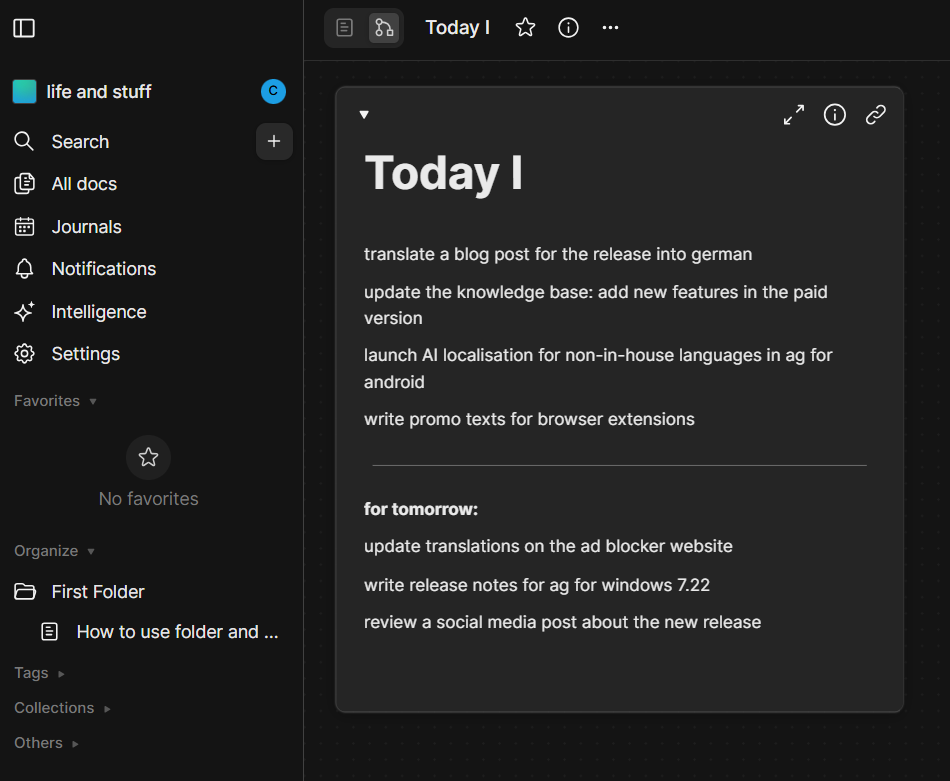
A plan for the day *border

Keep it visual but not overwhelming. For visualization, the same colleague came up with a scheme called “4 out of 6.” All tasks fall into six categories: work, study, writing, exercise, chores, downtime (yes, even doomscrolling counts if planned). Each day should contain at least four of these blocks. That’s enough to stay balanced without overloading. More is great, but four is enough.

For students who enjoy visual planning, AI posters can also turn key goals, reminders, or study milestones into eye-catching visuals.
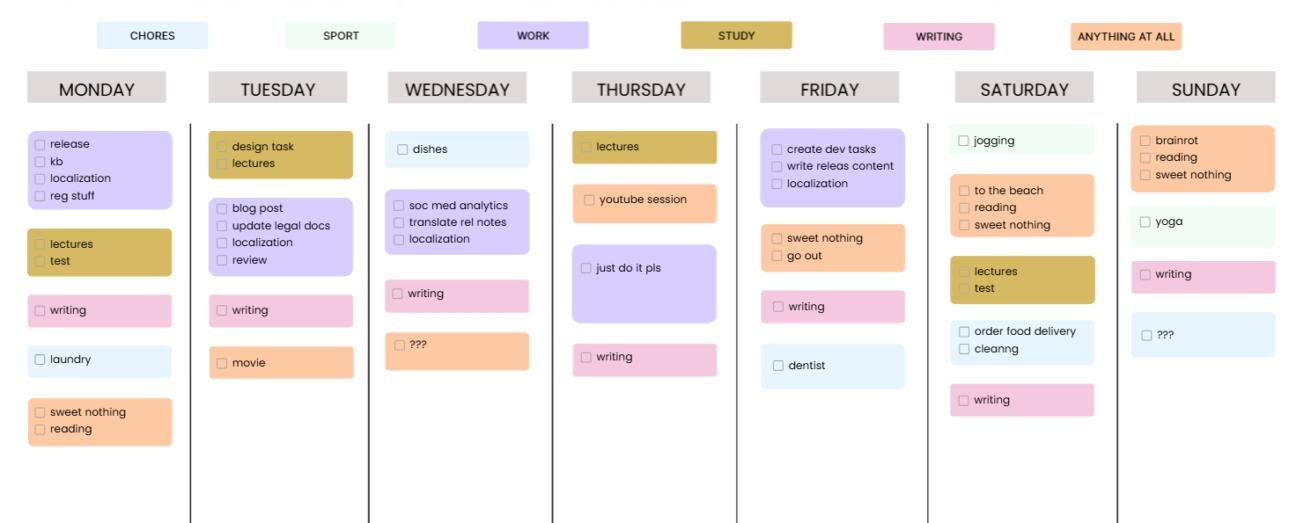
Weekly schedule *border

If you feel like a day goes to waste, try writing down even the smallest things you do. You’ll have written proof that you actually achieve a lot. And if you already remember your tasks well, you can just leave some blocks blank.

You can copy this template from AFFiNE if you have an account there.

Distraction limits

Block all that’s not needed. The biggest problem is distraction. It’s too easy to check reels, news feeds, or memes instead of studying. That’s why we block temptations.

One option is to use focus mode on a phone. Another — set up parental control for yourself. With AdGuard DNS, you can block certain websites on a schedule and study or work without interruptions. DNS also filters ads and pop-ups along the way.
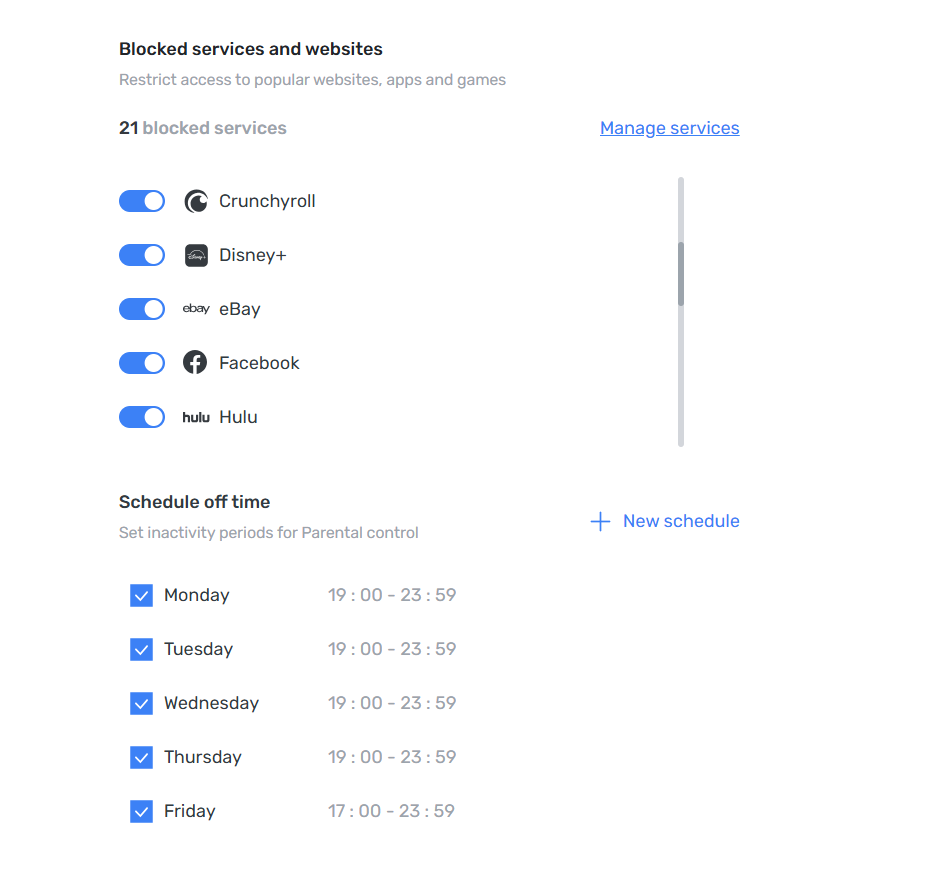
Parental control *border

The Pomodoro technique turned out useful. 25 minutes of focus, 5 minutes of rest — simple and effective. No special app is needed: you can just play a Pomodoro video on YouTube, whether it’s (lo-fi beats, brown noise, or even silence — whatever works). The only challenge is not wasting time searching for “the perfect” one.

If videos are not for you, you can use a simple timer and count tomatoes. Two tomatoes make one hour of concentrated work; four are often enough to finish most tasks.

This very article is being written with a Pomodoro cat video playing in the background — and it has already taken us three Pomodoros. It works.

💡
And if YouTube ads break the flow — AdGuard Ad Blocker takes care of them.

Tools for access and privacy

Not every helper is about discipline. Some just make studying smoother and save time.

VPN is one of those. Learning often means accessing materials that aren’t available where you are. It could be an academic archive restricted to a certain country, a lecture on YouTube blocked in your region, or a database. The simplest way to go around this is to change your IP. VPN is the safe way to do so.

💡
With AdGuard VPN, you can switch between 70+ locations and open the doors you need.

Temporary mail is another simple tool. Many websites won’t let you download an article or book without registration. Some, like Web of Science, won’t even let you browse without an account. Instead of using your main inbox, you can create a disposable email address to sign up for services.

💡
With AdGuard Mail, you generate a temporary address — convenient for quick registrations.

That’s just a small part of what we do. We’re not experts, just people who strive to learn more and keep improving. Share your own tips and tools that help you stay organized and focused — our social media is open for suggestions!


Piditkö tästä julkaisusta?
9 332 9332 arvostelua
Erinomainen!

AdGuard VPN Windowsille

Käytä mitä tahansa selainta tai sovellusta huolehtimatta nimettömyydestäsi enää koskaan. AdGuard VPN:llä koko maailma on käden ulottuvilla.
Lataa
Lataamalla sovelluksen hyväksyt lisenssisopimuksen ehdot
Lue lisää
AdGuard VPN for Windows -sovelluksen päänäyttö, jossa VPN-yhteys on aktiivinen.
AdGuard VPN for Windowsin päänäyttö, jossa näkyy yhteyden katkaistu tila.
Poissulkemiset-näyttö, jossa on luettelo verkkosivustoista, jotka eivät käytä VPN:ää.
9 332 9332 arvostelua
Erinomainen!

AdGuard VPN Macille

Vain kahdella napsautuksella voit valita kaupungin mistä tahansa maailmassa – meillä on 75+ sijaintia – ja tietosi ovat näkymättömiä uteliaille katseille.
Lataa
Lataamalla sovelluksen hyväksyt lisenssisopimuksen ehdot
Lue lisää
AdGuard VPN for Macin päänäyttö, jossa VPN-yhteys on aktiivinen.
AdGuard VPN:n Mac-version pääruutu, jossa näkyy, ettei yhteyttä ole muodostettu.
Poissulkemiset-näyttö, jossa on luettelo verkkosivustoista, jotka eivät käytä VPN:ää.
9 332 9332 arvostelua
Erinomainen!

AdGuard VPN Androidille

AdGuard VPN Androidille tarjoaa kymmeniä nopeita sijainteja. Selaa yksityisemmin liikkeellä ollessasi. Estä mainokset ja seurannat sisäänrakennetulla DNS-suojauksella
Lue lisää
Lataa
Lataamalla sovelluksen hyväksyt lisenssisopimuksen ehdot
Google Play
Lataamalla sovelluksen hyväksyt lisenssisopimuksen ehdot
AdGuard VPN Androidille -sovelluksen päänäyttö, jossa VPN-yhteys on aktiivinen.
AdGuard VPN Androidille -sovelluksen päänäyttö, jossa näkyy, että yhteys on katkaistu.
Sijainnit-näyttö, jossa näkyvät nopeimmat saatavilla olevat palvelimet.
Poissulkemiset-näyttö, jossa on luettelo verkkosivustoista, jotka eivät käytä VPN:ää.
Näyttö, jossa on QR-koodi AdGuard VPN:n asentamista varten.
9 332 9332 arvostelua
Erinomainen!

AdGuard VPN iOS:lle

Suojaa yksityisyytesi ja suoratoista suosikkiohjelmiasi nimettömästi iOS:n AdGuard VPN:llä. Estä mainokset sisäänrakennetulla DNS-suojauksella
Lue lisää
App Store
Lataamalla sovelluksen hyväksyt lisenssisopimuksen ehdot
AdGuard VPN:n iOS-version päänäkymä aktiivisella VPN-yhteydellä.
AdGuard VPN:n iOS-päänäyttö, jossa näkyy, ettei yhteyttä ole muodostettu.
Sijainnit-näyttö, jossa näkyvät nopeimmat saatavilla olevat palvelimet.
Poissulkemiset-näyttö, jossa on luettelo verkkosivustoista, jotka eivät käytä VPN:ää.
Näyttö, jossa on QR-koodi AdGuard VPN:n asentamista varten.
9 332 9332 arvostelua
Erinomainen!

AdGuard VPN Android TV:lle

Tutustu AdGuard VPN:ään Android TV:llä! Nauti saumattomasta suoratoistosta, vahvemmasta suojauksesta ja helposta käyttöönotosta.
Lataa
Lataamalla sovelluksen hyväksyt lisenssisopimuksen ehdot
Google Play
Lataamalla sovelluksen hyväksyt lisenssisopimuksen ehdot
Lue lisää
AdGuard VPN:n päänäyttö Android TV:ssä, jossa VPN-yhteys Suomessa Helsingissä sijaitsevaan palvelimeen on aktiivinen.
9 332 9332 arvostelua
Erinomainen!

AdGuard VPN Chromelle

AdGuard VPN Edgelle

AdGuard VPN Firefoxille

AdGuard VPN Operalle

Piilota todellinen sijaintisi ja näyttäydy toisessa maailmankolkassa – käytä kaikkea sisältöä ilman nopeusrajoituksia ja säilytä nimettömyytesi verkossa.
Vaihda sijaintiasi yhdellä painalluksella, piilota IP-osoitteesi ja tee verkkoselauksestasi turvallista ja anonyymiä.
Suojaa yksityisyyttäsi, piilota todellinen sijaintisi ja päätä, missä tarvitset ja et tavitse VPN-yhteyttä!
Ole ninja Opera-selaimessasi: Siirry mihin tahansa maailmankolkkaan nopeasti ja huomaamattomasti.
Asenna
Lataamalla sovelluksen hyväksyt lisenssisopimuksen ehdot
Lue lisää
Asenna
Lataamalla sovelluksen hyväksyt lisenssisopimuksen ehdot
Lue lisää
Asenna
Lataamalla sovelluksen hyväksyt lisenssisopimuksen ehdot
Lue lisää
Asenna
Lataamalla sovelluksen hyväksyt lisenssisopimuksen ehdot
Lue lisää
AdGuard VPN -selainlaajennuksen päänäyttö aktiivisella VPN-yhteydellä.
Sijainnit-näyttö, jossa näkyvät nopeimmat saatavilla olevat palvelimet.
9 332 9332 arvostelua
Erinomainen!

AdGuard VPN retittimiin

Asenna AdGuard VPN reitittimeesi suojataksesi koko verkkosi. Päätä, mitkä laitteet suojataan ja milloin
Tämä ominaisuus edellyttää AdGuard VPN -tilausta
Reititin, jossa on avaimenreiän muotoinen kilpikuvake.
9 332 9332 arvostelua
Erinomainen!

AdGuard VPN Linuxille

Hanki paras ilmainen Linux-VPN ja nauti saumattomasta verkkoselailusta, tehostetutsta suojauksesta, Internet-tietoliikenteen salauksesta sekä DNS-vuotosuojauksesta. Valitse useista VPN-palvelimista ja tavoita haluamasi sijainnit
AdGuard VPN:n maskotti Tengu ja Linux-pingviini Tux istumassa pensaikossa.
9 332 9332 arvostelua
Erinomainen!

AdGuard VPN Apple TV:lle

Tutustu AdGuard VPN:ään Apple TV:llä! Nauti saumattomasta suoratoistosta, vahvemmasta suojauksesta ja helposta käyttöönotosta
Tämä ominaisuus edellyttää AdGuard VPN -tilausta
Apple TV -suoratoistolaite, jossa on AdGuard VPN:n logo.
9 332 9332 arvostelua
Erinomainen!

AdGuard VPN Xboxille

Suojaa Xbox AdGuard VPN:llä ja nauti saumattomasta verkkopelaamisesta, vahvemmasta suojauksesta ja helposta käyttöönotosta
Tämä ominaisuus edellyttää AdGuard VPN -tilausta
Microsoft Xbox -konsoli ja -ohjain, joissa on AdGuard VPN -logo.
9 332 9332 arvostelua
Erinomainen!

AdGuard VPN PS4:lle/PS5:lle

Suojaa PlayStation AdGuard VPN:llä ja nauti saumattomasta verkkopelaamisesta, tehostetusta suojauksesta ja helposta asennuksesta. Valitse useista VPN-palvelimista ja käytä haluamiasi sijainteja
Ominaisuus on käytettävissä vain AdGuard VPN -tilauksella
Tämä ominaisuus edellyttää AdGuard VPN -tilausta
Sony PlayStation -konsoli ja -ohjain, joissa on AdGuard VPN -logo.
9 332 9332 arvostelua
Erinomainen!

AdGuard VPN Chromecastille

Asenna AdGuard VPN Google TV:llesi (Chromecast Gen 4) tai verkkoreitittimeesi (Chromecast Gen 3) ja nauti suoratoistosta Chromecastilla säilyttäen anonymiteettisi verkossa ja tavoittaen sisällön mistä tahansa. Chromecast Gen 3:lle tarvitset AdGuard VPN -tilauksen
Tämä ominaisuus edellyttää AdGuard VPN -tilausta
Google Chromecast -suoratoistolaite, jossa on avaimenreiän muotoinen kilpikuvake.
AdGuard VPN:n
lataus on käynnistynyt
Klikkaa nuolen osoittamaa painiketta aloittaaksesi asennuksen.
Skannaa asentaa AdGuard VPN mobiililaitteeseen
Näyttö, jossa on QR-koodi AdGuard VPN:n asentamista varten.

































