AdGuard VPN major update for all platforms and extra 10 GB in March and April

Nothing of this caliber has ever happened in AdGuard! Today we release AdGuard VPN updates for all platforms — for macOS, Windows, iOS, Android, and browser extensions for Chrome, Firefox, and Edge. 7/7, that makes a bingo!

You probably wonder what's new in all these apps and extensions. Let's see.

What's new

Exclusions 2.0

Firstly, now you can not only add websites to exclusions but also choose among the lists of popular services. The lists are divided into eight categories: Social networks, Messengers, Video and Music streaming services, Games, Shopping, Search engines, and Work communication tools. From now on, any of these services can be added to exclusions in one click! It's especially convenient if you use Selective mode where AdGuard VPN is on only for the domains added to exclusions.

This feature is available on all platforms except iOS.
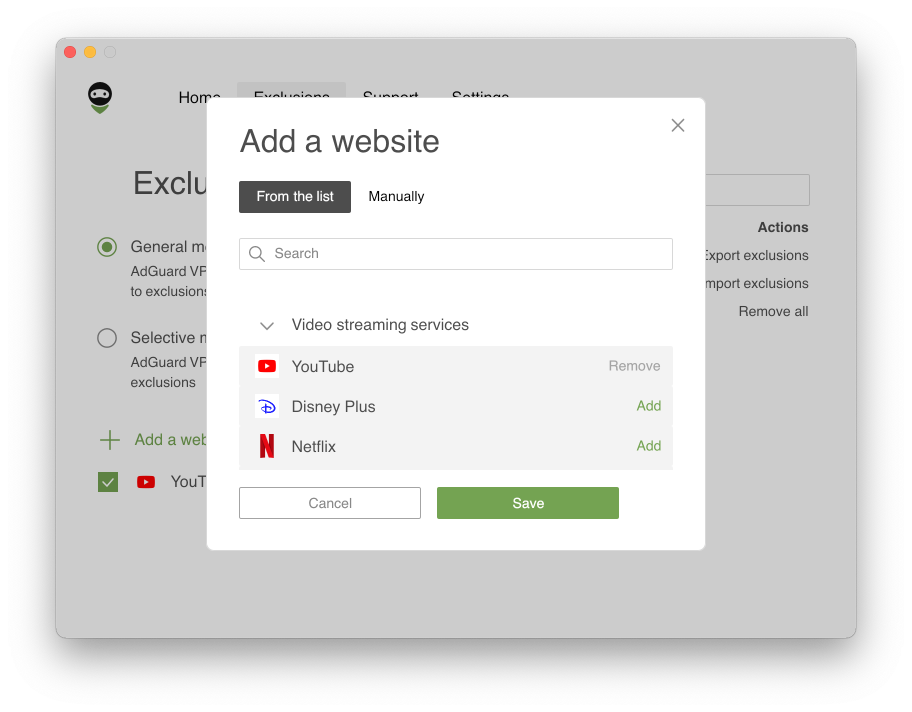
Exclusions 2.0

Secondly, Exclusions lists can be easily configured. If you've added a domain and some of its subdomains, they'll be grouped inside the root one. Also, when adding a root domain (example.com) its mask is added too (*.example.com) — previously, one had to enter it manually, not many users knew about it. If you've added a service, changed or removed something and now want to recover initial settings, don't worry: just press Reset to default next to the domain — this action will restore any missing domains and tick all checkboxes.
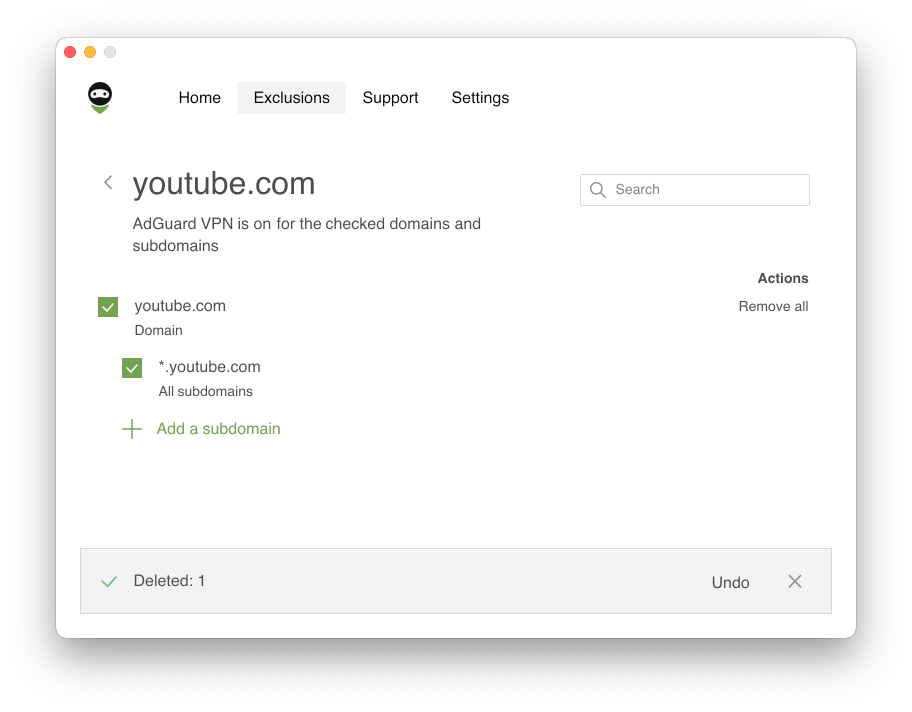
Reset to default

Full redesign

Both our apps and website have been redesigned. Perhaps, the visual style of the AdGuard VPN website has changed most: a landscape and many vivid illustrations have appeared there. In apps, all the illustrations and the main screen are new too (except AdGuard VPN for Mac and Windows — the design of the desktop apps will be updated soon). But you can already see what the main screen in AdGuard VPN for iOS looks like:
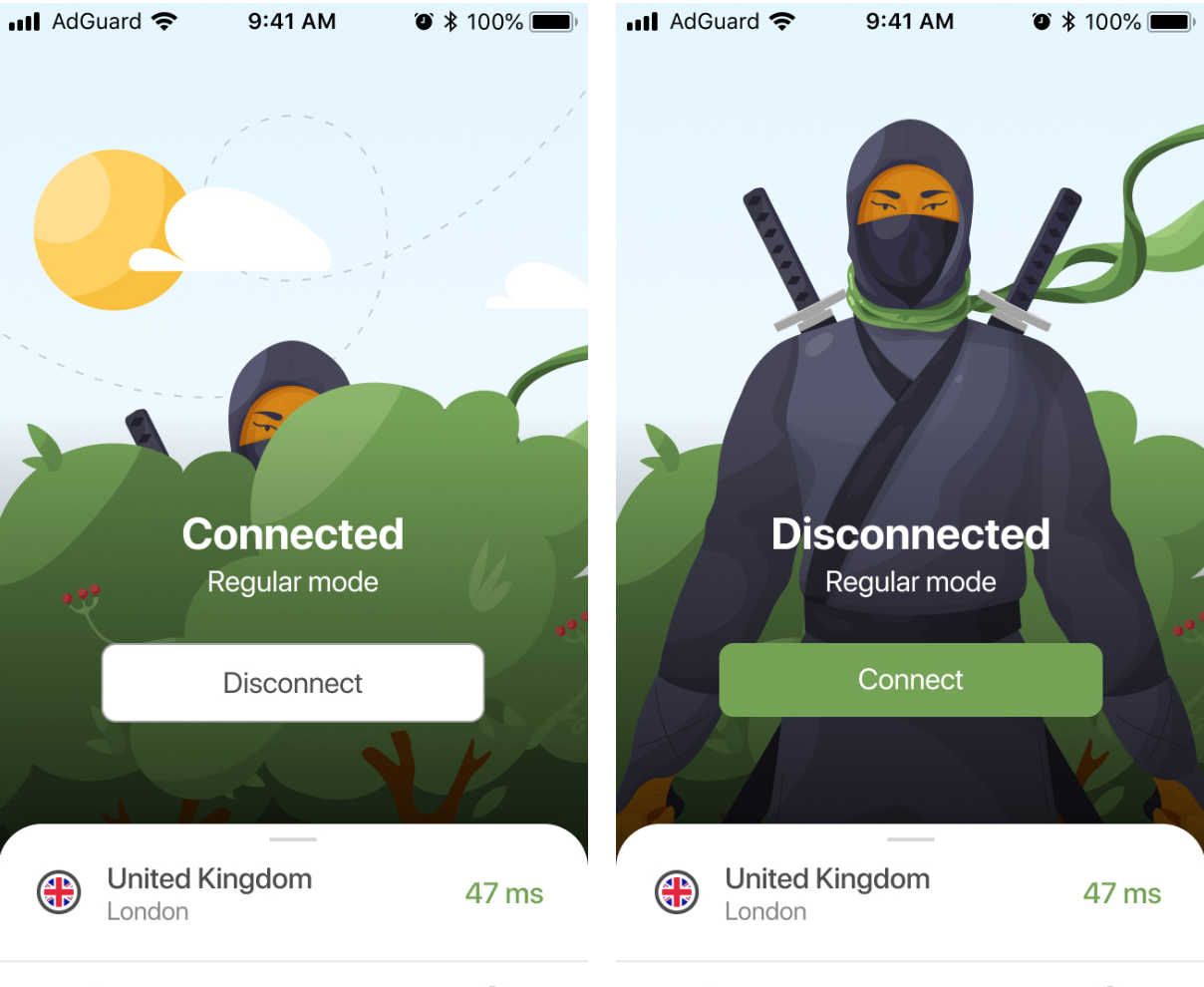
New design of app main screen

Besides the renewed exclusions and design, we have also found and fixed a lot of bugs and flaws, so AdGuard VPN apps and extensions turned more stable and reliable. Of course, there is always room for improvement and we definitely have things to strive for, but such simultaneous product releases cannot but make us feel happy.

Rising prices and new subscription format

Although prices went up a bit, there is an upside — we offer a new two-year subscription plan, the most cost-effective when you compare prices per month.

New prices:
Monthly subsciption — $11,99
Yearly subscription — $3,99 per month ($47.88 total price)
Two-year subscription — $2,99 per month ($71,76 total price)

Note that if you choose a two-year subscription plan, the price per month will be the same as before the price increase.

Auto-protection in AdGuard VPN for Android

The most noticeable change in AdGuard VPN for Android is Auto-protection. With this feature, you don't have to worry anymore whether your connection is secure at the moment. You can enable it for Wi-Fi, mobile networks or both. Depending on the chosen option, AdGuard VPN will turn on automatically when the device connects to cellular or Wi-Fi networks. For further convenience you can add your Wi-Fi network at home and/or work to the trusted ones, so that Auto-protection doesn't cover them.

Note that Auto-protection is not available in the Compatibility mode and in the SOCKS5 mode.

Custom DNS servers in AdGuard VPN for Mac and Windows

Following the footprints of AdGuard VPN for Android, the desktop apps now also feature DNS filtering. You can add custom DNS servers — choose from the broad selection of popular DNS providers such as Cloudflare DNS. Thanks to the new feature, AdGuard VPN users don't have to be limited to a default DNS server provided by their ISP. We suggest that you try various DNS solutions and choose one that suits you best, as each DNS provider has their perks.

Additional 10 GB to all users

The world is going through a difficult time. There are problems with access to various resources in some countries, and we can't stay away. We're giving all AdGuard VPN users, old and new, extra 10 GB in March and April. You'll have 13 GB of VPN traffic instead of three during both months — so that you can browse freely and get more information.


That seems to be it. Hurry up to update AdGuard VPN and see for yourself how different it has become. Hope you'll like it! As usual, we welcome feedback in whatever format convenient for you — share any thoughts in the comments here or on social media. See you!


این پست را دوست داشتید؟
۹٬۳۳۲ 9332 بررسی
بسیار عالی!

AdGuard VPN برای ویندوز

از هر مرورگر یا برنامه ای استفاده کنید و هرگز نگران گمنامی خود با AdGuard VPN نباشید.
بارگیری
با دانلود برنامه، شرایط موافقتنامه مجوز را می پذیرید
بیشتر بدانید
صفحه اصلی AdGuard VPN برای Windows با اتصال VPN فعال.
صفحه اصلی AdGuard VPN برای ویندوز که وضعیت قطع اتصال را نشان می‌دهد.
صفحه «استثناها» با فهرستی از وب‌سایت‌هایی که از VPN استفاده نمی‌کنند.
۹٬۳۳۲ 9332 بررسی
بسیار عالی!

AdGuard VPN برای مک

تنها در دو کلیک، یک شهر را از هر نقطه از جهان انتخاب کنید — ما 75+ مکان داریم — و داده‌های شما برای چشمان کنجکاو نامرئی است.
بارگیری
با دانلود برنامه، شرایط موافقتنامه مجوز را می پذیرید
بیشتر بدانید
صفحه اصلی AdGuard VPN برای مک با اتصال فعال VPN.
صفحه اصلی AdGuard VPN برای مک که وضعیت قطع اتصال را نشان می‌دهد.
صفحه «استثناها» با فهرستی از وب‌سایت‌هایی که از VPN استفاده نمی‌کنند.
۹٬۳۳۲ 9332 بررسی
بسیار عالی!

AdGuard VPN برای اندروید

AdGuard VPN برای Android ده‌ها مکان سریع ارائه می‌دهد. هنگام حرکت با حریم خصوصی بیشتری گشت‌وگذار کنید. با محافظت DNS داخلی، تبلیغات و رَدیاب‌ها را مسدود کنید
بیشتر بدانید
بارگیری
با دانلود برنامه، شرایط موافقتنامه مجوز را می پذیرید
Google Play
با دانلود برنامه، شرایط موافقتنامه مجوز را می پذیرید
صفحه اصلی AdGuard VPN برای Android با اتصال VPN فعال.
صفحه اصلی AdGuard VPN برای اندروید که وضعیت قطع اتصال را نشان می‌دهد.
صفحهٔ مکان‌ها که سریع‌ترین سرورهای در دسترس را نشان می‌دهد.
صفحه «استثناها» با فهرستی از وب‌سایت‌هایی که از VPN استفاده نمی‌کنند.
صفحه‌ای با یک کد QR برای نصب AdGuard VPN.
۹٬۳۳۲ 9332 بررسی
بسیار عالی!

AdGuard VPN برای iOS

با AdGuard VPN برای iOS از حریم خصوصی خود محافظت کرده و برنامه‌های دلخواهتان را به‌صورت ناشناس پخش برخط کنید. با محافظت DNS داخلی، تبلیغات را مسدود نمایید
بیشتر بدانید
App Store
با دانلود برنامه، شرایط موافقتنامه مجوز را می پذیرید
صفحه اصلی AdGuard VPN برای iOS با اتصال VPN فعال.
صفحه اصلی AdGuard VPN برای iOS که وضعیت قطع اتصال را نشان می‌دهد.
صفحهٔ مکان‌ها که سریع‌ترین سرورهای در دسترس را نشان می‌دهد.
صفحه «استثناها» با فهرستی از وب‌سایت‌هایی که از VPN استفاده نمی‌کنند.
صفحه‌ای با یک کد QR برای نصب AdGuard VPN.
۹٬۳۳۲ 9332 بررسی
بسیار عالی!

AdGuard VPN برای Android TV

AdGuard VPN برای Android TV را کشف کنید! از پخش بدون زحمت و دردسر، امنیت پیشرفته و نصب آسان لذت ببرید.
بارگیری
با دانلود برنامه، شرایط موافقتنامه مجوز را می پذیرید
Google Play
با دانلود برنامه، شرایط موافقتنامه مجوز را می پذیرید
بیشتر بدانید
صفحه اصلی AdGuard VPN برای Android TV با اتصال فعال VPN به سروری در هلسینکی، فنلاند.
۹٬۳۳۲ 9332 بررسی
بسیار عالی!

AdGuard VPN برای کروم

AdGuard VPN برای اج

AdGuard VPN برای فایرفاکس

AdGuard VPN برای اپرا

مکان واقعی خود را پنهان کنید و از مکان دیگری در جهان سر برآورید — به هر محتوایی بدون محدودیت سرعت دسترسی داشته باشید و ناشناس بودن وب خود را حفظ کنید.
با یک کلیک به مکان دیگری دسترسی داشته باشید، IP خود را پنهان کرده و گشت‌و‌گذار در وب خود را ایمن و ناشناس کنید.
از حریم خصوصی خود محافظت نمایید، مکان واقعی خود را پنهان کنید و تصمیم بگیرید که کجا به VPN نیاز دارید و کجا نه!
در مرورگر اُپرای خود یک نینجا باشید: به‌سرعت به هر نقطه از جهان حرکت کرده و جلب توجه نکنید.
نصب
با دانلود برنامه، شرایط موافقتنامه مجوز را می پذیرید
بیشتر بدانید
نصب
با دانلود برنامه، شرایط موافقتنامه مجوز را می پذیرید
بیشتر بدانید
نصب
با دانلود برنامه، شرایط موافقتنامه مجوز را می پذیرید
بیشتر بدانید
نصب
با دانلود برنامه، شرایط موافقتنامه مجوز را می پذیرید
بیشتر بدانید
صفحه اصلی افزونه مرورگر AdGuard VPN با اتصال VPN فعال.
صفحهٔ مکان‌ها که سریع‌ترین سرورهای در دسترس را نشان می‌دهد.
۹٬۳۳۲ 9332 بررسی
بسیار عالی!

AdGuard VPN برای روترها

AdGuard VPN را روی مسیریاب خود نصب کنید تا کل شبکهتان را امن کنید. تصمیم بگیرید که از کدام دستگاه‌ها و در چه زمانی محافظت کنید
این گزینه فقط با اشتراک AdGuard VPN در دسترس است
یک روتر با نماد سپرِ سوراخ‌کلید.
۹٬۳۳۲ 9332 بررسی
بسیار عالی!

AdGuard VPN برای لینوکس

بهترین VPN رایگان را برای لینوکس دریافت کنید و از مرور یکپارچه وب، امنیت پیشرفته، رمزگذاری انتقال داده اینترنت و محافظت از نشت DNS لذت ببرید. از بین چندین سرور VPN انتخاب کرده و به مکان‌های مورد نظر خود دسترسی پیدا کنید
تنگو، نماد شانس AdGuard VPN، به‌همراه تاکس، پنگوئن لینوکس، در میان بوته‌ها نشسته‌اند.
۹٬۳۳۲ 9332 بررسی
بسیار عالی!

AdGuard VPN برای Apple TV

AdGuard VPN را برای Apple TV کشف کنید! از پخش بدون زحمت و دردسر، امنیت پیشرفته و نصب آسان لذت ببرید
این گزینه فقط با اشتراک AdGuard VPN در دسترس است
یک دستگاه پخش جریانی اپل تی‌وی با لوگوی AdGuard VPN.
۹٬۳۳۲ 9332 بررسی
بسیار عالی!

AdGuard VPN برای Xbox

از Xbox خود با AdGuard VPN محافظت کرده و از بازی‌های برخط بدون وقفه، امنیت پیشرفته و برپایی آسان لذت ببرید
این گزینه فقط با اشتراک AdGuard VPN در دسترس است
یک کنسول و کنترلر مایکروسافت ایکس‌باکس با نشان‌واره AdGuard VPN.
۹٬۳۳۲ 9332 بررسی
بسیار عالی!

AdGuard VPN برای PS4/PS5

با AdGuard VPN از پلی استیشن خود محافظت کنید و از بازی برخط روان، امنیت پیشرفته و برپایی آسان لذت ببرید. از بین چندین سرور VPN انتخاب کرده و به مکان‌هایی که می‌خواهید دسترسی داشته باشید
این ویژگی فقط با اشتراک AdGuard VPN در دسترس است
این گزینه فقط با اشتراک AdGuard VPN در دسترس است
یک کنسول و کنترلر سونی پلی‌استیشن با لوگوی AdGuard VPN.
۹٬۳۳۲ 9332 بررسی
بسیار عالی!

AdGuard VPN برای کروم‌کست

AdGuard VPN را روی گوگل تی‌وی شما (کروم‌کست نسل ۴) یا روی مسیریاب شبکه شما (کروم‌کست نسل ۳) نصب کنید و از محتوای پخش برخط با کروم‌کست لذت ببرید در حالی که ناشناس برخط مانده و به محتوا از هر جایی دسترسی دارید. برای کروم‌کست نسل ۳، به اشتراک AdGuard VPN نیاز دارید
این گزینه فقط با اشتراک AdGuard VPN در دسترس است
دستگاه پخش جریانی Google Chromecast با نماد سپر دارای سوراخ کلید.
AdGuard VPN
بارگیری شروع شد
برای شروع نصب روی دکمه مشخص شده توسط فلش کلیک کنید.
اسکن کنید تا AdGuard VPN را روی دستگاه تلفن همراه خود نصب کنید
صفحه‌ای با یک کد QR برای نصب AdGuard VPN.

































