Four tomatoes, a VPN, and a closed to-do list: easy and smart tools to balance study, work, and life

We at AdGuard try to balance work, study, and life. Many digital tools out there look impressive — but they often feel overwhelming, built for people with iron discipline and perfect self-management. Big dashboards, kanban systems, five-year plans in Trello… they’re more likely to exhaust you before they help.

What actually works best, in our experience, are the simplest helpers. The lower the entry barrier, the easier it is to follow through. Here are a few small tools and tricks we use ourselves. Some take less than ten minutes to set up, some are just small habits, but everything here is manageable for anyone.

Prompts and simple visuals

Make the machine do it for you. The easiest way to start is to let an AI help build a schedule around your real life. Preparing for an exam? Taking extra courses? Adding a side hustle? Make the machine do the planning: first, ask the AI to interview you about your habits and time, and then ask it to come up with a routine just for you.

Here is a prompt example from one of our content managers who is trying to juggle work, study, and writing a novel without losing marbles:

Prompt example

I want to improve my time management and concentration so I can balance my job, studies, fitness, and writing a novel. Please create a self-assessment test (10–15 questions) with multiple-choice answers that takes into account personality and lifestyle differences. The test should help me identify my current habits, challenges, and strengths. After the test, provide personalized suggestions for organizational strategies and routines that can help me work, study, exercise, and write fiction more effectively while also saving time. Present the output in a clear structure: questions, answer options, scoring/interpretation, and strategy recommendations.

Make today a closed day. We also like the idea of a “closed list.” The rules are simple: write tasks for today, don’t add new ones. Fewer tasks are better, the list is finite, and you can do them in any order. It forces you to choose carefully and teaches you to say “no” to tasks that appear during the day. Plan for tomorrow today, and tomorrow becomes a closed list.
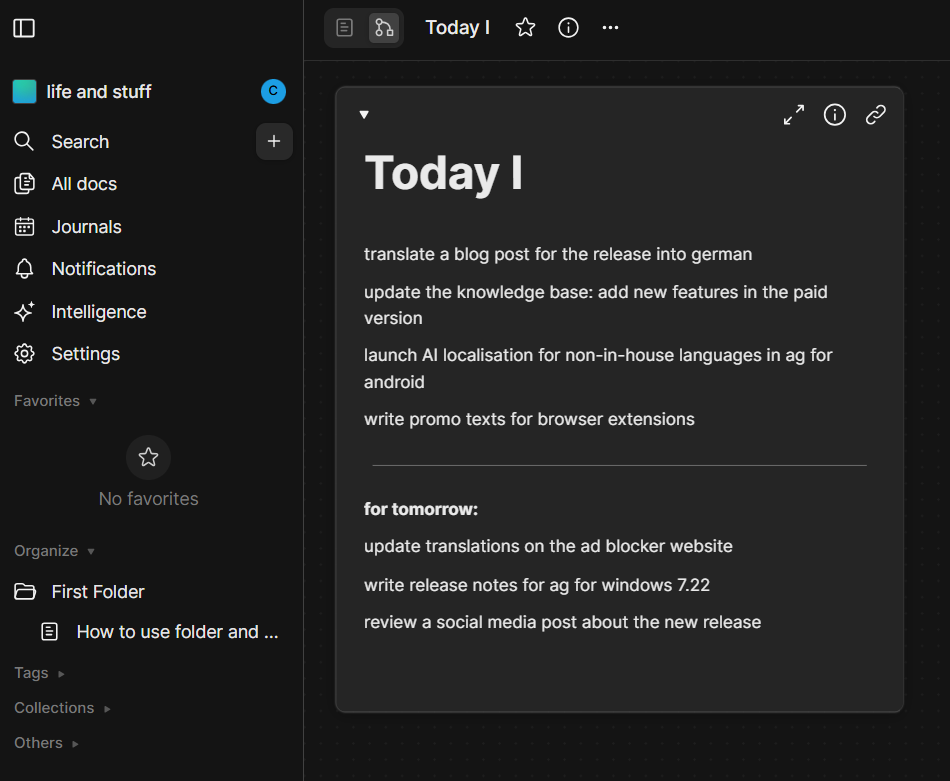
A plan for the day *border

Keep it visual but not overwhelming. For visualization, the same colleague came up with a scheme called “4 out of 6.” All tasks fall into six categories: work, study, writing, exercise, chores, downtime (yes, even doomscrolling counts if planned). Each day should contain at least four of these blocks. That’s enough to stay balanced without overloading. More is great, but four is enough.

For students who enjoy visual planning, AI posters can also turn key goals, reminders, or study milestones into eye-catching visuals.
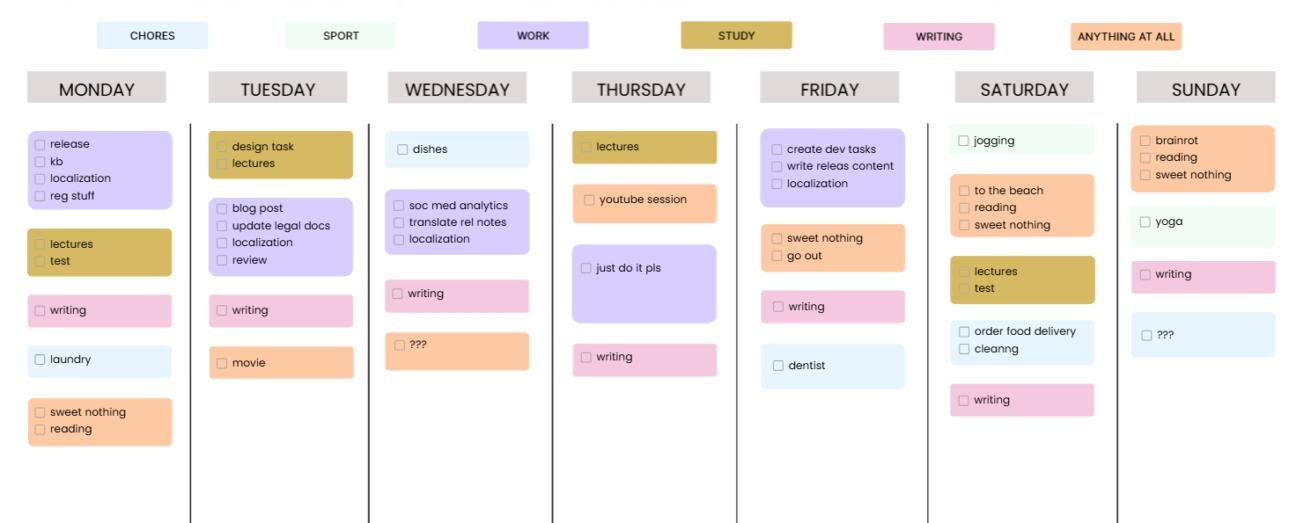
Weekly schedule *border

If you feel like a day goes to waste, try writing down even the smallest things you do. You’ll have written proof that you actually achieve a lot. And if you already remember your tasks well, you can just leave some blocks blank.

You can copy this template from AFFiNE if you have an account there.

Distraction limits

Block all that’s not needed. The biggest problem is distraction. It’s too easy to check reels, news feeds, or memes instead of studying. That’s why we block temptations.

One option is to use focus mode on a phone. Another — set up parental control for yourself. With AdGuard DNS, you can block certain websites on a schedule and study or work without interruptions. DNS also filters ads and pop-ups along the way.
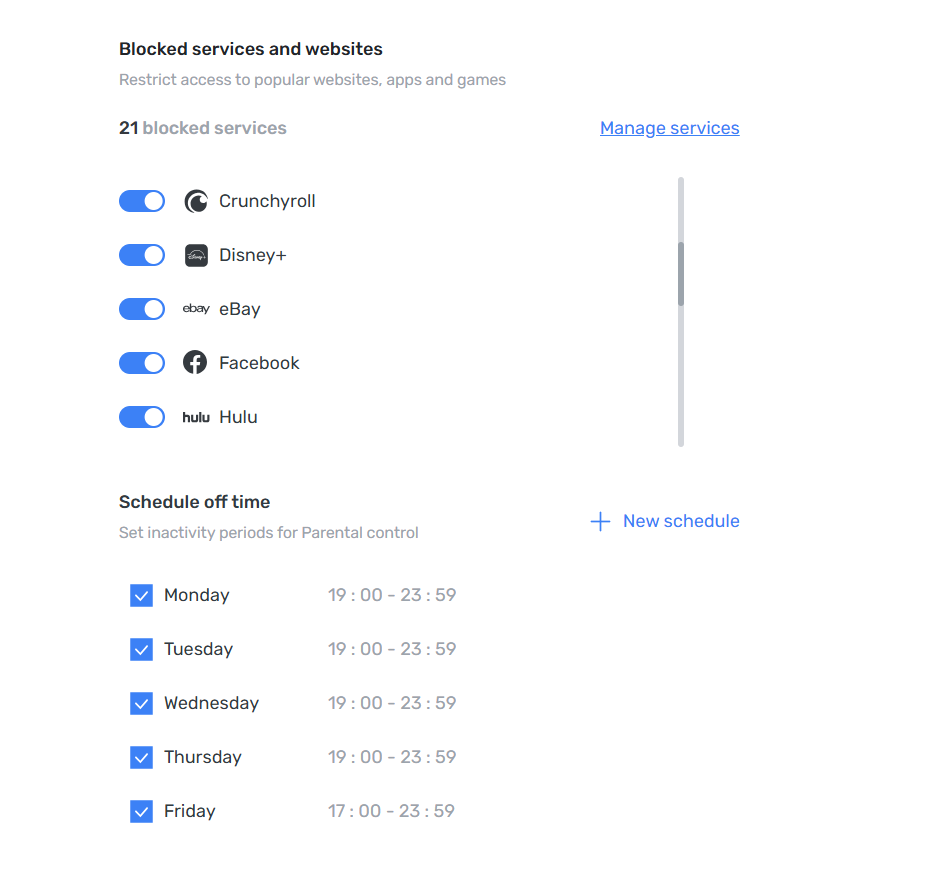
Parental control *border

The Pomodoro technique turned out useful. 25 minutes of focus, 5 minutes of rest — simple and effective. No special app is needed: you can just play a Pomodoro video on YouTube, whether it’s (lo-fi beats, brown noise, or even silence — whatever works). The only challenge is not wasting time searching for “the perfect” one.

If videos are not for you, you can use a simple timer and count tomatoes. Two tomatoes make one hour of concentrated work; four are often enough to finish most tasks.

This very article is being written with a Pomodoro cat video playing in the background — and it has already taken us three Pomodoros. It works.

💡
And if YouTube ads break the flow — AdGuard Ad Blocker takes care of them.

Tools for access and privacy

Not every helper is about discipline. Some just make studying smoother and save time.

VPN is one of those. Learning often means accessing materials that aren’t available where you are. It could be an academic archive restricted to a certain country, a lecture on YouTube blocked in your region, or a database. The simplest way to go around this is to change your IP. VPN is the safe way to do so.

💡
With AdGuard VPN, you can switch between 70+ locations and open the doors you need.

Temporary mail is another simple tool. Many websites won’t let you download an article or book without registration. Some, like Web of Science, won’t even let you browse without an account. Instead of using your main inbox, you can create a disposable email address to sign up for services.

💡
With AdGuard Mail, you generate a temporary address — convenient for quick registrations.

That’s just a small part of what we do. We’re not experts, just people who strive to learn more and keep improving. Share your own tips and tools that help you stay organized and focused — our social media is open for suggestions!


این پست را دوست داشتید؟
۹٬۳۳۲ 9332 بررسی
بسیار عالی!

AdGuard VPN برای ویندوز

از هر مرورگر یا برنامه ای استفاده کنید و هرگز نگران گمنامی خود با AdGuard VPN نباشید.
بارگیری
با دانلود برنامه، شرایط موافقتنامه مجوز را می پذیرید
بیشتر بدانید
صفحه اصلی AdGuard VPN برای Windows با اتصال VPN فعال.
صفحه اصلی AdGuard VPN برای ویندوز که وضعیت قطع اتصال را نشان می‌دهد.
صفحه «استثناها» با فهرستی از وب‌سایت‌هایی که از VPN استفاده نمی‌کنند.
۹٬۳۳۲ 9332 بررسی
بسیار عالی!

AdGuard VPN برای مک

تنها در دو کلیک، یک شهر را از هر نقطه از جهان انتخاب کنید — ما 75+ مکان داریم — و داده‌های شما برای چشمان کنجکاو نامرئی است.
بارگیری
با دانلود برنامه، شرایط موافقتنامه مجوز را می پذیرید
بیشتر بدانید
صفحه اصلی AdGuard VPN برای مک با اتصال فعال VPN.
صفحه اصلی AdGuard VPN برای مک که وضعیت قطع اتصال را نشان می‌دهد.
صفحه «استثناها» با فهرستی از وب‌سایت‌هایی که از VPN استفاده نمی‌کنند.
۹٬۳۳۲ 9332 بررسی
بسیار عالی!

AdGuard VPN برای اندروید

AdGuard VPN برای Android ده‌ها مکان سریع ارائه می‌دهد. هنگام حرکت با حریم خصوصی بیشتری گشت‌وگذار کنید. با محافظت DNS داخلی، تبلیغات و رَدیاب‌ها را مسدود کنید
بیشتر بدانید
بارگیری
با دانلود برنامه، شرایط موافقتنامه مجوز را می پذیرید
Google Play
با دانلود برنامه، شرایط موافقتنامه مجوز را می پذیرید
صفحه اصلی AdGuard VPN برای Android با اتصال VPN فعال.
صفحه اصلی AdGuard VPN برای اندروید که وضعیت قطع اتصال را نشان می‌دهد.
صفحهٔ مکان‌ها که سریع‌ترین سرورهای در دسترس را نشان می‌دهد.
صفحه «استثناها» با فهرستی از وب‌سایت‌هایی که از VPN استفاده نمی‌کنند.
صفحه‌ای با یک کد QR برای نصب AdGuard VPN.
۹٬۳۳۲ 9332 بررسی
بسیار عالی!

AdGuard VPN برای iOS

با AdGuard VPN برای iOS از حریم خصوصی خود محافظت کرده و برنامه‌های دلخواهتان را به‌صورت ناشناس پخش برخط کنید. با محافظت DNS داخلی، تبلیغات را مسدود نمایید
بیشتر بدانید
App Store
با دانلود برنامه، شرایط موافقتنامه مجوز را می پذیرید
صفحه اصلی AdGuard VPN برای iOS با اتصال VPN فعال.
صفحه اصلی AdGuard VPN برای iOS که وضعیت قطع اتصال را نشان می‌دهد.
صفحهٔ مکان‌ها که سریع‌ترین سرورهای در دسترس را نشان می‌دهد.
صفحه «استثناها» با فهرستی از وب‌سایت‌هایی که از VPN استفاده نمی‌کنند.
صفحه‌ای با یک کد QR برای نصب AdGuard VPN.
۹٬۳۳۲ 9332 بررسی
بسیار عالی!

AdGuard VPN برای Android TV

AdGuard VPN برای Android TV را کشف کنید! از پخش بدون زحمت و دردسر، امنیت پیشرفته و نصب آسان لذت ببرید.
بارگیری
با دانلود برنامه، شرایط موافقتنامه مجوز را می پذیرید
Google Play
با دانلود برنامه، شرایط موافقتنامه مجوز را می پذیرید
بیشتر بدانید
صفحه اصلی AdGuard VPN برای Android TV با اتصال فعال VPN به سروری در هلسینکی، فنلاند.
۹٬۳۳۲ 9332 بررسی
بسیار عالی!

AdGuard VPN برای کروم

AdGuard VPN برای اج

AdGuard VPN برای فایرفاکس

AdGuard VPN برای اپرا

مکان واقعی خود را پنهان کنید و از مکان دیگری در جهان سر برآورید — به هر محتوایی بدون محدودیت سرعت دسترسی داشته باشید و ناشناس بودن وب خود را حفظ کنید.
با یک کلیک به مکان دیگری دسترسی داشته باشید، IP خود را پنهان کرده و گشت‌و‌گذار در وب خود را ایمن و ناشناس کنید.
از حریم خصوصی خود محافظت نمایید، مکان واقعی خود را پنهان کنید و تصمیم بگیرید که کجا به VPN نیاز دارید و کجا نه!
در مرورگر اُپرای خود یک نینجا باشید: به‌سرعت به هر نقطه از جهان حرکت کرده و جلب توجه نکنید.
نصب
با دانلود برنامه، شرایط موافقتنامه مجوز را می پذیرید
بیشتر بدانید
نصب
با دانلود برنامه، شرایط موافقتنامه مجوز را می پذیرید
بیشتر بدانید
نصب
با دانلود برنامه، شرایط موافقتنامه مجوز را می پذیرید
بیشتر بدانید
نصب
با دانلود برنامه، شرایط موافقتنامه مجوز را می پذیرید
بیشتر بدانید
صفحه اصلی افزونه مرورگر AdGuard VPN با اتصال VPN فعال.
صفحهٔ مکان‌ها که سریع‌ترین سرورهای در دسترس را نشان می‌دهد.
۹٬۳۳۲ 9332 بررسی
بسیار عالی!

AdGuard VPN برای روترها

AdGuard VPN را روی مسیریاب خود نصب کنید تا کل شبکهتان را امن کنید. تصمیم بگیرید که از کدام دستگاه‌ها و در چه زمانی محافظت کنید
این گزینه فقط با اشتراک AdGuard VPN در دسترس است
یک روتر با نماد سپرِ سوراخ‌کلید.
۹٬۳۳۲ 9332 بررسی
بسیار عالی!

AdGuard VPN برای لینوکس

بهترین VPN رایگان را برای لینوکس دریافت کنید و از مرور یکپارچه وب، امنیت پیشرفته، رمزگذاری انتقال داده اینترنت و محافظت از نشت DNS لذت ببرید. از بین چندین سرور VPN انتخاب کرده و به مکان‌های مورد نظر خود دسترسی پیدا کنید
تنگو، نماد شانس AdGuard VPN، به‌همراه تاکس، پنگوئن لینوکس، در میان بوته‌ها نشسته‌اند.
۹٬۳۳۲ 9332 بررسی
بسیار عالی!

AdGuard VPN برای Apple TV

AdGuard VPN را برای Apple TV کشف کنید! از پخش بدون زحمت و دردسر، امنیت پیشرفته و نصب آسان لذت ببرید
این گزینه فقط با اشتراک AdGuard VPN در دسترس است
یک دستگاه پخش جریانی اپل تی‌وی با لوگوی AdGuard VPN.
۹٬۳۳۲ 9332 بررسی
بسیار عالی!

AdGuard VPN برای Xbox

از Xbox خود با AdGuard VPN محافظت کرده و از بازی‌های برخط بدون وقفه، امنیت پیشرفته و برپایی آسان لذت ببرید
این گزینه فقط با اشتراک AdGuard VPN در دسترس است
یک کنسول و کنترلر مایکروسافت ایکس‌باکس با نشان‌واره AdGuard VPN.
۹٬۳۳۲ 9332 بررسی
بسیار عالی!

AdGuard VPN برای PS4/PS5

با AdGuard VPN از پلی استیشن خود محافظت کنید و از بازی برخط روان، امنیت پیشرفته و برپایی آسان لذت ببرید. از بین چندین سرور VPN انتخاب کرده و به مکان‌هایی که می‌خواهید دسترسی داشته باشید
این ویژگی فقط با اشتراک AdGuard VPN در دسترس است
این گزینه فقط با اشتراک AdGuard VPN در دسترس است
یک کنسول و کنترلر سونی پلی‌استیشن با لوگوی AdGuard VPN.
۹٬۳۳۲ 9332 بررسی
بسیار عالی!

AdGuard VPN برای کروم‌کست

AdGuard VPN را روی گوگل تی‌وی شما (کروم‌کست نسل ۴) یا روی مسیریاب شبکه شما (کروم‌کست نسل ۳) نصب کنید و از محتوای پخش برخط با کروم‌کست لذت ببرید در حالی که ناشناس برخط مانده و به محتوا از هر جایی دسترسی دارید. برای کروم‌کست نسل ۳، به اشتراک AdGuard VPN نیاز دارید
این گزینه فقط با اشتراک AdGuard VPN در دسترس است
دستگاه پخش جریانی Google Chromecast با نماد سپر دارای سوراخ کلید.
AdGuard VPN
بارگیری شروع شد
برای شروع نصب روی دکمه مشخص شده توسط فلش کلیک کنید.
اسکن کنید تا AdGuard VPN را روی دستگاه تلفن همراه خود نصب کنید
صفحه‌ای با یک کد QR برای نصب AdGuard VPN.

































