With mandatory age checks hitting Reddit, Discord, and porn sites in the UK, VPN use is exploding over privacy fear
Over the past few days — especially on July 25 — we’ve seen a big spike in interest in AdGuard VPN from the UK.
Website traffic from UK users has surged by more than 60%, with visits from Android devices more than doubling and iOS traffic up by nearly 100%. VPN installs in the UK have also grown by 2.5 times, and we’re seeing a clear increase in traffic from keyword searches — a significant share of which is related to adult content.
And it’s clearly not a coincidence. The UK’s Online Safety Act kicked in over the weekend, bringing strict penalties for platforms that don’t enforce age checks. As a result, some of the most popular websites, including Pornhub, Reddit, Discord, and X, have started rolling out age verification systems, prompting users to seek ways to bypass them.
The main reason people are trying to bypass these checks comes down to privacy: they’re not exactly thrilled about handing over a selfie or a copy of their ID to websites or the third-party services they use. Sure, the methods vary from platform to platform, but they all have one thing in common: they ask for more personal data, and that naturally means more privacy risks.
How platforms implement the UK age verification law
Popular platforms that are most likely to expect huge penalties if they fail to enforce the law have implemented a blend of different approaches. For example, X offers several age verification methods that include both automatic and user-involved approaches. First, it uses existing “highly reliable signals” like self-declared age, ID verification history, account age, and verification badges (grey/gold) to determine if a user is over 18. If those aren’t available, X relies on estimation methods based on a user’s email address or social connections. However, if none of that works, users may be asked to verify manually by either uploading a government-issued ID or using facial age estimation via a selfie.
Reddit requires UK users to either upload a government-issued ID, such as a passport, or take a selfie through Persona, their third-party verification partner. Persona processes and stores this sensitive data for up to seven days but, according to Reddit, it does not access Reddit user data like subreddit activity.
Discord uses k-ID, a face verification service that requires users to perform simple actions like opening and closing their mouth in front of a camera. According to Discord, neither they nor k-ID permanently store personal ID documents or users’ video selfies. ID documents are deleted once the age check is complete, and the video selfie “never leaves” the user’s device.
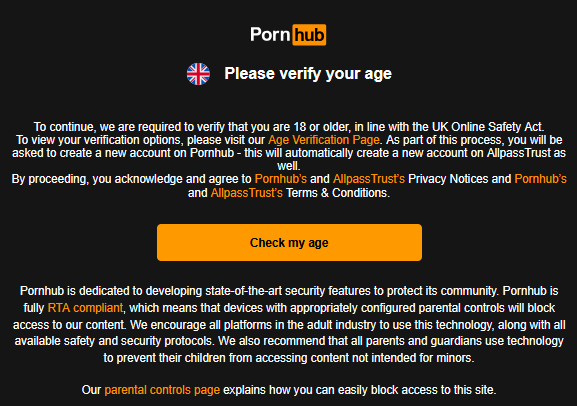
As for Pornhub, the adult site offers several ways of proving your age that include verification through an email address, phone number, online banking and a credit card.
Privacy risks are serious despite reassurances
Even though every platform rolling out age checks says they’ve designed the process with privacy in mind, many users remain worried. Sharing sensitive data like IDs or biometrics feels risky, especially when the promise that this info won’t be linked to accounts on adult sites or anywhere else doesn’t feel like enough. Given the long history of data leaks and hacks, handing over more private data naturally means more privacy risks.
At the end of the day, it’s really a matter of trust: do users trust these third-party providers they’ve probably never heard of to handle their sensitive info? Or do they trust the websites themselves not to share, sell, or misuse their data, especially when there’s a history of such mishandling, including for advertising purposes?
Dodging the checks: users take matters into their own hands
The concerns associated with privacy prompted users to look for workarounds. One of the most creative methods to emerge involved bypassing face verification systems using Death Stranding’s in-game photo mode. Players managed to fool both Reddit’s and Discord’s facial scanning tools by holding their phone up to a monitor and using the game's character, Sam Bridges, to mimic human actions. Bluesky’s system, Yoti, however, proved more resistant to such trickery.
However, while creative, such methods are not foolproof. For now, the most surefire method to bypass the age verification requirements remains using a VPN, hence the spike in interest in the tool.
It’s important to acknowledge that while the law has a noble goal — protecting children from harmful content — it does so at the expense of the privacy of millions of adult users. And it’s our firm belief that the balance being struck here is anything but fine. And we’re not alone in thinking like this. A petition to repeal the UK lawhas already racked up 340,000 signatures,more than triple the 100,000 needed for Parliament to consider it for debate.
Denis Vyazovoy, AdGuard CPO:
We've seen demand for VPNs in the UK skyrocket since the new law came into effect. People just want to protect their privacy — and that’s completely understandable. Uploading a passport, scanning your face, or sharing banking details is simply too much for many. We fully support a safer internet for everyone, especially for children, but it’s important to remember that privacy and freedom of access matter too. I hope the UK authorities will be able to find the right balance.
Extra 10GB of traffic for our users in the UK
We believe the privacy risks tied to this law are just too high to ignore. So, to support AdGuard VPN users in the UK, we’ve added 10GB of extra traffic to their plans — this applies to both existing users and newcomers.
If you’re in the UK, check your account starting July 29 and you’ll see a little bonus from us. It’s a small drop in the ocean, but at least we’re doing something. And don’t worry — any unused traffic will carry over into August.



































