Is your privacy at risk? The implications of Telegram’s new IP disclosure policy
A month has gone by since the dramatic arrest of Telegram CEO Pavel Durov in France, where he faces accusations that the platform was turning a blind eye to the need for cooperation with authorities to combat terrorist and extremist content. While a month may not seem like much in the grand scheme of Telegram’s existence — it was founded in 2013 — the shifts in its policies are certainly worth keeping a close eye on. And from the first cursory look at them, they are a bad harbinger for the future.
After Durov was released on €5m ($5.6m) bail pending trial, Telegram has made several changes into its FAQ and privacy policy. Some appear to be just a matter of wording — thus, Telegram said that the ability to report chats to Telegram moderators in public and private channels was not introduced just now, but has already been there. Some other changes, however, go beyond semantics and can have far-reaching implications for users.
Telegram will share your phone number and IP address
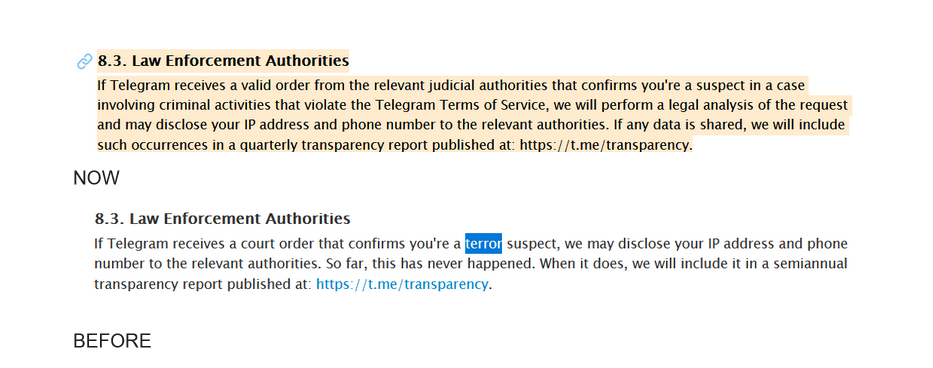
On September 23, Telegram updated its privacy policy, announcing that it will now share IP addresses and phone numbers with authorities in response to “valid” requests for assistance. Previously, the policy specified that such requests must take the form of a “court order.” The language has now been changed to “a valid order from the relevant judicial authorities.”
The most significant shift is, however, that the threshold for disclosing user data has been substantially lowered. Previously, the user’s IP address and phone number could only be handed over if they were a suspect in a terror-related case. Now, it is sufficient for the user to be a suspect in any case “involving criminal activities that violate the Telegram Terms of Service.”
You can see both the old and the new, updated version of the policy in the screenshots below.
What does it mean for you as a Telegram user?
In some countries, individuals can be labeled as terrorism suspects on dubious grounds — particularly in undemocratic nations where the law can be manipulated for witch hunts. As a result, the earlier assurance that only terrorism suspects could have their privacy compromised was only partially reassuring. This new development is, nevertheless, very concerning.
The broadening of what qualifies as “criminal cases” dramatically expands the circumstances under which Telegram commits itself to complying with government requests. This change means that a much larger number of users could potentially find their data disclosed to authorities. The less democratic the country is, the bigger is the threat that this tool will be abused by the authorities and that users will find themselves at risk of having their personal data disclosed to the governing bodies.
The catch here is in how Telegram is going to enforce this new policy, particularly how flexible it will be with government requests. What internal standards will it use to determine whether a request is valid? Telegram claims it will perform a “legal analysis” of every request, but how rigorous this will be and who will be responsible for it remain unclear. These questions will define Telegram’s future conduct regarding government assistance requests.
Denis Vyazovoy, CPO of AdGuard VPN:
“What concerns me most in this situation is how and to which requests Telegram will respond. It’s one thing to have a court order and use this backdoor to combat terrorism, but it’s entirely different to interfere in the private lives of ordinary people who, for various reasons, have caught the attention of intelligence agencies. Unfortunately, with each passing day, internet freedom is becoming more and more restricted.”
Until we see the results of this policy, it’s all up for speculation. However, with Durov facing a potentially lengthy prison sentence, we suspect Telegram will be more accommodating to various governments requests moving forward. It’s likely we’ll see the first signs of this deeper cooperation in the next quarterly transparency report from Telegram.
How to make Telegram more private for you
For starters, Telegram is not the most secure messaging platform available. The fact that not all of your direct messages are end-to-end encrypted by default — only those in Secret Chats are — should be a telltale of its security and privacy flaws.
Beyond the basics, such as having a separate phone number or phone numbers for your social media accounts, here are some ways to make the platform safer and more private for you.
Switch to Secret Chats
So, if you want to make your Telegram communication more private, you should only use the app in the Secret Chat mode.
How to start a Secret Chat:
- Open Telegram: Launch the app on your mobile device
- Select a contact: Tap the chat icon to find the person you want to message
- Initiate Secret Chat: Tap the contact’s name at the top of the screen. In the menu that appears, select Start Secret Chat
- Begin messaging: You’ll now be in a secure environment where your messages are end-to-end encrypted
Note, however, that the Secret Chat option is primarily limited to mobile devices. The only desktop version that offers this feature is Telegram’s native app for macOS, which can be downloaded from Telegram’s official site or the Mac App Store. If you don’t see that option on your device, then you must have a different Telegram desktop client for macOS called Telegram Lite. It is available here
At present, there is no Secret Chat feature available in the official clients for Windows or Linux, and Telegram Web also lacks this capability.
In its FAQ, Telegram justified such a limitation, citing security reasons.
Use a VPN
A VPN hides your real IP address from your internet provider and therefore from any application you use while connected to the VPN, including Telegram. When you connect to a VPN, it masks your real IP address by routing your internet traffic through the VPN server. This means that Telegram will only see the IP address of the VPN server, not your real IP address. As a result, even if Telegram complies with requests for user data, your real IP address will not be revealed.
However, it’s important to note that using a VPN does not prevent Telegram from knowing your phone number if you have already registered with it. Telegram requires a phone number for account creation, and this information is retained by the platform. So, if you want to increase your chances of staying anonymous, do not use your primary phone number to register with Telegram.













