Why do people use VPNs and how? We’ve asked you and here are the answers
In a world where the line between reality and the digital realm is blurred, there’s a growing need for tools that help us navigate the online domain and protect us from its potential pitfalls. VPNs (Virtual Private Networks), which establish a secure connection between the user’s device and the server hosting a particular website, are one such tool. Over the years, as we have begun to spend more and more of our time online, VPNs have become ever more popular. The VPN market is projected to grow sevenfold from $45 billion to $350 billion by 2032. An impressive number in itself, it also reflects the growing awareness and interest in online privacy.
But privacy is not the only reason people turn to VPNs. In fact, people use VPNs for a variety of reasons, from circumventing censorship to getting airline tickets on the cheap. They also use VPNs differently: some choose to enable a VPN for all sites, while others only enable it for a few selected sites — Netflix, for example.
To get a better understanding of what drives people to resort to VPNs, what features they value the most, and how they use VPNs in countries with a strikingly different Internet climate and regulations, we have conducted a survey, polling over 500 users of different VPN services. Today we’re ready to present our findings, which we hope will give insight not only into VPN usage patterns but also into the overall attitudes to privacy.
Most people who use VPNs use them daily and to protect privacy
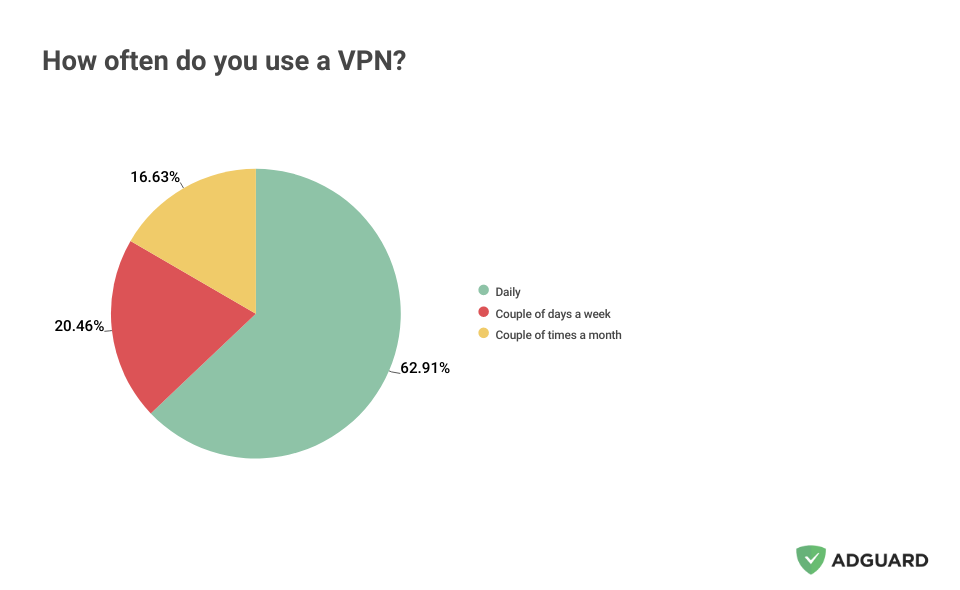
Among those people who use a VPN, almost two-thirds (62.91%) switch on a VPN at least once a day. About 20%, or one in five respondents, said that they use a VPN “couple of days a week,” while about 17% admitted to using a VPN “couple of days a month.”
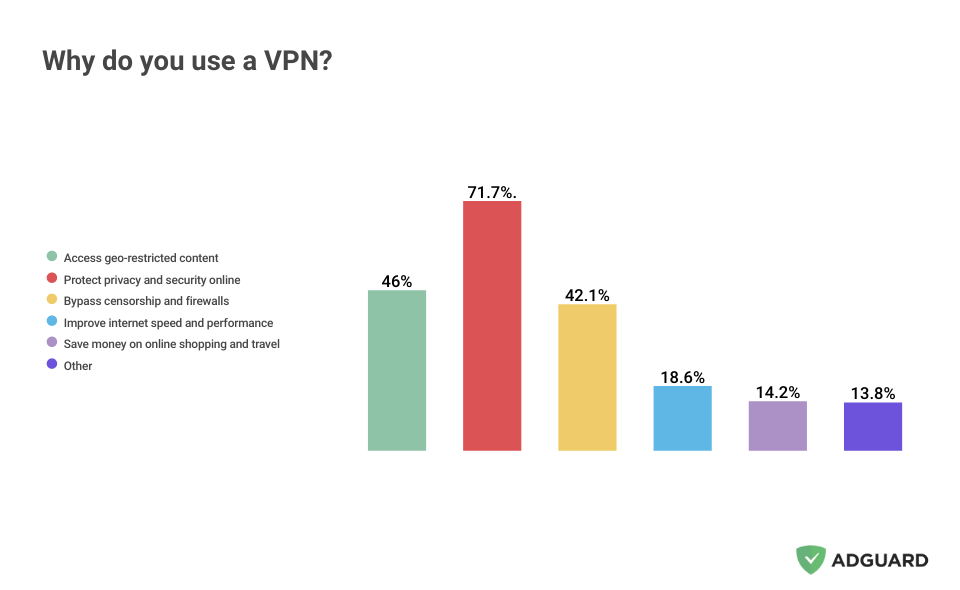
When it comes to why people connect to the Internet through a VPN tunnel, “to protect privacy and security online” emerged as the top reason, cited by over 70% of all respondents. “Accessing geo-restricted content” was the second most popular choice, favored by 46% of respondents. “Bypassing censorship and firewalls” rounded out the top three, with 42.1% of our respondents choosing it. This trio of reasons set themselves apart from the rest of the field by a wide margin. The remaining reasons are (in order of how they fared in our poll): “improving Internet speed” (18.6%) and “saving money on online shopping” (14.2%). About 14% of respondents chose “other,” meaning that all or some of the reasons they use a VPN were not included in our list.
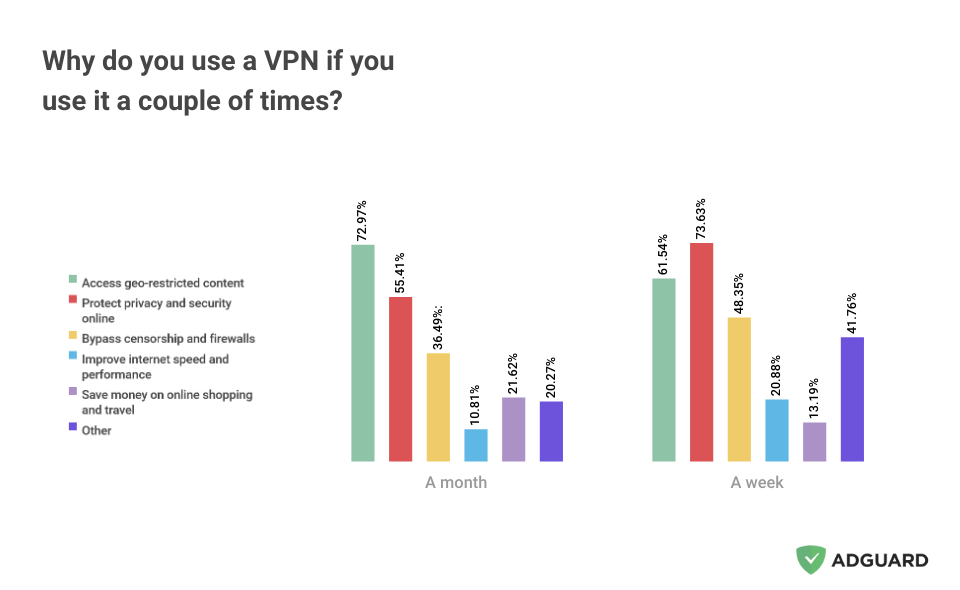
We’ve noticed a marked difference in how VPN users perceive the service based on how often they use it. It turns out that the less frequently people use a VPN, the less they prioritize privacy and security, and the more they value the ability to access geo-restricted content. For example, about 72% of respondents who said they use a VPN only a few times a month cited “access to geo-restricted content” as the reason for having one. In comparison, about the same percentage (73%) of users who connect to a VPN a few times a week chose protection of security and privacy online as their reason for using a VPN.
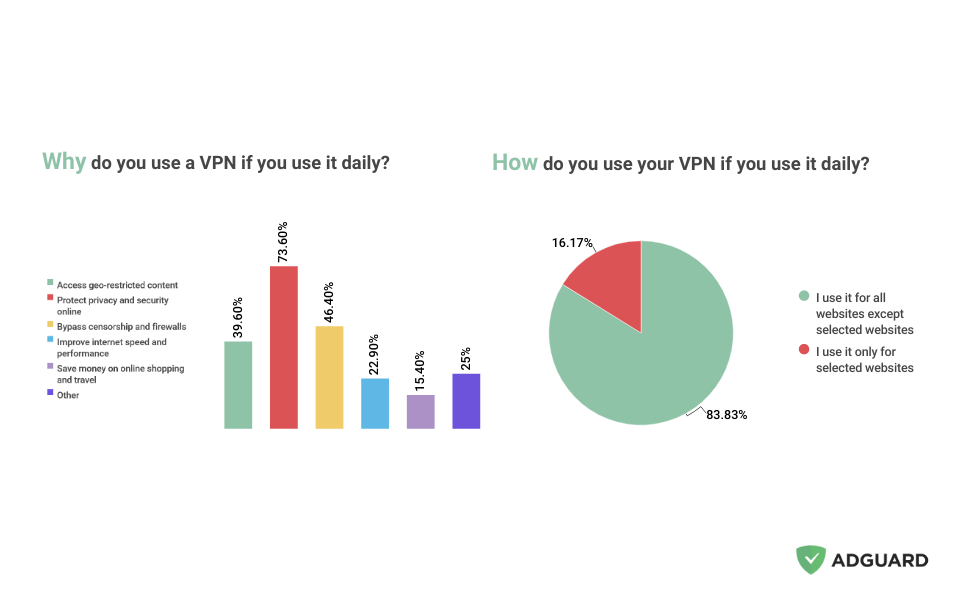
The same is true for people who use a VPN daily — about 73% said they use it for security and privacy reasons and about 46% said they use it for bypassing censorship and firewalls.
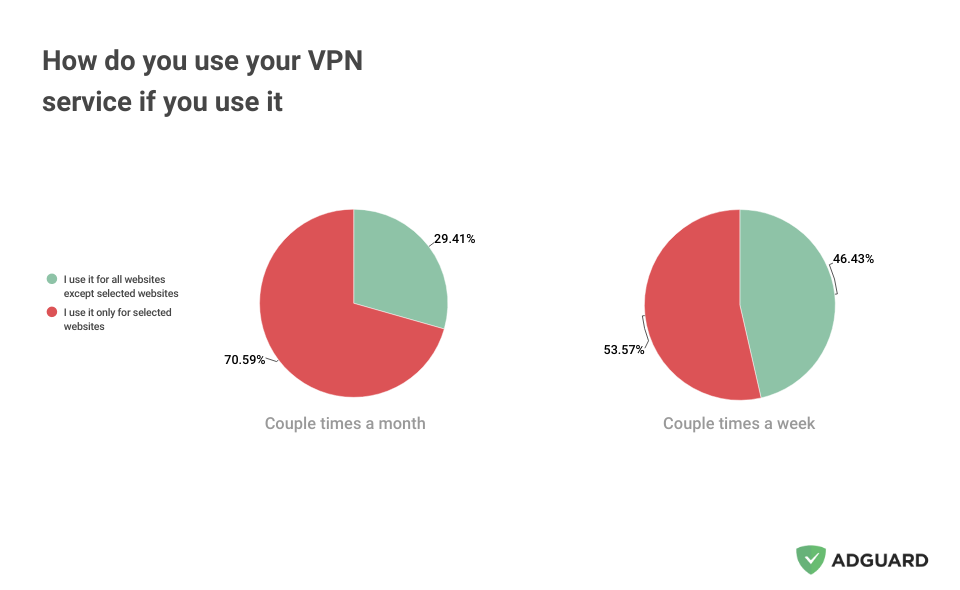
There is also a marked difference in the type of VPN mode people choose, depending on whether they use the service daily, a few times a week, or a few times a month. Those who use a VPN for daily web browsing mostly (83%) enable a VPN for all but selected websites.
The less frequently a person uses a VPN, the more likely they are to turn it on for specific sites only. Over 70% of respondents who said they use a VPN a few times a month revealed they activate it for certain websites. More than half of respondents who use a VPN a few times a week admitted to doing the same.
No-logging policy and privacy protection mean the most
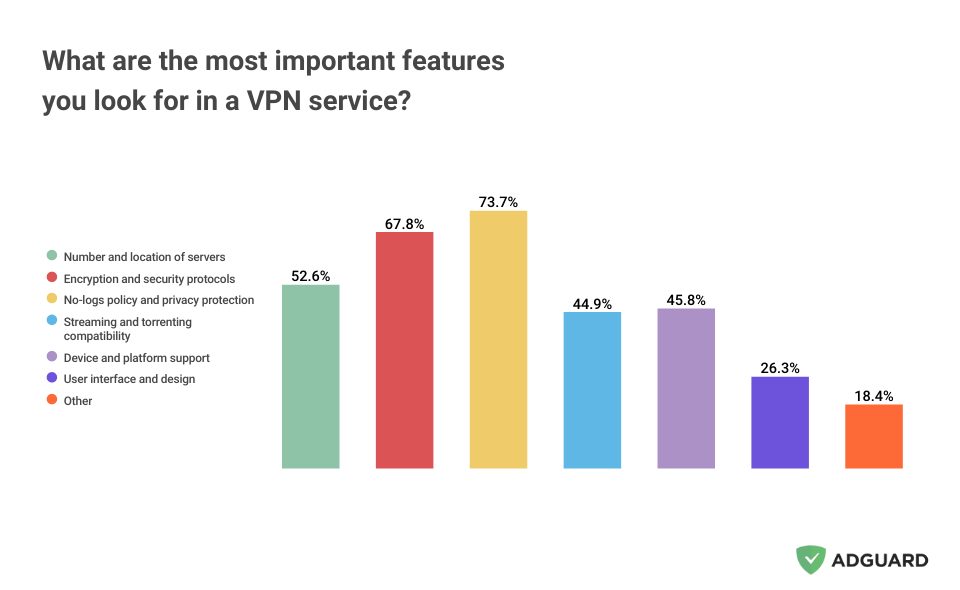
There are many VPN services on the market, each one trying to woo users with special offers and exclusive features. But which features really matter the most? According to our survey, the majority of people (73.7%) find it really important for a VPN to have a “no-logging policy and a good privacy record.”
A no-logging policy is essentially a promise a VPN gives you to not keep any records of your online activity when you connect to their services. This means that your online activity is kept secret from third parties, such as your ISP, the government, or hackers. At AdGuard VPN, we do not keep your logs.
Next comes the “encryption and security protocols that a VPN uses” (67.8%). The more up-to-date the protocol, the less likely it is to be plagued by vulnerabilities or blocked by censors. For example, AdGuard VPN has developed its own protocol that makes VPN traffic look almost indistinguishable from normal traffic. This, in turn, makes it harder for anyone to detect. More than half (52.6%) of respondents see the “number and location of servers” as an important factor when choosing a VPN. And it’s hard to disagree with that, since the more locations a VPN service boasts, the more options a user has and the higher is the average connection speed.
Desktop and mobile users: How are they different?
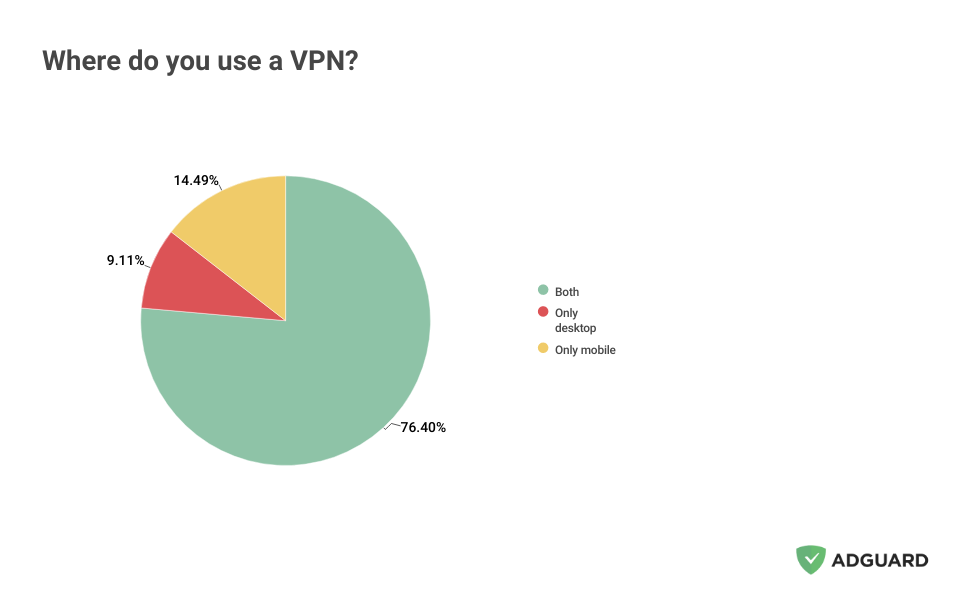
Our findings have shown that, having installed a VPN, most people — more than three-fourth of all respondents — use it both on desktop and mobile.
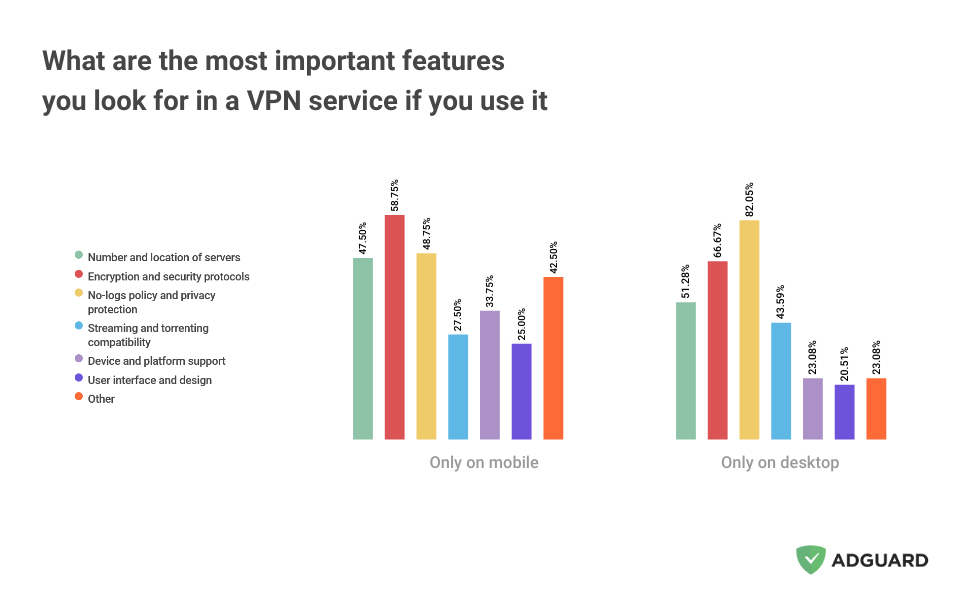
Interestingly, the most important feature for those who only use a VPN on mobile seems to be “encryption and security protocols.” If we were to venture a guess, it could be because of the security risks posed by public Wi-Fi networks, which we are more likely to connect to while on our phones or tablets. When it comes to those who only use a VPN on their desktop computers, they prioritize no-logs policy and privacy protection the most, while encryption and security protocols come second.
Regional differences: US vs. Iran
After looking at the data from a bird’s eye view, we decided to zoom in on two very different regions with what we suspected would be two very different usage patterns: the US and Iran.
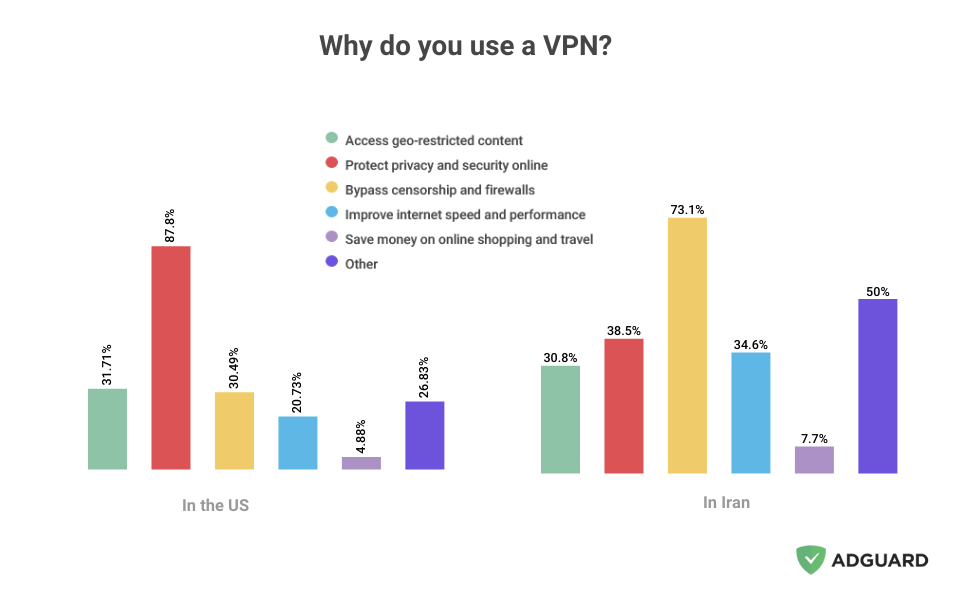
For VPN users in the US, “protecting privacy and security online” was by far the most important reason why they chose to install the VPN in the first place. A whopping 87.8% of the respondents from the US selected this option. Against this backdrop, all other reasons pale in comparison, but still deserve a mention. About the same number of people chose “accessing geo-restricted content” (31.71%) and “bypassing censorship and firewalls” (30.49%) as reasons. Each fifth respondent (20.73%) said that they were using a VPN “to improve their internet speed and performance.” While it may sound counterintuitive — after all, when you use a VPN, it reroutes your traffic through a different server, meaning it has one more server to pass through — a VPN can improve your speed in some cases. For example, it can happen when your ISP (internet service provider) intentionally throttles your connection based on your online activity, such as gaming, or torrenting. Some 26% of respondents chose “other” reasons.
As for Iran — the country that consistently ranks among the worst in terms of Internet freedom — the absolute majority, over 73% of respondents, cited “bypassing censorship and firewalls” as the reason for using a VPN. Other reasons trailed far behind. For example, 38.5% of respondents said they use a VPN “to protect their privacy and security”, 34% use it “to improve their Internet speed and performance”, and 30.8% admitted to using a VPN “to access geo-restricted content.” A striking 50% of respondents said they use a VPN for “other” reasons, and we are genuinely curious to know what those are.
Another question that showed the difference between US and Iranian VPN users is their view on what are the most important features in a VPN. While those in the US see “no-logs policy and privacy protection” as the deal breaker or deal maker, those in Iran gave the most importance to “number and location of servers” as well as “encryption and security protocols.”
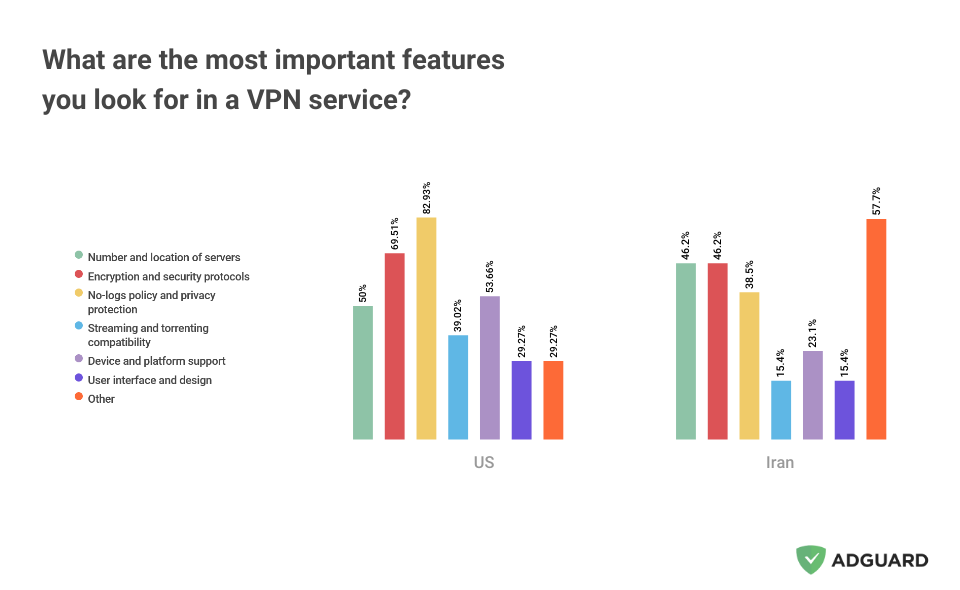
For Iranians, the fact that a VPN does not log user activity and protects privacy only comes in after those two.
Conclusion
If we look at the results of the survey, It becomes evident that VPNs serve a variety of crucial roles in today’s digital landscape. They are not just tools for boosting online privacy and security but also serve as key means for bypassing censorship, accessing geo-restricted content, and sometimes even improving internet speed.
While the primary reason for VPN usage globally remains privacy and security, regional variations highlight distinct needs and challenges. For example, in the US the focus is predominantly on privacy and security, reflecting concerns about personal data protection. Conversely, in Iran, where internet freedom is significantly restricted, the emphasis shifts to bypassing censorship and accessing a broader range of content. This means, our findings not only underscore the adaptability of VPNs to different internet climates and user needs, but also hint at broader socio-political dynamics influencing technology use.
Ultimately, the increasing reliance on VPNs across the globe signifies a growing consciousness about online privacy and a collective move towards securing personal digital spaces.













