TechTok #4. Learning the basics about DNS filtering and DNS privacy

We’re continuing our TechTok series, where we answer your questions about ad blocking, VPNs, and technology in general. We’ve already covered several VPN- and ad blocking-related topics, so today let’s tackle some of your questions about DNS filtering and DNS privacy. It seems logical to kick things off with this question from Lenny:

How does AdGuard DNS work? What are some of the pros and cons of DNS filtering compared to the regular ad blocking and when is it best to use each of them?

DNS filtering is a very important tool in privacy protection and ad blocking, and to better understand it we should first brush up on what DNS is and how it works.

Let’s say you type something into your browser’s address bar or click on a link. How does the browser know where to take you? It only understands the language of IP addresses, and not human words like google.com. So in order to learn the website’s IP address the browser reaches a DNS server. DNS stands for “Domain Name System,” and this system exists to translate domain names (e. g. google.com) into IP addresses (e. g. 74.125.139.139). There are many DNS servers that can serve as translators, and you can use any one of them. Your Internet Service Provider (ISP) will provide you with a default DNS server, but you can go ahead and switch to any one that you prefer.
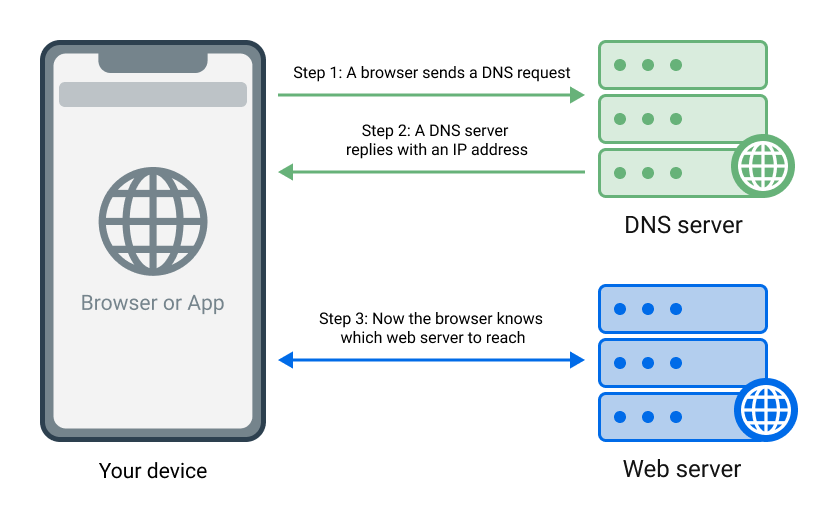
How DNS works
How DNS works

A ‘normal’ DNS server will simply return the IP address of the website you want to visit, without any ifs and buts. There are, however, DNS servers that under certain circumstances instead of giving the browser the correct IP address return 0.0.0.0, effectively pointing it to a ‘black hole.’ This is precisely how ad-blocking DNS servers, including AdGuard DNS, work.
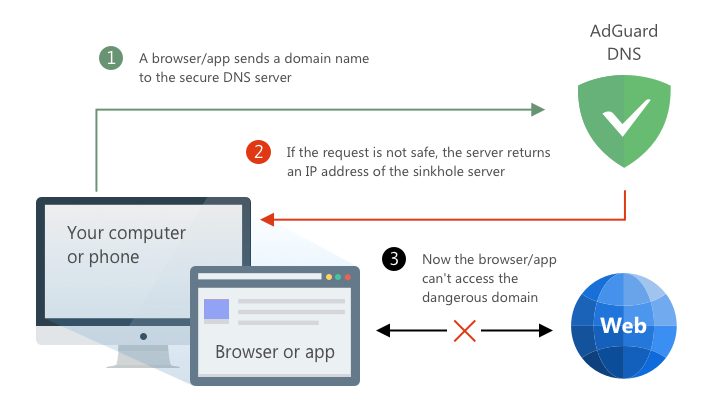
How DNS filtering works
The basic principle behind DNS filtering

Different servers may have different lists of domains they block — in case of AdGuard DNS it’s a long list of ad, tracking, and malicious domains.

💡
AdGuard DNS Family also blocks domains associated with adult content.

Now let’s compare DNS filtering with regular filtering. Its main drawback is apparent — with DNS filtering, you can only block entire domains. It lacks the finesse of the more nuanced web filtering, where you would be able to block specific requests, apply ‘cosmetic’ rules to make the page look better after blocking the ad, and do many more things. Nearly all other drawbacks of DNS blocking stem from this inability one way or another and can be described altogether as “much less flexible filtering.” But what about the advantages?

First and foremost, it’s the ability to easily set it up on virtually any device connected to the Internet — phones and tablets, smart TVs, even smart home appliances. While in order to do web filtering you’d need a browser extension or a standalone ad-blocking app, with DNS filtering you can literally change one line of text in your router’s settings, and all devices connected to your home Wi-Fi will be protected from ads and trackers.

💡
Some routers even come with pre-installed DNS solutions. For example, all ASUS Wi-Fi 7-compatible routers come integrated with AdGuard DNS out of the box.

Another distinct advantage of DNS filtering is that it is being applied at the earliest possible stage, so in a sense it’s the most efficient way to block ads and prevent tracking, especially on mobile devices where battery and traffic consumption may be of concern.

To sum it up and to answer the last part of Lenny’s question, ideally you would want to supplement network filtering with DNS filtering on all devices that support both. They complement each other, especially in terms of protecting you against tracking. If you have to choose, and if your device allows it, opt for regular web filtering — it is more flexible and will give you a better overall experience. And on devices like routers and smart TVs go for DNS protection, as it might be the only option available there.

💡
For more details on how DNS in general and DNS filtering in particular work, visit our Knowledge base.

Now that we know how DNS and DNS filtering work, it’s time to talk about how to keep your DNS connection safe and private. This simple question from xiulou will help us kickstart the conversation:

What do you think of the DNScrypt protocol?

Just like your regular web traffic needs to be secured to prevent bad actors from spoofing and tampering with it, your DNS traffic needs that too. DNSCrypt was one of the earliest attempts at encrypting DNS queries to protect them from surveillance. At the time, it was a serious breakthrough in DNS privacy, but mostly because the alternatives were virtually non-existent. DNSCrypt is still around today (and AdGuard DNS supports it to this day), but it’s been long surpassed and overshadowed by more modern protocols like DNS-over-HTTPS and DNS-over-TLS.

Speaking of those, Dmitry inquires:

Please explain “for dummies” how DNS-over-TLS and DNS-over-HTTPS work.

DNSCrypt, despite being the pioneer of DNS encryption protocols, is only responsible for less than 10% of all encrypted DNS requests today. Much more popular protocols are DNS-over-TLS (DoT) and especially DNS-over-HTTPS (DoH), which together take up close to 90% of all encrypted DNS traffic. Let’s try to dip a little into how they work.

With unencrypted DNS, when your browser requests the IP address of the website you’re connecting to, it sends the request with the domain name of that website to the DNS server in plain text. This means that anyone who ‘listens’ to your DNS traffic faces no hurdles and can easily see every single website that you’re trying to visit — this is not private at all.

With DoH, your DNS communication is encrypted with HTTPS — the known, go-to secure protocol that you see everywhere on the web (think green lock icons next to the address bar in your browser). Every DNS query your browser sends over DoH is encrypted by being ‘wrapped’ inside an HTTPS request. This not only provides protection in and of itself, but also makes your DNS traffic look like regular HTTPS traffic to outside observers. This way they might not even realize what they see is a DNS query, let alone look inside it.

DoT operates in a slightly different way to DoH. It uses TLS security protocol to create a direct, secure tunnel between your browser and the DNS server, over which the DNS queries can travel both ways. This makes your DNS traffic safe, but also much more trivial to detect for anyone watching, as it’s easily distinguished from regular HTTPS traffic. All in all, both protocols provide security but do it differently and each has its own uses.

There are more DNS-related questions left, but it’s impossible to pack all the answers in just one article. We will definitely get back to DNS filtering and DNS privacy later — send us more of your questions about DNS and on other topics over through this form, and you might see the answers already in the next TechTok edition!

Tetszett ez a bejegyzés?
9 332 9332 értékelések
Kiváló!

AdGuard VPN Windows-ra

Használjon bármilyen böngészőt vagy alkalmazást, és soha többé ne aggódjon anonimitása miatt. Az AdGuard VPN segítségével az egész világ az Ön rendelkezésére áll.
Letöltés
A program letöltésével elfogadja a Licencszerződés feltételeit
Tudjon meg többet
Az AdGuard VPN for Windows főképernyője aktív VPN-kapcsolattal.
Az AdGuard VPN Windows-verziójának főképernyője, amely a leválasztott állapotot mutatja.
A Kizárások képernyő azon webhelyek listájával, amelyek nem használják a VPN-t.
9 332 9332 értékelések
Kiváló!

AdGuard VPN Mac-re

Mindössze két kattintással kiválaszthat egy várost a világ bármely pontjáról – több mint 75 helyszínünk van –, és adatai láthatatlanok maradnak a kíváncsi szemek elől.
Letöltés
A program letöltésével elfogadja a Licencszerződés feltételeit
Tudjon meg többet
Az AdGuard VPN főképernyője Macen, aktív VPN-kapcsolattal.
Az AdGuard VPN Mac-verziójának főképernyője, amely a leválasztott állapotot mutatja.
A Kizárások képernyő azon webhelyek listájával, amelyek nem használják a VPN-t.
9 332 9332 értékelések
Kiváló!

AdGuard VPN Android-ra

Az Androidhoz készült AdGuard VPN több tucat gyors helyszínt kínál. Böngésszen fokozott adatvédelemmel útközben is. Blokkolja a hirdetéseket és a nyomkövetőket a beépített DNS védelemmel
Tudjon meg többet
Letöltés
A program letöltésével elfogadja a Licencszerződés feltételeit
Google Play
A program letöltésével elfogadja a Licencszerződés feltételeit
Az AdGuard VPN Androidhoz készült alkalmazásának főképernyője aktív VPN-kapcsolattal.
Az AdGuard VPN Androidhoz készült alkalmazásának főképernyője, amely a leválasztott állapotot mutatja.
A Helyszínek képernyő, amely a leggyorsabb elérhető kiszolgálókat mutatja.
A Kizárások képernyő azon webhelyek listájával, amelyek nem használják a VPN-t.
Az AdGuard VPN telepítésére szolgáló QR-kódot tartalmazó képernyő.
9 332 9332 értékelések
Kiváló!

AdGuard VPN iOS-re

Védje meg magánéletét, és streamelje kedvenc műsorait névtelenül az iOS-hez készült AdGuard VPN segítségével. Blokkolja a hirdetéseket a beépített DNS védelem segítségével
Tudjon meg többet
App Store
A program letöltésével elfogadja a Licencszerződés feltételeit
Az AdGuard VPN iOS-verziójának főképernyője aktív VPN-kapcsolattal.
Az AdGuard VPN iOS rendszerhez készült alkalmazásának főképernyője, amely a leválasztott állapotot mutatja.
A Helyszínek képernyő, amely a leggyorsabb elérhető kiszolgálókat mutatja.
A Kizárások képernyő azon webhelyek listájával, amelyek nem használják a VPN-t.
Az AdGuard VPN telepítésére szolgáló QR-kódot tartalmazó képernyő.
9 332 9332 értékelések
Kiváló!

AdGuard VPN Android TV-hez

Fedezze fel az AdGuard VPN-t Android TV-hez! Tapasztalja meg a zökkenőmentes streamelést, a fokozott biztonságot és még sok mást.
Letöltés
A program letöltésével elfogadja a Licencszerződés feltételeit
Google Play
A program letöltésével elfogadja a Licencszerződés feltételeit
Tudjon meg többet
Az AdGuard VPN Android TV-hez készült alkalmazásának főképernyője aktív VPN-kapcsolattal egy Helsinkiben, Finnországban található szerverhez.
9 332 9332 értékelések
Kiváló!

AdGuard VPN Chrome-hoz

AdGuard VPN Edge-hez

AdGuard VPN Firefox-hoz

AdGuard VPN Opera-hoz

Rejtse el valódi tartózkodási helyét, és tűnjön fel a világ egy másik helyéről – érjen el sebességkorlátozás nélkül bármilyen tartalmat, és őrizze meg internetes névtelenségét.
Egy kattintással más helyre juthat, elrejtheti IP-címét, és biztonságossá és névtelenné teheti internetes tevékenységét.
Védje meg magánéletét, rejtse el valódi tartózkodási helyét, és döntse el, hol van szüksége VPN-re, és hol nincs!
Legyen nindzsa az Opera böngészőjében: gyorsan mozogjon a világ bármely részére, és maradjon észrevétlen.
Telepítés
A program letöltésével elfogadja a Licencszerződés feltételeit
Tudjon meg többet
Telepítés
A program letöltésével elfogadja a Licencszerződés feltételeit
Tudjon meg többet
Telepítés
A program letöltésével elfogadja a Licencszerződés feltételeit
Tudjon meg többet
Telepítés
A program letöltésével elfogadja a Licencszerződés feltételeit
Tudjon meg többet
Az AdGuard VPN böngészőbővítmény főképernyője aktív VPN-kapcsolattal.
A Helyszínek képernyő, amely a leggyorsabb elérhető kiszolgálókat mutatja.
9 332 9332 értékelések
Kiváló!

AdGuard VPN routerekhez

Telepítse az AdGuard VPN-t a routerére, hogy biztonságossá tegye a teljes hálózatot. Döntse el, mely eszközöket és mikor szeretné védeni
Ez a lehetőség csak AdGuard VPN-feliratkozással érhető el
Kulcslyuk alakú pajzsikonnal ellátott router.
9 332 9332 értékelések
Kiváló!

AdGuard VPN Linux-hoz

Szerezze meg a legjobb ingyenes VPN-t Linuxhoz, és élvezze a zökkenőmentes webböngészést, a fokozott biztonságot, az internetes adatforgalom titkosítását és a DNS szivárgás elleni védelmet. Válasszon több VPN szerver közül, és érje el az Ön által kívánt helyszíneket
Az AdGuard VPN kabalafigurája, Tengu, a Linux pingvinjével, Tuxszal a bokrokban ül.
9 332 9332 értékelések
Kiváló!

AdGuard VPN Apple TV-hez

Fedezze fel az AdGuard VPN-t Apple TV-hez! Tapasztalja meg a zökkenőmentes streamelést, a fokozott biztonságot és az egyszerű beállítást
Ez a lehetőség csak AdGuard VPN-feliratkozással érhető el
Egy Apple TV streamelőeszköz az AdGuard VPN logójával.
9 332 9332 értékelések
Kiváló!

AdGuard VPN Xbox-ra

Védje Xboxját az AdGuard VPN-nel, és élvezze a zökkenőmentes online játékot, a fokozott biztonságot és a könnyű beállítást
Ez a lehetőség csak AdGuard VPN-feliratkozással érhető el
Egy Microsoft Xbox konzol és kontroller az AdGuard VPN logójával.
9 332 9332 értékelések
Kiváló!

AdGuard VPN PS4/PS5-re

Védd PlayStationödet AdGuard VPN-nel, és élvezd a zökkenőmentes online játékot, a fokozott biztonságot és az egyszerű beállítást. Válassz több VPN-kiszolgáló közül, és férj hozzá a kívánt helyekhez
Ez a funkció csak AdGuard VPN-előfizetéssel érhető el
Ez a lehetőség csak AdGuard VPN-feliratkozással érhető el
Egy Sony PlayStation konzol és kontroller az AdGuard VPN logójával.
9 332 9332 értékelések
Kiváló!

AdGuard VPN Chromecast-hoz

Telepítse az AdGuard VPN-t a Google TV-jére (Chromecast 4. generáció), vagy a hálózati routerére (Chromecast 3. generáció), és élvezze a streamelt tartalmakat Chromecaston keresztül, miközben névtelen marad az interneten, és bárhonnan hozzáfér a tartalmakhoz. A Chromecast 3. generációhoz AdGuard VPN előfizetés szükséges.
Ez a lehetőség csak AdGuard VPN-feliratkozással érhető el
Google Chromecast streamelőeszköz kulcslyuk alakú pajzsikonnal.
AdGuard VPN
letöltés megkezdődött
Kattintson a nyíllal jelzett gombra a telepítés elindításához.
Szkennelés az AdGuard VPN mobileszközre történő telepítéséhez
Az AdGuard VPN telepítésére szolgáló QR-kódot tartalmazó képernyő.







