Brazil bans X and targets VPN users: What this means for your online privacy

The Brazilian government and Elon Musk-owned platform X have been embroiled in a bitter conflict for months. Yet, hardly anyone — especially the 22 million Brazilian users of X — was prepared for the dramatic twist that unfolded in late August — a total ban of the micro-blogging site in the country.

What happened

Before we dig into the recent developments, let’s rewind a bit. Soon after Musk took over X (then Twitter), he reversed the blocks of some political accounts that had been imposed by the previous Twitter leadership at the request of the Brazilian authorities. Arguing that requests for takedowns amount to censorship, Musk refused to comply with them moving forward.

This shift by X led to an investigation into Musk for “obstruction of justice.” Things heated up further when Musk decided to shut down X’s Brazilian office in early August. Musk claimed this move was a response to threats from Brazilian Supreme Court judge Alexandre de Moraes, who warned that X’s local legal representative could face arrest if the company didn’t follow the takedown orders. While Musk accused the judge of “betraying the constitution and people of Brazil,” Moraes insisted that suspending the accounts was crucial to tackling misinformation and restoring public order.

The situation took a dramatic turn on August 30, when Brazil’s Supreme Court imposed a total ban on X within the country. The official reason for this extreme measure was Musk’s failure to appoint a representative by the given deadline. On Monday, September 2, all five judges on the Brazilian supreme court panel voted to uphold the ban.

Enforcement

Moraes gave Brazil’s telecommunication watchdog 24 hours to enforce the decision. The agency passed on the information on more than 20,000 of the country’s internet providers. That order also applied to Starlink, a satellite internet service provider, wholly owned by Musk’s SpaceX. Before the ban on X had even been imposed, the judge also ordered Starlink’s assets in the country frozen to ensure X pays the fines it incurred for defying the court orders.

At first, Starlink refused to comply with the order, but on September 3, the company made an about-face, saying that it was now complying. “Regardless of the illegal treatment of Starlink in freezing of our assets, we are complying with the order to block access to X in Brazil. We continue to pursue all legal avenues, as are others who agree that @alexandre’s recent orders violate the Brazilian constitution.”
The X’s ban has sparked a mixed bag of reactions in Brazil, and resulted in an influx of Brazilian users to Bluesky, one of the most popular X’s “alternatives.”.

Fines for individual VPN users: how real is the threat?

However, the most controversial aspect of the court’s decision is penalties that individual Brazilian X users are now facing for attempting to circumvent the ban with the help of “technological subterfuges” which include VPN services. The order stipulates a daily fine of R$50,000 ($8,910) for both individuals and businesses for accessing X via VPNs despite the ban.

However, enforcing this order will be pretty much impossible. Why? Because VPNs are legal in Brazil, so it’ll be tough for authorities to tell when someone is using a VPN to access X versus when they’re just browsing other sites or social networks.
If the VPN is working correctly, even if your connection drops, your provider won’t be able to see which sites you’re visiting. That’s because most VPNs come with a feature called a kill switch. Here’s how it works: the kill switch immediately cuts off your internet connection if the VPN connection fails. This prevents any of your browsing data from leaking out while your VPN is off.

In theory, your searches while using a VPN could be exposed if there’s a DNS leak. This happens when your DNS requests are accidentally sent to a third-party DNS server instead of the one provided by your VPN. However, if your VPN is functioning as it should, you generally don’t need to worry about it. Most well-known VPN services are designed to handle these situations effectively and keep your browsing private.
So the bottom line is that unless your VPN is messed up and not doing its job, there’s not much the authorities can do from a technical standpoint to find out what sites you’re visiting, even if they ask your ISP for information about you.

The human factor — the weakest link is you

In fact, we believe that the simplest way for the government to figure out if you’re using a VPN to access a platform like X or any other site is by monitoring your activity on that platform. For example, if there are new posts on your timeline, it’s a clear sign you’ve been on Twitter. If they also know you’re using a VPN, piecing together these two bits of info won’t be too hard for them. While your Internet provider cannot see what sites you’re visiting or the data you're sending through the VPN, they can detect that you’re using a VPN. The telltale signs are encrypted traffic and the IP address of the VPN server itself.

A different question is whether the authorities really want to go to all the trouble of checking each individual user’s posts and cross-correlating them with the information they can get from ISPs.

Despite a looming threat of steep fines, Brazlians’ interest in VPNs has spiked in the run-up and in the aftermath of the X’s ban in the country.
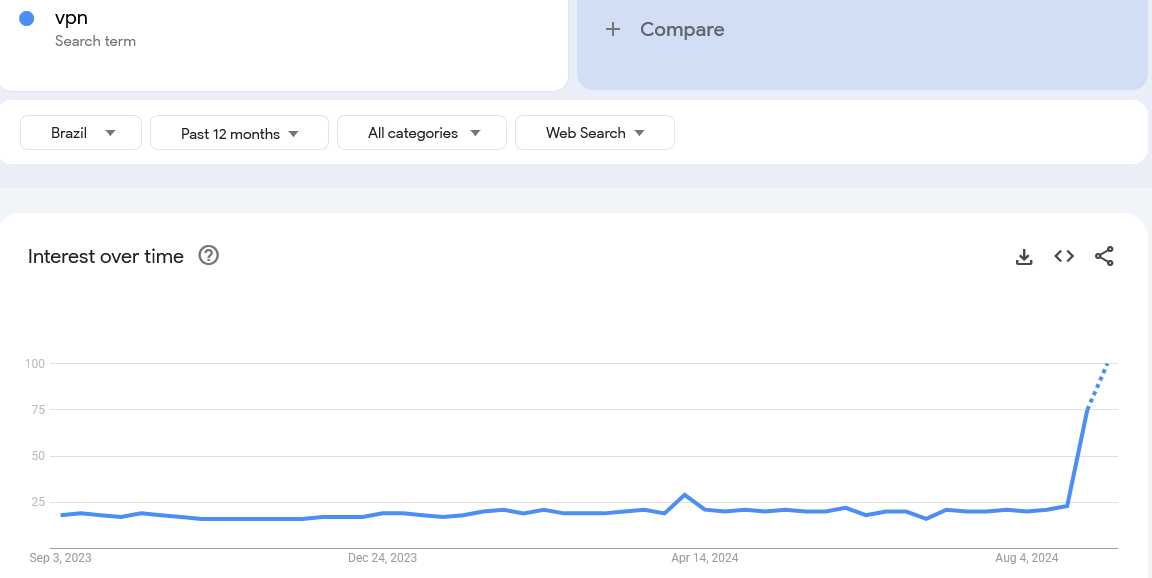
Popularity of VPN searches in Brazil

We’ve also seen an almost two-fold increase in the number of AdGuard VPN users from Brazil within the last three months.

Am I safe using AdGuard VPN in Brazil?

While there’s no way to offer a 100% guarantee of safety, from a technical standpoint, the Brazilian government is unlikely to detect that you’re accessing X through a VPN, provided your VPN service is functioning correctly. VPNs encrypt your internet traffic and mask your IP address, making it challenging for authorities to discern what you’re doing online.

However, if your VPN has vulnerabilities or leaks, such as DNS leaks, there could be a risk. To minimize any potential issues, it’s better to invest in a reputable VPN service known for its robust security features. AdGuard VPN, along with other well-regarded providers, can help ensure your online activities remain private and secure.

Tetszett ez a bejegyzés?
9 332 9332 értékelések
Kiváló!

AdGuard VPN Windows-ra

Használjon bármilyen böngészőt vagy alkalmazást, és soha többé ne aggódjon anonimitása miatt. Az AdGuard VPN segítségével az egész világ az Ön rendelkezésére áll.
Letöltés
A program letöltésével elfogadja a Licencszerződés feltételeit
Tudjon meg többet
Az AdGuard VPN for Windows főképernyője aktív VPN-kapcsolattal.
Az AdGuard VPN Windows-verziójának főképernyője, amely a leválasztott állapotot mutatja.
A Kizárások képernyő azon webhelyek listájával, amelyek nem használják a VPN-t.
9 332 9332 értékelések
Kiváló!

AdGuard VPN Mac-re

Mindössze két kattintással kiválaszthat egy várost a világ bármely pontjáról – több mint 75 helyszínünk van –, és adatai láthatatlanok maradnak a kíváncsi szemek elől.
Letöltés
A program letöltésével elfogadja a Licencszerződés feltételeit
Tudjon meg többet
Az AdGuard VPN főképernyője Macen, aktív VPN-kapcsolattal.
Az AdGuard VPN Mac-verziójának főképernyője, amely a leválasztott állapotot mutatja.
A Kizárások képernyő azon webhelyek listájával, amelyek nem használják a VPN-t.
9 332 9332 értékelések
Kiváló!

AdGuard VPN Android-ra

Az Androidhoz készült AdGuard VPN több tucat gyors helyszínt kínál. Böngésszen fokozott adatvédelemmel útközben is. Blokkolja a hirdetéseket és a nyomkövetőket a beépített DNS védelemmel
Tudjon meg többet
Letöltés
A program letöltésével elfogadja a Licencszerződés feltételeit
Google Play
A program letöltésével elfogadja a Licencszerződés feltételeit
Az AdGuard VPN Androidhoz készült alkalmazásának főképernyője aktív VPN-kapcsolattal.
Az AdGuard VPN Androidhoz készült alkalmazásának főképernyője, amely a leválasztott állapotot mutatja.
A Helyszínek képernyő, amely a leggyorsabb elérhető kiszolgálókat mutatja.
A Kizárások képernyő azon webhelyek listájával, amelyek nem használják a VPN-t.
Az AdGuard VPN telepítésére szolgáló QR-kódot tartalmazó képernyő.
9 332 9332 értékelések
Kiváló!

AdGuard VPN iOS-re

Védje meg magánéletét, és streamelje kedvenc műsorait névtelenül az iOS-hez készült AdGuard VPN segítségével. Blokkolja a hirdetéseket a beépített DNS védelem segítségével
Tudjon meg többet
App Store
A program letöltésével elfogadja a Licencszerződés feltételeit
Az AdGuard VPN iOS-verziójának főképernyője aktív VPN-kapcsolattal.
Az AdGuard VPN iOS rendszerhez készült alkalmazásának főképernyője, amely a leválasztott állapotot mutatja.
A Helyszínek képernyő, amely a leggyorsabb elérhető kiszolgálókat mutatja.
A Kizárások képernyő azon webhelyek listájával, amelyek nem használják a VPN-t.
Az AdGuard VPN telepítésére szolgáló QR-kódot tartalmazó képernyő.
9 332 9332 értékelések
Kiváló!

AdGuard VPN Android TV-hez

Fedezze fel az AdGuard VPN-t Android TV-hez! Tapasztalja meg a zökkenőmentes streamelést, a fokozott biztonságot és még sok mást.
Letöltés
A program letöltésével elfogadja a Licencszerződés feltételeit
Google Play
A program letöltésével elfogadja a Licencszerződés feltételeit
Tudjon meg többet
Az AdGuard VPN Android TV-hez készült alkalmazásának főképernyője aktív VPN-kapcsolattal egy Helsinkiben, Finnországban található szerverhez.
9 332 9332 értékelések
Kiváló!

AdGuard VPN Chrome-hoz

AdGuard VPN Edge-hez

AdGuard VPN Firefox-hoz

AdGuard VPN Opera-hoz

Rejtse el valódi tartózkodási helyét, és tűnjön fel a világ egy másik helyéről – érjen el sebességkorlátozás nélkül bármilyen tartalmat, és őrizze meg internetes névtelenségét.
Egy kattintással más helyre juthat, elrejtheti IP-címét, és biztonságossá és névtelenné teheti internetes tevékenységét.
Védje meg magánéletét, rejtse el valódi tartózkodási helyét, és döntse el, hol van szüksége VPN-re, és hol nincs!
Legyen nindzsa az Opera böngészőjében: gyorsan mozogjon a világ bármely részére, és maradjon észrevétlen.
Telepítés
A program letöltésével elfogadja a Licencszerződés feltételeit
Tudjon meg többet
Telepítés
A program letöltésével elfogadja a Licencszerződés feltételeit
Tudjon meg többet
Telepítés
A program letöltésével elfogadja a Licencszerződés feltételeit
Tudjon meg többet
Telepítés
A program letöltésével elfogadja a Licencszerződés feltételeit
Tudjon meg többet
Az AdGuard VPN böngészőbővítmény főképernyője aktív VPN-kapcsolattal.
A Helyszínek képernyő, amely a leggyorsabb elérhető kiszolgálókat mutatja.
9 332 9332 értékelések
Kiváló!

AdGuard VPN routerekhez

Telepítse az AdGuard VPN-t a routerére, hogy biztonságossá tegye a teljes hálózatot. Döntse el, mely eszközöket és mikor szeretné védeni
Ez a lehetőség csak AdGuard VPN-feliratkozással érhető el
Kulcslyuk alakú pajzsikonnal ellátott router.
9 332 9332 értékelések
Kiváló!

AdGuard VPN Linux-hoz

Szerezze meg a legjobb ingyenes VPN-t Linuxhoz, és élvezze a zökkenőmentes webböngészést, a fokozott biztonságot, az internetes adatforgalom titkosítását és a DNS szivárgás elleni védelmet. Válasszon több VPN szerver közül, és érje el az Ön által kívánt helyszíneket
Az AdGuard VPN kabalafigurája, Tengu, a Linux pingvinjével, Tuxszal a bokrokban ül.
9 332 9332 értékelések
Kiváló!

AdGuard VPN Apple TV-hez

Fedezze fel az AdGuard VPN-t Apple TV-hez! Tapasztalja meg a zökkenőmentes streamelést, a fokozott biztonságot és az egyszerű beállítást
Ez a lehetőség csak AdGuard VPN-feliratkozással érhető el
Egy Apple TV streamelőeszköz az AdGuard VPN logójával.
9 332 9332 értékelések
Kiváló!

AdGuard VPN Xbox-ra

Védje Xboxját az AdGuard VPN-nel, és élvezze a zökkenőmentes online játékot, a fokozott biztonságot és a könnyű beállítást
Ez a lehetőség csak AdGuard VPN-feliratkozással érhető el
Egy Microsoft Xbox konzol és kontroller az AdGuard VPN logójával.
9 332 9332 értékelések
Kiváló!

AdGuard VPN PS4/PS5-re

Védd PlayStationödet AdGuard VPN-nel, és élvezd a zökkenőmentes online játékot, a fokozott biztonságot és az egyszerű beállítást. Válassz több VPN-kiszolgáló közül, és férj hozzá a kívánt helyekhez
Ez a funkció csak AdGuard VPN-előfizetéssel érhető el
Ez a lehetőség csak AdGuard VPN-feliratkozással érhető el
Egy Sony PlayStation konzol és kontroller az AdGuard VPN logójával.
9 332 9332 értékelések
Kiváló!

AdGuard VPN Chromecast-hoz

Telepítse az AdGuard VPN-t a Google TV-jére (Chromecast 4. generáció), vagy a hálózati routerére (Chromecast 3. generáció), és élvezze a streamelt tartalmakat Chromecaston keresztül, miközben névtelen marad az interneten, és bárhonnan hozzáfér a tartalmakhoz. A Chromecast 3. generációhoz AdGuard VPN előfizetés szükséges.
Ez a lehetőség csak AdGuard VPN-feliratkozással érhető el
Google Chromecast streamelőeszköz kulcslyuk alakú pajzsikonnal.
AdGuard VPN
letöltés megkezdődött
Kattintson a nyíllal jelzett gombra a telepítés elindításához.
Szkennelés az AdGuard VPN mobileszközre történő telepítéséhez
Az AdGuard VPN telepítésére szolgáló QR-kódot tartalmazó képernyő.







