AdGuard VPN now supports post-quantum cryptography. Here’s what that means
All AdGuard VPN apps now support post-quantum cryptography. This is an important investment in the security of the near future, but it also helps us today by making VPN traffic indistinguishable from regular browser traffic.
We’ve explained how post-quantum cryptography works in a separate article. Here, we’ll briefly cover the key concepts and explain how this feature is implemented in AdGuard VPN.
What does post-quantum cryptography protect against?
To protect sensitive information such as passwords, messages, and banking transactions, from unauthorized access, users rely on advanced encryption methods. Most websites and services, including AdGuard VPN, use AES. Cracking an AES-encrypted connection is virtually impossible — it requires an immense amount of computing power, even for quantum computers.
However, before encryption can begin, the client and the server must generate a shared key. While traditional computers cannot break this key, quantum computers will be able to. Unlike regular computers that test possible solutions one by one, quantum computers can check many possibilities at the same time. If the shared key is compromised, the entire encryption becomes ineffective.
This poses a serious security threat: encryption methods once considered safe will no longer be reliable, and new solutions will have to be developed.
The good and bad news
Good news: Quantum computers are still in their early stages and remain extremely rare. Only a handful of companies, like Google and Microsoft, have developed quantum chips, while others like IBM, offer cloud-based quantum computing services. This gives us time to prepare.
Bad news: Hackers are already collecting encrypted data, planning to decrypt it later when quantum computers become more widely available.
Fortunately, there are already encryption methods that even quantum computers can’t break — and these methods are now available in all AdGuard VPN apps.
How and why AdGuard VPN uses post-quantum cryptography
For VPNs, traffic security is critical. If there’s even a slight risk that encrypted traffic could be decrypted in the future, VPNs become unsafe for users. That’s why it’s crucial for us to use the latest security technologies.
How does it work?
AdGuard VPN uses a hybrid encryption method called X25519MLKEM768, the same approach used in Chrome and other Chromium-based browsers.
X25519provides the standard encryption algorithm.ML-KEM768adds post-quantum security.
What does this mean?
- This greatly increases protection because the combined key from both algorithms is virtually impossible to crack, even by quantum computers.
- Even if vulnerabilities are found in the post-quantum
ML-KEM768algorithm, the trustedX25519algorithm will still provide security.
As an added benefit, the AdGuard VPN protocol looks identical to browser traffic. This is crucial for countries with VPN restrictions.
Does post-quantum cryptography affect performance?
Using a hybrid encryption method requires a bit more data to establish a connection — about 1.2 KB instead of 32 bytes in each direction — because two keys are exchanged between the client and the server. The extra processing may also slightly affect battery life.
However, the difference is barely noticeable. Even on slower devices, the connection can take up to 0.1 seconds longer. Newer devices take even less. But if you’re concerned about this, you can leave post-quantum cryptography disabled — it’s turned off by default.
Where to find this feature in the app
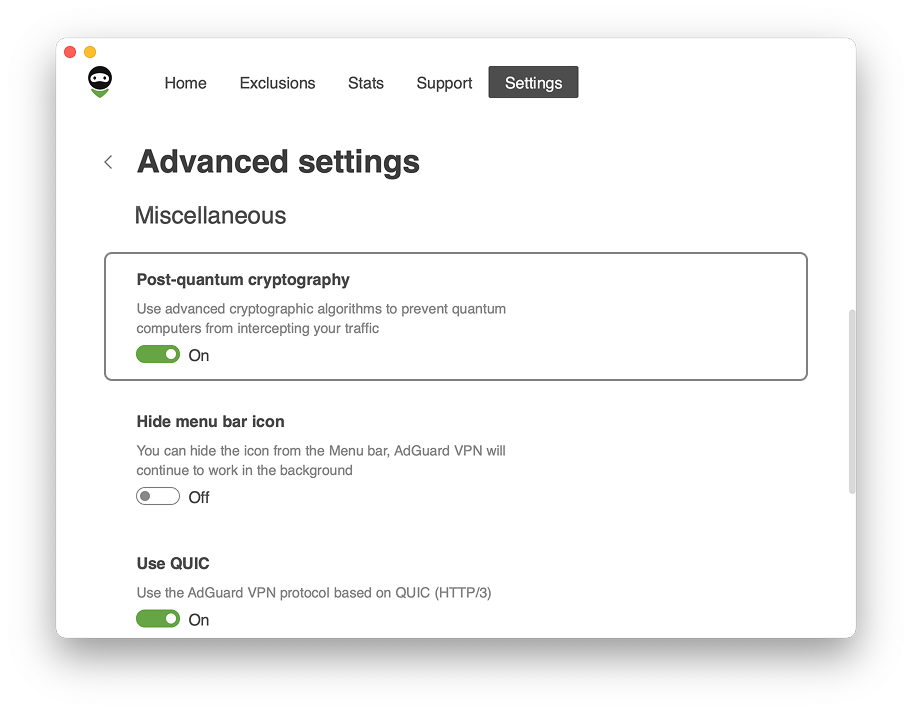
All AdGuard VPN apps now support post-quantum cryptography, but the feature is disabled by default. Here’s how to enable it:
AdGuard VPN for Windows and Mac
- Go to Settings → App settings → Advanced settings.
- Enable Post-quantum cryptography.
AdGuard VPN for Android and iOS
- Go to Settings → General → Advanced.
- Enable Post-quantum cryptography.













