AdGuard VPN v2.2 for Android: Android TV compatibility and more free VPN traffic

We come bearing good news: AdGuard VPN v2.2 for Android is an official release! You will find that the major points of this version are its compatibility with Android TV and an option to get free gigabytes of traffic. They have now become available to all users of AdGuard VPN for Android. Let us get into more detail below, and we're sure you will appreciate what our app has to offer!

Compatibility with Android TV

First and foremost, we have to mention the newly added compatibility with Android TV, something we haven't yet done in our VPN for Android app. It required some meticulous work, and now we can proudly offer our users easy navigation, location selection, and an encrypted VPN tunnel to stream data without disclosing your personal data to your Internet provider. You will be able to operate Android TV safely and securely with the help of AdGuard VPN for Android with access to the content of your choice — just download the app from Google Play onto your smart TV!

android_tv_en

Achieving this is an important milestone, but we will not be stopping. For the moment, only the basic features of VPN will work when you launch the app on your smart TV. But this will change soon. Our next step: we are working on implementing the function of adding apps and websites to exclusions right on your smart TV.

More free gigabytes of traffic to claim

In this release you will also find the option to claim more gigabytes of free traffic by confirming your email address and/or installing AdGuard VPN for another platform. There is a new item in the main menu exactly for this, you will not miss it, we promise.
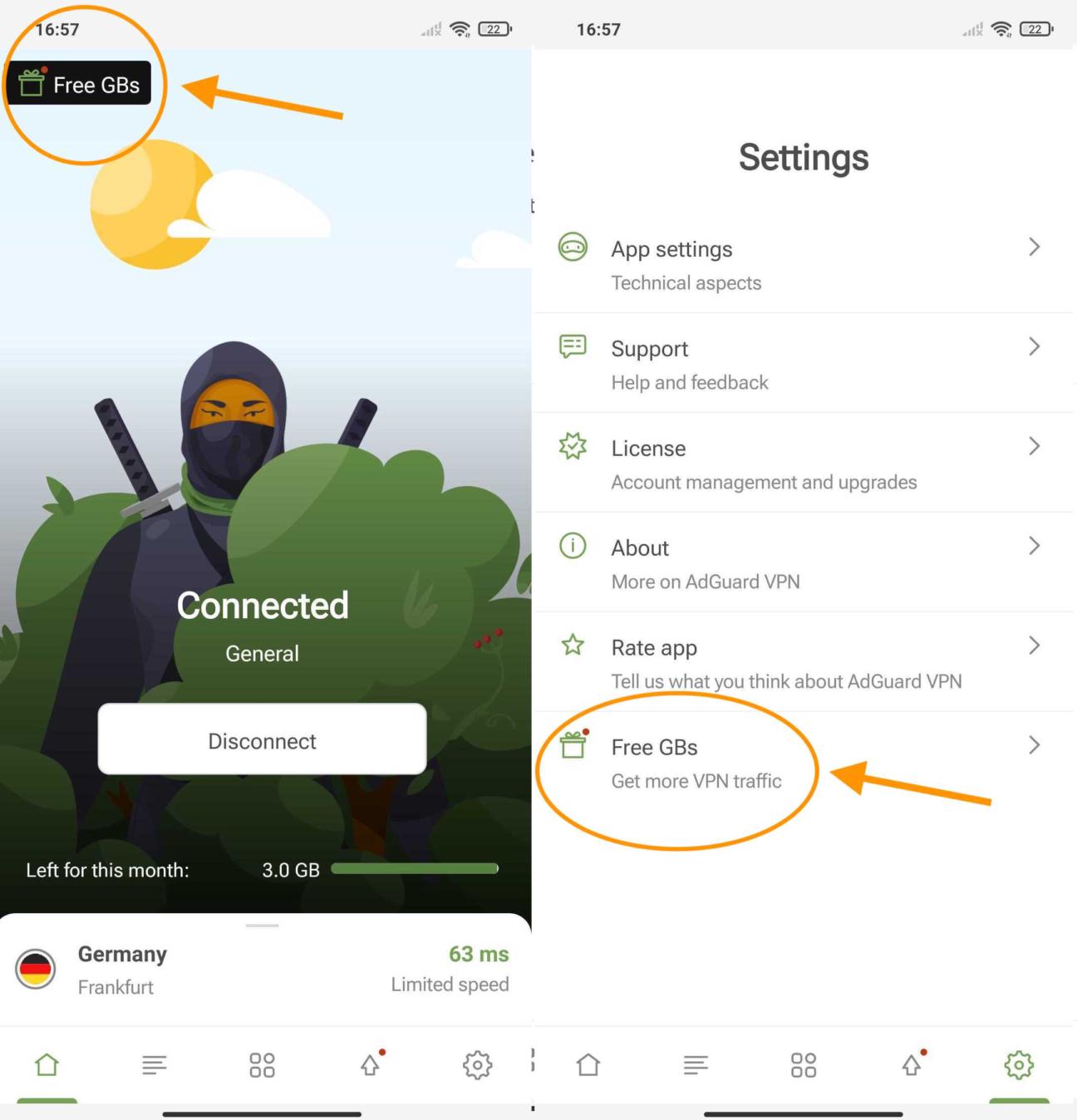
free_gigabytes_en

Last but not least

In other news, now AdGuard VPN for Android has in-app push notifications that will let you know when your VPN traffic is about to end. That way you won’t run out unexpectedly in the middle of watching your favorite TV show or an important sporting event.

We have also worked on the UI, tweaked the translations and updated the VPN client. And, of course, we did some bug fixing and other various changes for a smoother run of the application.

Like always, you can find the complete changelog in our Github repository. We hope you will like the work we did on this relase, and enjoy AdGuard VPN v2.2 for Android! We will be glad to hear your thoughts on our latest release here in the blog or on social media.

喜歡這篇文章嗎?
9,332 9332 使用者評論
非常好!

AdGuard VPN Windows 版

安心使用任何瀏覽器或應用程式,而不用再擔心匿名性。使用 AdGuard VPN 體驗當整個世界仿佛就在你的指尖上時是什麼樣的感覺。
下載
透過下載該程式,您接受授權協定的條款
了解更多
AdGuard VPN Windows 版的主畫面,顯示 VPN 連線已啟用。
AdGuard VPN Windows 版的主畫面,顯示已中斷連線的狀態。
例外清單畫面,顯示不使用 VPN 的網站清單。
9,332 9332 使用者評論
非常好!

AdGuard VPN Mac 版

從我們的位於世界各地的 75+ 個伺服器位置一鍵選擇所需要的伺服器。安全隱藏個人數據避免受到他人的監視。
下載
透過下載該程式,您接受授權協定的條款
了解更多
AdGuard VPN Mac 版的主畫面,VPN 連線已啟用。
AdGuard VPN Mac 版的主畫面,顯示未連線狀態。
例外清單畫面,顯示不使用 VPN 的網站清單。
9,332 9332 使用者評論
非常好!

AdGuard VPN Android 版

AdGuard VPN Android 版提供數十個高速伺服器位置。隨時隨地更私密地瀏覽。內建 DNS 保護,封鎖廣告和追蹤器。
了解更多
下載
透過下載該程式,您接受授權協定的條款
Google Play
透過下載該程式,您接受授權協定的條款
AdGuard VPN Android 版的主畫面,顯示 VPN 連線已啟用。
AdGuard VPN Android 版的主畫面,顯示連線已中斷的狀態。
「位置」畫面顯示可用的最快伺服器。
例外清單畫面,顯示不使用 VPN 的網站清單。
顯示用於安裝 AdGuard VPN 之 QR 碼的畫面。
9,332 9332 使用者評論
非常好!

AdGuard VPN iOS 版

使用適用於 iOS 的 AdGuard VPN 匿名保護個人隱私並觀看您喜歡的節目。使用內建 DNS 保護封鎖廣告。
了解更多
App Store
透過下載該程式,您接受授權協定的條款
AdGuard VPN iOS 版的主畫面,顯示 VPN 連線已啟用。
AdGuard VPN iOS 版的主畫面,顯示為已中斷連線狀態。
「位置」畫面顯示可用的最快伺服器。
例外清單畫面,顯示不使用 VPN 的網站清單。
顯示用於安裝 AdGuard VPN 之 QR 碼的畫面。
9,332 9332 使用者評論
非常好!

AdGuard VPN 於 Android TV 平台

探索專為 Android TV 設計的 AdGuard VPN!享受無縫串流、加強的安全防護,以及簡單的設定過程。
下載
透過下載該程式,您接受授權協定的條款
Google Play
透過下載該程式,您接受授權協定的條款
了解更多
AdGuard VPN Android TV 版的主畫面,已啟用與芬蘭赫爾辛基伺服器的 VPN 連線。
9,332 9332 使用者評論
非常好!

AdGuard VPN Chrome 版

AdGuard VPN Edge 版

AdGuard VPN Firefox 版

AdGuard VPN Opera 版

隱藏實際位置並“飛到“世界各地、不受速度限制訪問任何內容並保持 Web 上的匿名性。
一鍵連線不同的地理位置,隱藏 IP 位址,讓網路瀏覽更加安全及隱秘。
保護隱私、隱藏真實地理位置、自己決定哪一個網站的流量要通過 VPN 傳送!
成為 Opera 瀏覽器裡的忍者:快速移動到世界任何地方,而不會被他人檢測到。
安裝
透過下載該程式,您接受授權協定的條款
了解更多
安裝
透過下載該程式,您接受授權協定的條款
了解更多
安裝
透過下載該程式,您接受授權協定的條款
了解更多
安裝
透過下載該程式,您接受授權協定的條款
了解更多
AdGuard VPN 瀏覽器擴充功能的主畫面,顯示 VPN 連線已啟用。
「位置」畫面顯示可用的最快伺服器。
9,332 9332 使用者評論
非常好!

AdGuard VPN 用於路由器

在路由器上安裝 AdGuard VPN 全面保護網路。自己決定保護時間,以及要保護的裝置
此選項僅在訂購 AdGuard VPN 後可用
具有鑰匙孔盾牌圖示的路由器。
9,332 9332 使用者評論
非常好!

AdGuard VPN Linux版

安裝用於 Linux 的最佳免費 VPN 服務,享受無縫銜接的網頁瀏覽、更高的安全性、網際網路流量加密和 DNS 防泄露保護。從多個 VPN 伺服器中進行選擇自己喜歡的伺服器位置
AdGuard VPN 的吉祥物天狗與 Linux 企鵝 Tux 一起坐在灌木叢中。
9,332 9332 使用者評論
非常好!

AdGuard VPN Apple TV 版

探索專為 Apple TV 設計的 AdGuard VPN!享受無縫串流、加強的安全防護,以及簡單的設定過程
此選項僅在訂購 AdGuard VPN 後可用
一部帶有 AdGuard VPN 標誌的 Apple TV 串流裝置。
9,332 9332 使用者評論
非常好!

AdGuard VPNXbox 版

使用 AdGuard VPN 保護 Xbox,享受順暢遊戲體驗、增強的安全性和簡單的設定
此選項僅在訂購 AdGuard VPN 後可用
一台 Microsoft Xbox 主機和控制器,附有 AdGuard VPN 標誌。
9,332 9332 使用者評論
非常好!

AdGuard VPN PS4/PS5 版

使用 AdGuard VPN 保護 PlayStation,享受無縫線上遊戲、增強的安全性和簡單的設定。從多個 VPN 伺服器中進行選擇,訪問想要的位置
此功能僅在 AdGuard VPN 高級版可用
此選項僅在訂購 AdGuard VPN 後可用
一台 Sony PlayStation 遊戲主機和控制器,上面有 AdGuard VPN 標誌。
9,332 9332 使用者評論
非常好!

AdGuard VPN Chromecast 版

在 Google TV(Chromecast 4代),或在網路路由器(Chromecast 3代)上安裝 AdGuard VPN,線上保持匿名狀態,隨時隨地訪問網頁以享受 Chromecast 的串流內容。 在 Chromecast 3代上,使用者需要 AdGuard VPN 訂閱。
此選項僅在訂購 AdGuard VPN 後可用
一部帶有鑰匙孔盾牌圖示的 Google Chromecast 串流裝置。
AdGuard VPN
下載已開始
點擊由該箭頭所指示的按鈕以開始安裝。
掃描 QR 圖碼在行動裝置上安裝 AdGuard VPN
顯示用於安裝 AdGuard VPN 之 QR 碼的畫面。







