AdGuard VPN
for Windows
version 2.9.2
from April 30, 2026
A small bug has crept into the release. That’s why we’re publishing a hotfix today: so you can enjoy the service, and we can get on with some bigger tasks.
AdGuard VPN
for Windows
version 2.9.1
from April 16, 2026
This is a technical update aimed to increase the app stability and fix minor bugs.
AdGuard VPN
for Windows
version 2.9
from February 17, 2026
In this update, we have further expanded the accessibility features of AdGuard VPN for Windows to make it more user-friendly. Our journey towards making the app as inclusive as possible began in v2.8, and now it continues in v2.9.
Accessibility support for more sections
In this version, we’ve added accessibility support for the Settings, App settings, DNS servers, and Support sections. Now visually impaired users can rely on screen readers to understand the available options and get helpful information. This is another step in our ongoing efforts to make AdGuard VPN comfortable for all users.
Let’s take a quick look at how exactly this could help users.
Support section
The Support section now works correctly with assistive technologies. Interface elements include voice descriptions and can be fully navigated without using a mouse.
This means that now users with visual impairment can navigate the section without relying on visual cues to find helpful information and contact support.
Settings → App settings
Settings are one of the most important sections when using a VPN. Now users with visual or motor impairments can clearly understand which settings they’re changing, control how the app behaves on their own, and customize their VPN experience without outside assistance.
DNS servers
DNS servers can be used to improve security and overall Internet experience. And now, this section is fully accessible to users who previously couldn’t use it properly due to interface limitations.
Changelog
Fixes
WhatsApp can’t connect to servers when added to Exclusions in Selective mode #1036
VPN client (AdGuard VPN protocol implementation)
VPN client updated to v0.19.35 #1051
Sciter (UI engine)
Sciter updated to v1.0.991 #1059
AdGuard VPN
for Windows
version 2.8.2
from January 28, 2026
What do AdGuard VPN and horoscopes have in common? Promised compatibility doesn’t always work. This hotfix resolves an issue with AdGuard VPN not cooperating with other software.
AdGuard VPN
for Windows
version 2.8.1
from December 29, 2025
Online privacy is cool and all, but have you ever updated to a new version after the previous one just crashed with no explanation? Well, you have a chance to experience that.
AdGuard VPN
for Windows
version 2.8
from December 18, 2025
This update brings several meaningful improvements to AdGuard VPN for Windows. We’ve introduced accessibility features so more people can use the app comfortably.
Accessibility support
We’ve taken another step toward making AdGuard VPN more inclusive. In this version, we’ve added accessibility support for the home, authorization, and onboarding screens: you can now rely on screen readers for clear descriptions of icons, buttons, and dynamic elements. These improvements are just the beginning, we will continue to make AdGuard VPN even more comfortable for all users.
Changelog
Fixes
Discord losing connection in voice chats #801
AdGuard VPN leaks DNS server requests #938
Errors when fast-switching between locations #969
Unable to establish connection with any VPN server #970
VPN client (AdGuard VPN protocol implementation)
VPN Client updated to v0.19.23 #1005
AdGuard VPN
for Windows
version 2.7
from August 27, 2025
AdGuard VPN for Windows now has dynamic VPN protocol selection — a feature that automatically picks the fastest and most stable protocol (HTTP2/TLS or HTTP3/QUIC) for your connection. This improves VPN speed and stability, which is particularly helpful in regions where VPN usage is restricted or unreliable.
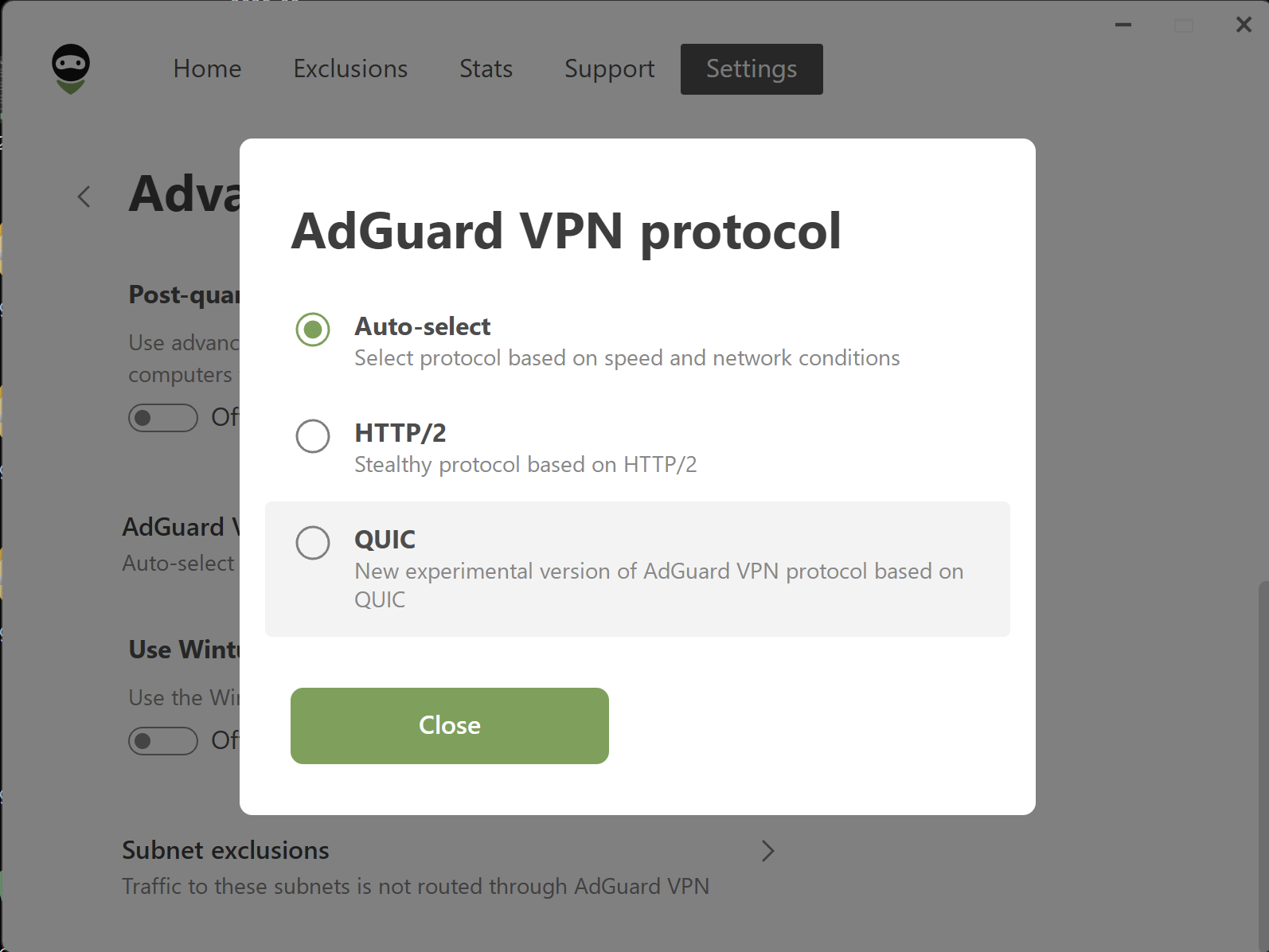
This option is enabled by default. To change it, open Settings → App settings → Advanced settings → Miscellaneous → AdGuard VPN protocol and select your preferred protocol instead of Auto-select.
We’ve also updated the VPN client, making the app more stable and reliable overall.
Changelog
Fixes
The AdGuard VPN minimised preview icon is missing when hovering over it in the taskbar #921
VPN client (AdGuard VPN protocol implementation)
Updated VPN client to v0.17.4 #446
AdGuard VPN
for Windows
version 2.6.2
from July 3, 2025
This is a technical update aimed to increase the app stability and fix minor bugs.
VPN client (AdGuard VPN protocol implementation)
VPN client updated to v0.16.42 #917
AdGuard VPN
for Windows
version 2.6.1
from June 25, 2025
A small bug has crept into the release. That’s why we’re publishing a hotfix today: so you can enjoy the service, and we can get on with some bigger tasks.
AdGuard VPN
for Windows
version 2.6
from June 24, 2025
This update enhances AdGuard VPN with three core improvements. First, there is a new startup window toggle. Second, the application now opens 10 times faster. Third, we’ve improved network stability.
New toggle for startup behavior
We’ve all been there: you reboot your computer, expecting a fresh start, but instead face a parade of apps restarting. AdGuard VPN now offers a cleaner startup with the new Open main window at system startup toggle. If you switch it off, the app will still run in the background, maintaining full protection without interruptions.

To check the new settings, go to Settings → App settings → System startup → Open main window at system startup. This feature is part of our ongoing effort to adapt AdGuard VPN to you, not the other way around.
Reopen time optimization
Although closing AdGuard VPN by clicking the X button worked flawlessly, we noticed that reopening the application from the desktop icon took a bit longer than it should. This micro delay is history. Now, when you click the desktop icon now, AdGuard VPN opens in just 0.2–0.3 seconds instead of 2–2.5 seconds.
We’ve also enhanced the VPN client to provide stronger stability, smarter adaptability, and optimized efficiency. Now the VPN handles network interference more effectively, keeping your connection stable when it matters most.
Changelog
Fixes
After waking the computer from sleep mode with the VPN active and the Kill Switch feature enabled, the Internet connection is lost until manually reconnecting to the VPN #774
Can’t add a non-punycode top-level internationalized domain name in Exclusions #831
App crashes when attempting to add default applications that already exist in the Exclusions list #853
The app starts maximized #771
Typo and missing corner rounding in the notification window #713
VPN client (AdGuard VPN protocol implementation)
VPN client updated to v0.16.37 #905